7 Myths About Sales Force Automation That Sales Leaders Should Ignore
Sales force automation has changed the way businesses handle field sales activities, work with representatives, and keep track of performance. Many sales leaders still hesitate to use it. They are worried about the cost. They think it is too hard to use. Some believe it is for big companies or firms that deal with fast-moving consumer goods. Others are afraid it will put too much pressure on field representatives. They are concerned it might mess up their routines. Some think it could take away the touch that helps in making sales. These worries stop them from trying a system that could actually make things better.
Many concerns arise from experiences or an incomplete understanding of modern sales force automation. In fact, sales force automation can support businesses of all sizes and industries by simplifying routine tasks, improving field visibility, and giving sales teams better access to operational information. Understanding the difference between these assumptions and the actual capabilities of sales force automation can help sales leaders make informed decisions. In this blog, we will learn seven common sales force automation myths and the reality behind them.
Common Sales Force Automation Myths and the Reality Behind Them
Sales force automation is often judged more by what businesses assume it does than how it supports everyday sales operations. These assumptions can prevent companies from adopting tools that improve visibility, reduce work, and help field teams operate more efficiently. Let us look at seven myths and what sales leaders should understand instead.
Myth 1: Sales Force Automation Is Only for Large Enterprises
This myth comes from the perception that automation software requires a large budget, dedicated IT resources, and complex infrastructure. Since enterprise businesses often adopt advanced sales systems, smaller companies may assume these tools are beyond their needs or capabilities.
In reality, SFA can benefit businesses of different sizes. Small and mid-sized teams can use it to manage sales visits, track orders, monitor attendance, and monitor field performance without relying on multiple spreadsheets or manual reports. Many solutions also offer flexible features and pricing to match business requirements.
Myth 2: Reps Will Treat It as Surveillance and Refuse to Use It
The concern usually comes from systems that focus heavily on employee monitoring without helping representatives manage their daily responsibilities. When employees see technology only as a way to track their movements, they may view it as a lack of trust rather than a work tool.
In reality, adoption improves when the software makes fieldwork easier. Features such as digital order entry, customer information access, beat planning, and simplified reporting can reduce administrative work for reps. Clear communication about how the system supports both employees and managers also helps build acceptance.
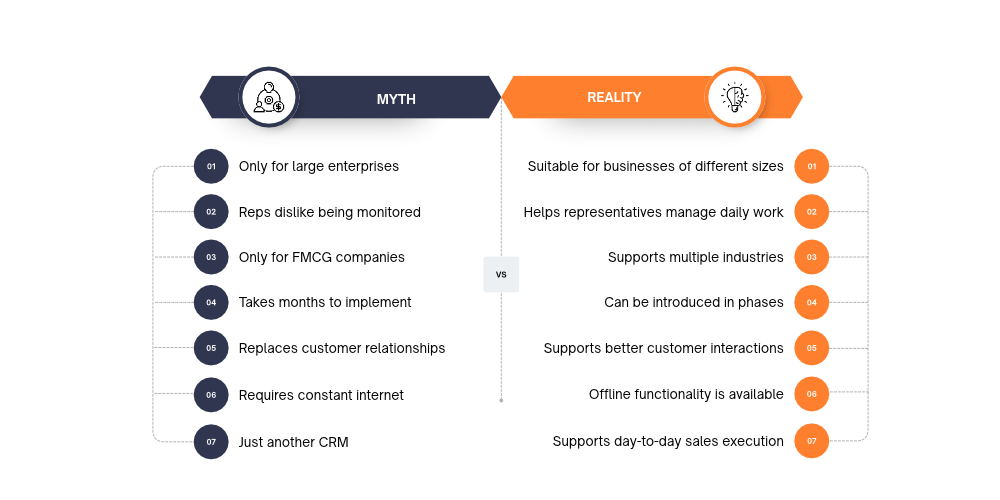
Myth 3: Sales Force Automation Only Works for FMCG Companies
This assumption exists because FMCG businesses are among the most visible users of field sales automation. Their frequent retail visits, distributor networks, order collection, and outlet coverage requirements make them common examples of SFA adoption. As a result, businesses in other sectors may assume that these tools are not designed for their sales operations.
In reality, SFA can support any industry that depends on field representatives, dealer networks, or distributor relationships. Delta Sales App, for example, supports businesses across industries such as pharmaceuticals, paints and chemicals, oil and lubricants, automotive, solar, and building-related distribution. Its features help teams manage customer visits, track orders, monitor field activities, and improve territory coverage, regardless of the products they sell.
Myth 4: Implementation Takes Months and Disrupts Selling
Businesses may associate SFA implementation with lengthy software projects, complicated integrations, extensive employee training, and disruptions to existing sales activities. This concern is particularly common among companies with established reporting processes.
In reality, implementation time depends on the software, business requirements, data readiness, and level of customization. A phased rollout can help teams introduce essential features first, train a small group of users, and expand gradually without interrupting regular sales operations.

Myth 5: Automation Replaces the Relationship Side of Selling
Some sales leaders believe that automating visits, reporting, and customer records will make sales interactions less personal. This concern often comes from viewing automation as a replacement for the representative's role rather than a way to support it.
In reality, SFA software handles repetitive administrative tasks so representatives can spend more time engaging with customers. With access to customer history, previous orders, outstanding payments, and visit information, reps can have better-informed conversations and focus on building stronger business relationships.
Myth 6: It Does Not Work for Field Teams With Poor Connectivity
Field representatives often work across remote territories where mobile internet access is unreliable. Businesses may therefore assume that sales automation will interrupt their work whenever a stable connection is unavailable.
In reality, SFA applications with offline functionality allow representatives to record visits, enter orders, and save relevant information without an active internet connection. The data can synchronize automatically when connectivity returns, helping field teams continue their work across areas with inconsistent network coverage.
Myth 7: SFA Is Just a CRM With a Different Name
This myth comes from the overlap between CRM and SFA features. Both systems can manage customer information, sales records, and reporting, which makes it easy to assume they serve exactly the same purpose.
In reality, CRM primarily focuses on managing customer relationships, interactions, and sales opportunities, while SFA supports the execution of day-to-day sales activities, particularly for field teams. It helps manage visits, routes, orders, attendance, and field performance. Understanding the SFA vs CRM differences can help businesses identify which capabilities their sales process requires.
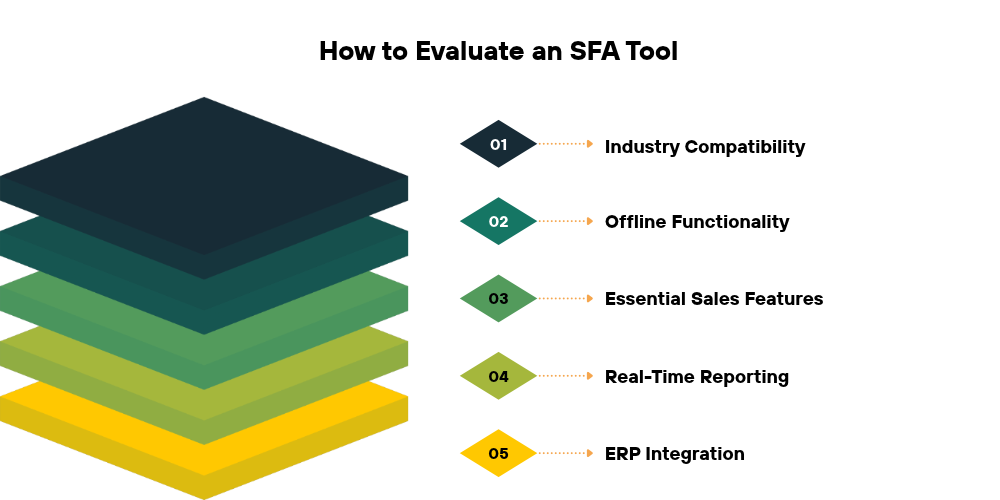
How to Evaluate an SFA Tool Without Falling for the Next Myth
Understanding these myths is only the first step. Before selecting a platform, sales leaders should evaluate how well it fits their actual sales process, field team requirements, and reporting needs.
1. Questions to Ask Vendors Before a Demo
-
Does the software support our sales process and industry requirements?
-
Can representatives use it when internet connectivity is unavailable?
-
Does it support order management, visit verification, and route planning?
-
Can managers access real-time sales reports and field activity data?
-
Does it integrate with our existing ERP or accounting system?
-
What training and implementation support does the vendor provide?
2. How to Run a 30-Day Pilot With a Few Field Reps
Instead of introducing the software across the entire organization immediately, start with a small group of representatives. Select users from different territories or experience levels to understand how the platform performs in real working conditions. During the pilot, monitor daily usage, visit completion, order reporting, data accuracy, and employee feedback. Review the results with both managers and representatives to identify practical improvements before expanding the rollout.
3. Signs a Tool Fits Your Sales Process
A suitable SFA platform should support the way your sales team actually works. Representatives should be able to complete routine tasks without unnecessary steps, while managers should get reliable visibility into field activities and sales performance. Look for a solution that offers relevant features, easy adoption, dependable reporting, offline functionality where required, and room to scale as your operations grow.
Conclusion:
Sales force automation is not limited by company size, industry, or the type of sales team using it. The right solution can help businesses reduce manual reporting, improve field visibility, streamline sales activities, and give representatives more time to focus on customers. The key is to look beyond common misconceptions and evaluate how well a platform supports your actual sales process.
For businesses looking to bring more structure and visibility to field operations, Delta Sales App offers tools for managing field representatives, verifying customer visits, tracking orders, planning routes, and monitoring sales performance. Rather than relying on assumptions, explore how these capabilities can fit into your existing workflow.
Ready to see what sales force automation can do for your team? Get a personalized product demo of Delta Sales App and discover a smarter way to manage your field sales operations.
Frequently Asked Questions
1. Is Sales Force Automation Worth It for a Small Sales Team?
Yes. Sales force automation can benefit small teams by reducing manual reporting, organizing customer visits, simplifying order entry, and giving managers better visibility into field activities. Even a team of fewer than 20 representatives can use an SFA solution to improve coordination, maintain accurate records, and manage daily sales operations more efficiently.
2. How Long Does It Take to Implement Sales Force Automation Software?
Implementation time depends on the software, business requirements, data migration, integrations, and level of customization. A basic setup may take less time than a system requiring complex workflows or multiple integrations. Starting with essential features, training a small group of representatives, and gradually expanding usage can help businesses introduce SFA without disrupting regular sales activities.
3. Can Sales Force Automation Software Work Without an Internet Connection?
Yes, some SFA applications offer offline functionality for field representatives working in areas with unreliable connectivity. They can record visits, enter orders, and update relevant information without an active internet connection. For example, Delta Sales App allows representatives to record field activities and orders offline, with the data synchronizing automatically once an internet connection is restored. This helps field teams continue their daily work without depending on constant network availability.
4. Does Sales Force Automation Software Integrate With Existing ERP and Accounting Systems?
Many SFA platforms support integration with ERP and accounting systems to reduce duplicate data entry and improve information flow between departments. Depending on the solution, integrations may synchronize customer details, orders, inventory, and financial information. Before selecting a platform, confirm which systems are supported and whether the integration requires additional configuration or customization.
5. What Should Sales Leaders Measure After Implementing SFA?
Sales leaders should track more than the number of representatives using the application. Useful indicators include planned versus completed visits, outlet coverage, order volume, collection performance, reporting accuracy, beat plan adherence, and user adoption. Comparing these metrics before and after implementation can help businesses understand whether the software is improving field productivity and sales operations.