
5 Best Route Planning Software for Field Sales Teams in 2026

A rep can have a packed day of customer visits and still burn hours on bad route planning. A beat might look tight on a spreadsheet, but traffic, missed appointments, new orders, retailers that aren't available, territory changes, and unplanned stops can take that plan apart fast. For FMCG and distribution teams, route planning is more than finding the shortest path between outlets. The route has to work with the beat plan, visit frequency, territory coverage, secondary sales targets, distributor priorities, and retail execution. And managers still need to know whether the route got followed and whether the day's visits turned into orders, collections, or other useful field activity.
This blog looks at five route planning tools for field sales teams in 2026, focused on how well each one handles route optimization, field execution, CRM or ERP connectivity, mobile use, reporting, and practical sales workflows. They were picked based on their current features, pricing, field-sales capabilities, and fit for different team structures.
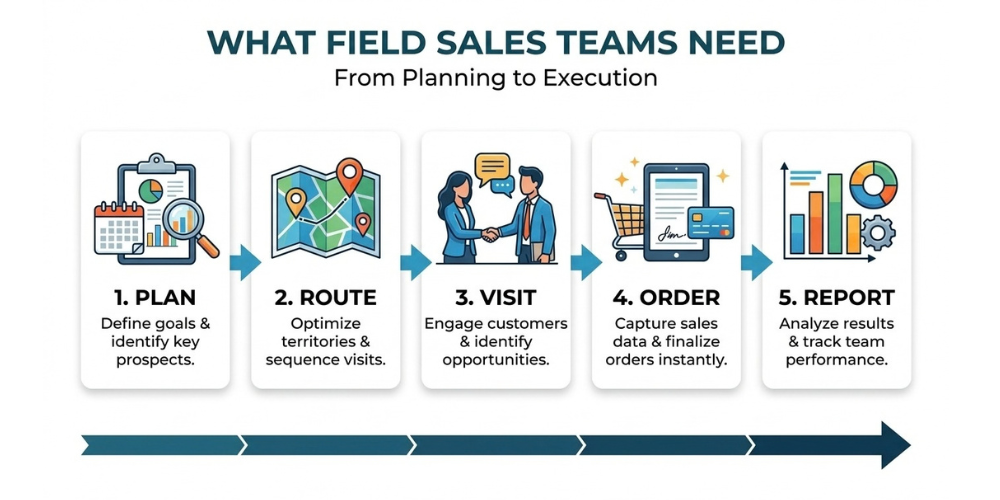
What Field Sales Teams Need From Route Planning Software
A route planner can work out an efficient sequence of stops, and that's not enough on its own for a field sales organization. Sales teams need a system that ties the route to what happens before, during, and after each visit.
Multi-stop optimization and same-day re-routing
Field reps rarely get a day that goes exactly to plan. A retailer asks for an earlier visit, a distributor needs an urgent follow-up, and a scheduled customer turns out to be unavailable. Good sales route planning software handles multiple stops and still lets managers or reps adjust the day when things change. This matters more when a territory has dozens of outlets. A useful system should help figure out which stores to hit first, cut unnecessary backtracking, and keep travel time in check.
The best tools also know the difference between a navigation route and a sales route. A sales route has priorities. A high-value retailer, an overdue collection, a promotional outlet, or a customer due for a specific visit can outrank a stop that's just geographically closer.
Beat plans and visit frequency rules
Route optimization should work alongside a structured beat plan. For example, a distributor may have:
-
Monday for Territory A
-
Tuesday for Territory B
-
Wednesday for Territory C
-
Weekly visits for high-volume retailers
-
Fortnightly visits for lower-volume outlets
The software should make it possible to translate these rules into recurring routes and assigned customer visits. This helps managers maintain territory coverage instead of allowing reps to repeatedly visit the easiest or most convenient outlets.
Two-way sync with your CRM or ERP
A route is only as good as the customer data behind it. When CRM or ERP data syncs with the route planning software, reps work from current information instead of keeping their own spreadsheet. Ideally, the data flows both ways: customer updates, visit activity, notes, and other field information go back into the central system without anyone re-entering it by hand. This matters most for organizations managing customer master data, primary sales, secondary sales, inventory, collections, and account information across several systems.
Mobile app with offline access
Connectivity is a real operational problem for a lot of field sales teams. Reps work in rural territories, inside large buildings, in areas with shaky mobile networks, or across regions where the signal comes and goes through the day. A route planning system that stops working the moment the connection drops just creates more work. Offline functionality should let reps keep doing their field activity and sync once they're back online.
Visit tracking and reporting
Route planning should eventually answer one question for management: did the rep actually do the planned day? Managers need to compare planned visits against actual ones, check GPS paths, see which stops got missed, and know how much time went to travel versus actually being with customers. For FMCG organizations, the route needs to connect to sales outcomes too. A manager wants to know whether a beat generated orders, collections, and productive calls, or zero orders, not just that the rep physically drove through the territory.
The 5 Best Route Planning Software for Field Sales Teams in 2026
Which route planning software is right depends on more than how fast it draws a route. Field sales teams also need to weigh route planning, territory coverage, customer visit frequency, mobile usability, GPS-based location tracking, and how well route activity connects to the rest of the sales process. The five tools below stand out for different needs, from dedicated route optimization to full sales-force automation.
1. Delta Sales App
Overview:
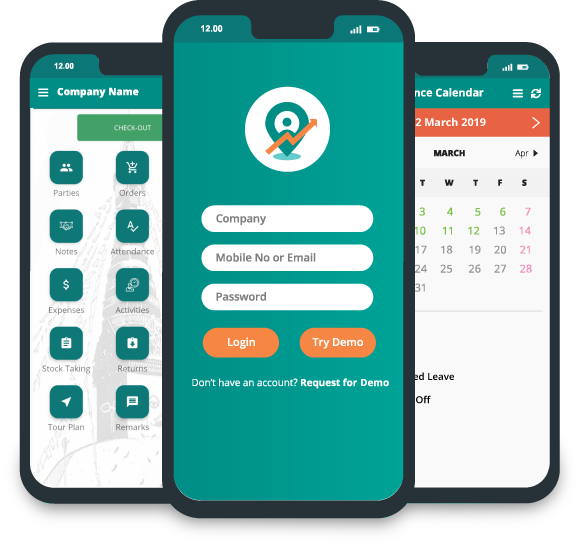
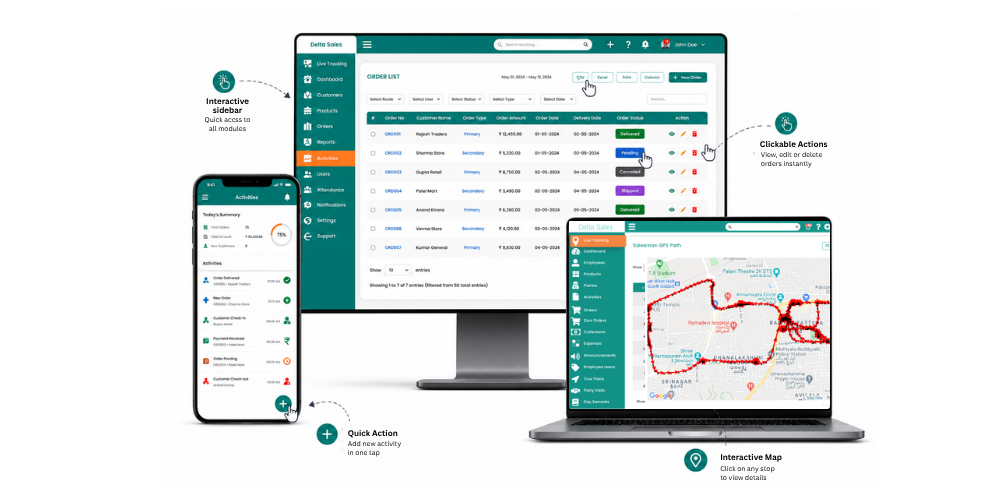
Delta Sales App puts route planning inside field sales force automation, which suits FMCG companies, distributors, manufacturers, wholesalers, and other businesses whose teams spend most of the day in the field.
Rather than treating route planning as a separate navigation task, it ties the planned route to what happens at each customer stop. Managers can build beat plans, assign customers to reps, watch field movement via GPS, and check whether the planned visits actually happened. That matters most for FMCG and distribution teams, where the sales route is tightly linked to secondary sales, retailer coverage, order booking, collections, and retail execution. A rep might have 20 or 30 outlets on the day's list, but just reaching them doesn't say whether the territory was actually covered well. Managers need to see the visits, the productive calls, the orders, the collections, and the route that was followed.
Delta Sales App gives that fuller view of field sales from one platform. Its offline-first setup matters too for teams working where mobile connectivity isn't reliable, since reps can keep doing field activity without a live connection and everything syncs once they're back online.
Key Features:
-
Beat planning and route planning
-
GPS-based employee location tracking
-
Planned-versus-actual route visibility
-
Customer and retailer visit tracking
-
Route optimization for field visits
-
Geo-fencing and location verification
-
Offline order booking and field activity
-
Automated order and collection reporting
-
Distributor and party management
-
Primary and secondary sales tracking
-
Attendance and leave management
-
Expense reporting
-
Retail execution
-
Real-time sales dashboards and analytics
-
Daily Sales Report (DSR) and EOD reporting
Useful For:
Delta Sales App fits best for FMCG sales teams, distributors, manufacturers, wholesalers, and businesses handling recurring retailer visits across several territories. It's a strong choice when the need goes beyond route optimization and into beat execution, GPS visibility, order management, collections, attendance, and sales reporting.
2. Badger Maps
Overview:
Badger Maps is a sales mapping and route planning platform built for outside sales teams. It helps reps see customer locations on a map, organize their territories, and build efficient routes for multiple visits. It's a good fit for sales teams that already have customer data in a CRM and want stronger geographic visibility and route planning on top of it.
Key features include sales territory mapping, multi-stop route optimization, customer location visualization, recurring routes, territory management, mileage tracking, CRM synchronization, and mobile sales mapping.
Useful For:
Badger Maps is useful for outside sales teams that primarily need territory visualization, customer mapping, and efficient multi-stop sales routes, particularly when CRM integration is an important requirement.
3. SPOTIO
Overview:
SPOTIO is a field sales management platform that brings together territory management, activity tracking, lead management, and route planning. It's built to help managers organize field reps while giving reps a structured way to plan and run their day. The route functionality works alongside territory and activity data rather than sitting off on its own as a navigation tool.
Key features include route optimization, territory management, field activity tracking, location verification, lead and account management, sales performance reporting, CRM integrations, and mobile field-sales tools.
Useful For:
SPOTIO is useful for growing field sales teams that need route planning alongside territory management, activity tracking, and sales performance monitoring.
4. Route4Me
Overview:
Route4Me is a route optimization platform for businesses with more complicated routing needs. It handles multi-stop routes, recurring routes, routes that change on the fly, and mobile route execution. It's broader than a sales-specific planner, which makes it a good fit where routing complexity is the main operational concern rather than sales workflow.
Key features include multi-stop route optimization, dynamic route planning, recurring routes, route scheduling, mobile route execution, GPS tracking, offline route capabilities, API integrations, and CRM and ERP integrations.
Useful For:
Route4Me is useful for organizations managing large numbers of stops, complex territories, recurring routes, and different operational routing requirements. It can be a good option when advanced route optimization is the primary requirement.
5. Salesforce Maps
Overview:
Salesforce Maps adds location intelligence and route planning on top of the Salesforce ecosystem. Sales teams can see accounts, leads, and other Salesforce records plotted geographically and use that to plan field visits. Since it's tied closely to Salesforce, it makes the most sense for organizations already running Salesforce as their main CRM. Key features include customer and account mapping, route planning, automated scheduling, location-based prioritization, territory visualization, lead and account mapping, Salesforce data integration, and field-sales activity planning.
Useful For:
Salesforce Maps is useful for organizations that already rely heavily on Salesforce and want route planning and geographic sales intelligence directly within their existing CRM environment.
How to Choose the Right Route Planning Tool for Your Team
The best route planning software is not necessarily the one with the most routing features. It is the one that fits the way the sales team actually works.
Decide between a route planner and a full-field sales platform
First, nail down the actual problem. If reps already have a CRM, an order-management system, a reporting process, and a field activity platform, adding a dedicated route planner on top might be all that's needed. But if an organization is still managing beat plans, customer visits, GPS tracking, orders, collections, attendance, and DSRs across spreadsheets and separate apps, a standalone route planner only fixes one piece of it. That second scenario is common in FMCG and distribution, and route planning does more good when it's tied to customer visits and sales execution.

Match the tool to your CRM and ERP
Before choosing a route planner, list all of the systems that store customer and product information. Check if the integration is:
-
One-way or two-way?
-
Real-time or scheduled?
-
Native or API-based?
-
Included in the subscription, or separately charged
-
Capable of synchronizing custom fields.
Consider what happens when a representative updates a customer record in the field. If the information still needs to be manually copied into the CRM or ERP, the integration may not be addressing the underlying issue.
Match it to your team size and budget
A five-person field team and a 500-rep national sales organization need different things. Smaller teams usually care more about price, easy onboarding, simple route building, and mobile usability. Larger teams need territory hierarchies, permissions, more advanced routing logic, APIs, central reporting, and integration support. And the subscription price should be weighed against what it costs to keep running separate systems for route planning, GPS tracking, order booking, attendance, and reporting.
Match it to how your reps visit customers
Think through the actual field-sales model. Does a rep see 10 key accounts a day or 50 retailers? Are the visits appointment-based or beat-based? Does every outlet have a set visit frequency? Are orders taken during the visit itself? Do reps collect payments? Does the team work in rural areas with weak connectivity? Are distributors and retailers part of the same workflow?
These questions rule out the wrong tools fast. A route planner built mainly for B2B prospecting probably isn't the right choice for an FMCG team managing hundreds of recurring retailer visits and SKU-level orders.
Questions to ask during a demo or free trial
Before committing, ask vendors:
-
Can recurring beat plans be created and assigned to individual reps?
-
Can managers compare planned routes with actual GPS paths?
-
Can routes be changed during the day?
-
What happens when the rep loses internet connectivity?
-
Does offline activity sync automatically?
-
Can customer data sync two ways with the existing CRM?
-
Can ERP data such as customer, product, inventory, or order information be connected?
-
Can the system track visit duration and productive calls?
-
Can managers measure territory coverage?
-
Can the platform connect route activity with orders and collections?
-
Are GPS and geo-fencing included in the base price?
-
What happens to the data if the company changes CRM or ERP systems later?
A short pilot with real customer locations is usually more useful than a generic product demonstration. Load an actual territory, create a beat, assign it to a few reps, and measure whether the system makes their daily workflow easier.
Conclusion
Route planning software can cut unnecessary travel, improve territory coverage, and make daily visits more organized. But it earns its keep when it's connected to the rest of the field-sales process. For FMCG companies and distributors, that means knowing not just where a rep is headed, but which retailers got visited, whether the planned beat was completed, what orders came out of it, which collections were made, and how the territory performed.
Delta Sales App puts route planning, beat management, GPS tracking, customer visits, order and collection reporting, attendance, and sales analytics into one field-sales platform. That gives managers a clearer view of both route execution and sales performance and helps reps get through their day more efficiently.
Ready to improve route planning and field-sales visibility? Book a free demo of the Delta Sales App and see how it fits your sales workflow.