
Why Your Field Sales App Keeps Crashing: The Technical Truth Behind SFA App Lag
-1784524399.png)
Your sales rep has just walked into a retailer’s store. They use the field sales app to check stock or place an order or register attendance. The screen freezes instead of loading immediately. The app crashes after waiting a few seconds. The retailer waits as the representative has to reboot the application, log back in, and go through the whole process again. This is a more common scenario than many businesses may think. When a field sales app slows down or becomes unstable, it frustrates more than just the sales reps. This means delays in getting to customers, fewer outlets visited per day, inaccurate reporting, and even missed sales opportunities. These small delays compound over time, hurting both team productivity and revenue.
Most companies believe poor internet connection or older mobile devices are to blame for app crashes. While these factors can contribute, they are seldom the root cause. Usually the problem is with the design of the sales force automation software. Poor offline architecture, inefficient data sync, too many GPS requests, memory leaks, and unoptimized databases can all lead to lag, freezing, and unexpected crashing during critical sales activities. The truth is, a high-performing sales force automation solution isn’t about how many features it has. It also depends on how well those features perform in real-world field conditions. Whether the sales rep is tracking employees by GPS, recording a customer visit, taking an order, or working a beat plan, it all should be fast, reliable, and seamless.
In this blog we’ll explore the technical reasons field sales apps crash, what causes SFA app lag, and the engineering practices that separate a reliable field sales automation solution from one that slows your sales team down. Know what’s happening behind the scenes, and you’ll know exactly what to look for in software that helps your field force instead of hindering it.
Why Performance Matters More Than Features
When a company is evaluating a Sales Force Automation (SFA) solution, the first thing they typically look at is the feature list. Order management in the app? Can you track employees' locations? Does it support attendance, expense reporting, inventory management, and sales analytics? Those capabilities are important, but they’re only useful if your team can utilize them without delay or interruption.
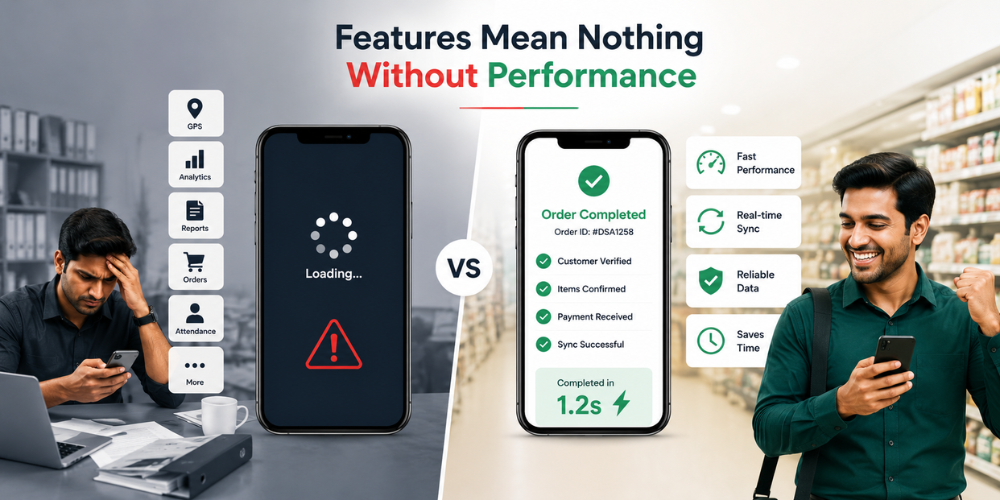
Imagine a field sales rep trying to enter an order while at a retailer. If it takes 10-15 seconds to load the products, freezes when saving the order, or crashes before completing the transaction, then the feature itself is not worth it. No matter how slick the software looks on paper, bad performance causes friction in every customer interaction. Speed is not a luxury; it’s a necessity for field teams. Sales reps can visit dozens of retailers a day. Even a few seconds of lag for each activity such as verifying inventory, updating customer info, or marking attendance can result in hours of lost productivity over a week. These delays also decrease the number of customer visits done daily and leave a bad impression on retailers.
Performance also impacts user adoption. If the app is slow, syncs slowly, or crashes too often, employees will find workarounds, like writing down orders on a piece of paper or delaying data entry until later. This defeats the entire purpose of investing in field sales automation software in the first place. A well-designed SFA platform should make daily tasks feel easy. Order management, GPS tracking of employees, beat planning, recording of customer visits, and reporting should work fast, even on basic Android devices or in places where internet connectivity is patchy. And that’s where thoughtful engineering really matters.
Instead of asking, "How many features does this field sales app have?" businesses should also ask:
-
How quickly does it load customer data and product data?
-
Does it work well in low network areas?
-
Can sales reps still work offline?
-
How well does it sync data in the background?
-
Will it be stable after using it for hours on end?
The best field force management app don't just offer more features, they ensure every feature performs reliably in real-world conditions. After all, an app that responds instantly and works consistently will always deliver more value than one packed with features that your sales team struggles to use.
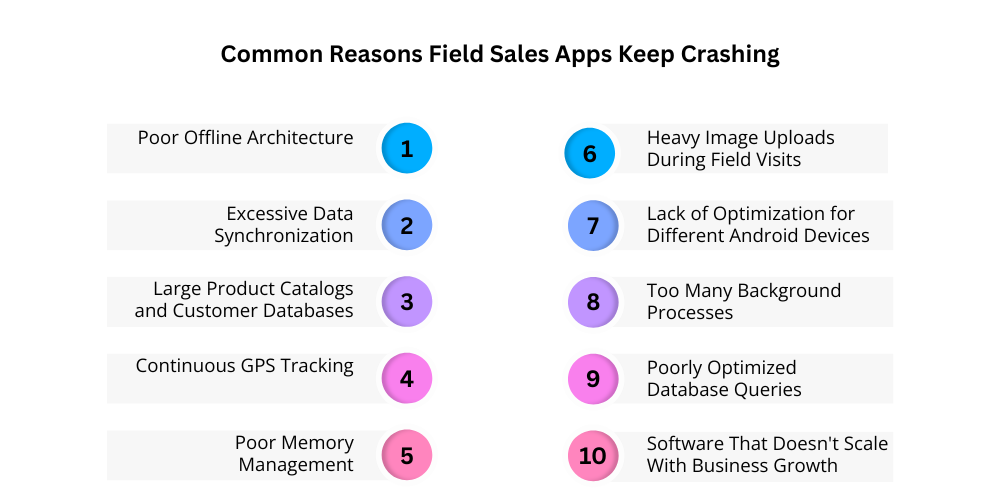
Common Reasons Field Sales Apps Keep Crashing
In most cases the root cause is in the technical design of the Sales Force Automation (SFA) application itself. Whatever a sales representative does, log in, check product details, make an order, record a visit, or sync data, the app has to work efficiently with device resources, analyze the data, and send it to the server. If these processes are not optimized, performance starts to degrade.
A field sales automation app is not like office-bound software; it is used in unpredictable environments. Sales reps drive in areas with bad mobile networks, swap between Wi-Fi and cellular data, use devices with varying hardware capabilities, and work around the clock for long hours. “An application that is not built to handle these real-world conditions will eventually slow down, eat a lot of battery, or crash altogether. Here are some of the most common technical reasons why field sales apps can slow down, freeze, or crash unexpectedly and why picking a well-built SFA solution is just as important as picking one with the right features.
-
Bad Architecture: Offline
Mobile coverage is often bad in the areas in which field sales people work. If there's a brief network outage, an SFA app that needs a persistent internet connection can result in pages not loading, orders failing, or customer data disappearing before being committed. If an application is not designed to work offline, it can become unstable in low network environments, as every user action must be relayed to the server in real time. This constant reliance increases load times and also makes the app vulnerable to drops in connection. This means sales reps may have to repeat work, leading to lost productivity and a frustrating user experience.
-
Data Over-Synchronizing
Much of the sales force automation software attempts to do it all in real time. The app is constantly talking to the server, whether you are marking attendance, submitting an order, uploading an image, or recording a payment. In the event of simultaneous synchronization requests, especially on slow mobile networks, the application may slow down, show loading screens too often, or freeze completely. Bad synchronization logic also leads to increased server requests and puts the application and device under extra load. Too much syncing adds delays that frustrate daily field operations rather than improving real-time visibility. Intelligent synchronization must happen without disrupting the salesperson's workflow.
-
Large Product Catalogs and Customer Databases
As the business grows, so too does the amount of data stored in their field sales software. With thousands of products, retailers, pricing rules, promotional schemes, and transaction histories, the workload on the application is huge. When software isn’t designed to efficiently load only the data it needs, it can try to load huge chunks of data at one time, leading to slow searches, slow screen loading, and the occasional crash. Retailers might find that it takes longer to open retailer profiles and product searches get slower and slower over time.
-
Too Many Background Processes
Some field sales apps perform multiple background operations at the same time, such as syncing data, tracking GPS, checking notifications, refreshing reports, and uploading files. When these processes compete for the phone's resources, overall performance suffers. The app may take longer to respond, consume more battery, and become increasingly unstable during the workday. Background tasks that aren't properly managed can slow down even basic activities like opening customer profiles or recording orders. Efficient task scheduling ensures the application remains responsive while still completing important background operations.
-
Continuous GPS Monitoring
Location tracking is an essential component of field sales automation, but sub-optimized GPS services can greatly affect the performance of the app. Some apps are constantly asking for location updates, even when the user is not moving. This will consume more battery, add load on the processor of the device, and can make the app slow during long working hours. Frequent GPS requests can also create unnecessary background activity, competing with other important app functions. Over time, this means reduced responsiveness, overheating, and even unexpected app crashes. Smart location tracking has to balance between accuracy and device performance.
-
Bad memory handling
Every screen a salesperson opens consumes part of the phone's memory. If the application doesn't release unused resources properly, memory usage continues to increase throughout the day. This is one of the main reasons some apps perform normally in the morning but begin freezing or crashing after several hours of continuous use. As available memory decreases, even simple actions such as opening customer records or generating reports become slower. Eventually, the mobile operating system may force the app to close to free up resources. Proper memory management is a critical part of building a stable Sales Force Automation (SFA) application.
-
Heavy Image Uploads During Field Visits
Sales reps are often required by their organization to take photos of store displays, shelves, promotional material, or completed visits. Uploading large images without compression can greatly slow the application, especially if the network speeds are slow. When customers come to visit, users may experience delays in uploads, frozen screens, or rejected submissions. Large media files also take up more storage space and increase the time it takes to synchronize data. Without image optimization, routine audits and visit verifications can be a time-consuming burden. Efficient image processing is key to keeping the experience of a smooth field sales app.
-
Lack of Optimization for Different Android Devices
Android smartphones differ from iPhones in that they have huge differences in processing power, memory capacity, operating system versions, and screen size. Budget or mid-range devices with limited hardware resources are used by many field teams. If an SFA app is optimized for only high-end smartphones, users with lower-end devices are far more likely to encounter lag, slow response times, and random crashes. Many businesses do not consider this when choosing software and then discover compatibility problems after installation. The reliable sales force automation software should be tested on a variety of Android devices for consistent performance of each member of the sales team.
-
Poorly Optimized Database Queries
The database queries are the foundation of every retailer search, product lookup, order history request, and report. If the queries are not optimized, the application will take longer to get information as the database increases in size. The result is slower searches, delayed order processing, and a general sluggish experience for the field sales reps. What starts as a small delay can become a major productivity problem as business data expands over time. Poor database performance also delays access to important sales information, which can affect the accuracy of reporting and decision-making. Structured databases are the foundation of a fast and reliable field sales automation experience.
-
Software That Doesn't Scale With Business Growth
Many Sales Force Automation (SFA) applications work well when initially introduced because they are dealing with a relatively small number of users and transactions. But as the business grows, the system has to handle more sales representatives, retailers, products, orders, and reports every day. Without a scalable architecture, performance degrades slowly. An application that used to be fast and responsive may start to slow down more and more. As the workload increases, crashes and delays may become more frequent. Businesses may also see longer synchronization times, slower report generation, and less reliable system performance during peak usage. Selecting an SFA platform built to scale will help ensure consistent performance as your sales operations continue to grow
Signs Your Current Field Sales App Has Technical Problems
Performance issues don’t always happen overnight. More often than not, they evolve over time as your business grows, your customer database grows, and your field team gets more and more daily activities to handle. While it’s normal to have some slowdowns every now and then, if you’re having ongoing issues, it could be that your field sales app wasn’t built to handle the demands of real-world sales operations.
If your sales reps are often late or have technical glitches, it can affect customer visits, reduce productivity, and undermine confidence in your Sales Force Automation (SFA) software. Being able to recognize these warning signs early on can help you determine if it’s time to upgrade to a more reliable field sales automation solution.
Here are some of the most common signs:
-
Sluggish login times
-
App crashing often
-
App crashes unexpectedly
-
Battery drains quickly on field visits
-
Customer visit records are missing
-
Payment or Order Synchronization Failed
-
Images are taking too long to upload.
-
Reports take time to develop
-
Bad performance on entry-level Android devices
-
The app slows down throughout the day
-
Sales reps resorting to manual workarounds instead of the app
If your field team is facing several of these issues regularly, then it is a clear indication that your current field sales software may have underlying technical limitations that are affecting productivity and the overall user experience.
What Makes a High-Performance Sales Force Automation App?
Selecting the right Sales Force Automation (SFA) software isn’t only about comparing features like order management, attendance and leave management, or reporting. A true high-performance field sales app is designed to be fast, stable, and reliable in the real world. It will work reliably regardless of whether a sales rep is in a busy city, a far-flung village with poor connectivity, or on a basic Android device.
The best field sales automation software combines powerful functionality with an optimized technical foundation. Instead of slowing users down, it enables sales representatives to complete tasks quickly, helping businesses improve productivity, customer service, and data accuracy. Here are the key characteristics every high-performance SFA solution should have.

-
Fast Offline Functionality
A good field sales app should function even without internet. Sales representatives should be able to take orders, record customer visits, mark attendance, and collect information without worrying about network interruptions. When the connection is restored, the application should automatically synchronize data without any manual intervention.
-
Intelligent Data Synchronization
A high-performance SFA solution should sync data intelligently in the background, not uploading every action immediately. That means faster loading screens, less wait time for customers, and sales reps can keep working while the server securely updates the info.
-
Optimized GPS Tracking
-1784522880.png)
Field activity monitoring is important but never at the expense of performance A well-designed GPS-enabled field sales app also takes advantage of optimized location services, allowing for accurate tracking with less drain on battery, processor, and unnecessary background activity.
-
Lightweight and Responsive User Interface
A clean, responsive interface helps reps get through their tasks faster, with fewer taps and less loading time. From finding a retailer and placing an order to updating customer information, every interaction should feel natural and seamless. A lightweight interface also performs better on entry-level Android devices usually used by field sales teams.
-
Efficient Data Management
As companies grow, they gather huge amounts of data: customer data, product data, pricing data, sales data, etc. The best sales force automation software will get you only the information you need to do the job at hand, not everything all at once. Good data management enables faster searches, less waiting, and reliable operation even with large databases.
-
Stable Performance Across Android Devices
Field sales teams often use smartphones with different hardware specs and Android versions. A good field sales automation solution should be capable of running seamlessly on budget and high-end devices to provide a uniform experience to all sales team members.

-
Optimized Image and File Handling
Image capture is a requirement in many field activities for store audits, product displays, or visit verification. A good SFA app will compress and process images so uploads don’t slow down the application or use up too much mobile data. This means sales reps can get their field work done without unnecessary delays.
-
Scalable Architecture
Your SFA solution should grow along with your business. The application must be able to maintain the same speed and stability as the number of sales representatives, retailers, products, and daily transactions increase. Scalable architecture means companies won’t find themselves hitting performance roadblocks simply because they’ve scaled their operations.
-
Strong Security Without Sacrificing Speed
Security is crucial when working with customer information, sales data, and business transactions. But efficient implementation of secure authentication and encrypted data transfers is key, so login times don’t become lengthy or routine tasks don’t slow down. The best field sales software combines strong security with an intuitive user experience.
-
Regular Updates and Performance Improvements
Technology and business needs are always changing. Improvements for stability, performance optimization, newer Android versions support, and fixing technical issues before they affect users need to be regularly updated in the high-performance SFA platform. Continuous optimization helps businesses keep their field operations reliable in the long run.
How Delta Sales App Is Built for Performance
A good Sales Force Automation (SFA) platform should be more than a long list of features. It should empower field sales teams to work efficiently without burdening them, whatever device they are using and wherever they are. “Every element of the Delta Sales App platform is designed to perform, enabling sales reps to perform their daily duties in record time, even in the rough field conditions. Delta Sales App solves many of the common performance challenges of field sales teams.
-
Offline Functionality That Keeps Your Sales Team Moving
One of the biggest reasons why apps are slow is they depend on a stable internet connection. Offline Sales Order Management helps sales representatives to continue to take orders and record field activities in areas with poor or no network coverage. When the connection is restored, the data is automatically synchronized so you don’t lose any data and there is minimal disruption.
-
GPS Tracking Optimized without Draining the Battery
Location tracking is critical to monitor field activities, but it must not adversely affect device performance. The GPS Employee Tracking feature of the Delta Sales app accurately tracks the location of your employees while using minimal battery and eliminating unnecessary background GPS requests. This keeps businesses having real-time visibility without impacting app responsiveness.
-
Smart Beat Planning for More Efficient Field Visits
Poorly planned routes often lead to wasted travel time and unnecessary searching for customer information. With Beat Planning, sales representatives receive structured daily visit schedules, helping them cover more retailers efficiently while reducing repetitive actions within the app. This improves both field productivity and the overall user experience.
-
Faster and Simpler Order Management
Collecting orders is one of the most frequently used features in any field sales app. Delta Sales App’s Order Management feature is designed to simplify the process of taking orders. Sales representatives can easily search for products, create orders, and submit them with minimal effort. The faster the order processing, the less time teams will have to wait at the retailers and the more visits they can make per day.
-1784524399.png)
-
Accurate Customer Visit Tracking
Tracking visits to retailers is a critical aspect in gaining better visibility and accountability on the field. Delta Sales App’s Customer Visit Tracking feature efficiently captures visit details, allowing managers to track field activities and sales reps to update customer interactions without delays or complex workflows.
-
Automated Attendance and Expense Tracking System
Manual administrative tasks can slow down field operations and take away from selling time. Attendance & Leave Management and Expense Management are the two features that make the Delta Sales app an efficient tool for managing all routine processes. Employees can mark attendance, submit expenses, and complete daily reporting all from a single platform. This reduces redundancy and allows sales teams to focus on engaging customers.
-
Real-Time Reports Without Manual Compilation
Collecting sales data is only useful if it can be retrieved quickly. The Delta Sales App automatically generates sales reports and analytics, providing managers with real-time insights into sales performance, field activities, and team productivity without manual data compilation. This leads to quicker decision-making with less administrative burden.
-
Built to Scale With Your Business
Businesses need software that can scale with their growth, managing more sales reps, retailers, products, and transactions without affecting performance. Delta Sales App is built to grow with your business so your field teams continue to experience fast, reliable, and consistent performance as your operations become more complex.
Final Thoughts
When a field sales app is lagging or crashing, it’s more than just an inconvenience. It affects sales productivity, customer relationships, and business growth. Every time you wait for customer data to load. Every time a sync doesn’t work. Every time an app crashes. You’re wasting precious time your field sales team could be spending with customers.
A lot of companies compare features, and that’s what they’re trained on, but that’s not the real differentiator; performance is. A good Sales Force Automation (SFA) tool should be able to operate on multiple devices, perform reliably even with poor network conditions, synchronize data efficiently, and scale with the business without sacrificing speed or stability.
Is your current field sales automation software plagued with crashes, lag, and low user adoption? It might be time to assess if it is truly serving your business needs. To summarize, choosing a platform built for real-world field operations can make your sales team more productive, enhance retailer experiences, and maximize every customer visit.
Get a free demo today and see how a high-performance SFA solution can transform your field business operations.