
12 Manual Field Sales Tasks You Should Automate Today
-1787029655.png)
Field sales representatives are not paid to fill out spreadsheets. They are paid to build relationships, read the atmosphere, manage concerns, and close sales. However, in field sales, company representatives still waste hours every week doing manual tasks like recording visits, chasing signatures, updating spreadsheets, retyping notes into a CRM, and balancing receipts at the end of the month.
Studies on sales productivity show the truth: representatives spend about a third of their time on selling activities and the rest on administrative tasks, traveling, and coordinating internally. For field sales teams, this administrative work is often even worse because much of the work takes place outside the office on paper or in apps that don't communicate with each other.
The good news is that none of this work really needs a human. Route planning, data entry, reminders, and reporting. These are the kinds of tasks that software can handle better, faster, and more accurately than a person with a clipboard between meetings. Automating these tasks saves time. It improves data quality, speeds up the sales process, and gives representatives the time they need to sell.
Below are twelve tasks that still take up time for field sales teams today. Why each one's a problem and what it looks like to automate it in real life.
12 Manual Field Sales Tasks You Should Automate Today
Not every manual task needs to be eliminated, but repetitive administrative work can quickly drain your sales team's time and productivity. The following 12 field sales tasks are among the most common processes businesses can simplify through automation, helping sales representatives spend less time on paperwork and more time selling.
1. Visit Check-Ins and Location Logging
-1787029303.png)
The manual version: A rep pulls into a client's parking lot, walks in for a meeting, and later that day or sometimes days later tries to remember and record when the visit happened. Some teams still use paper logs or a shared spreadsheet that reps update from memory at the end of the week.
Why it's a problem: Manually logged visit times are unreliable. They get backfilled, rounded, or simply forgotten. Managers lose the ability to trust the data. This is a problem because it means they cannot accurately measure how much of their area is covered. They also cannot measure how often they visit places or how much time the representatives are actually spending in the field.
What automation looks like: GPS-based check-in tools automatically timestamp and geo-tag a visit the moment a rep arrives at a client site, often with a single tap or fully passively through a mobile app running in the background. Some tools even auto-detect a "visit" based on dwell time at a known client address, so reps don't have to remember to do anything at all. Managers get an accurate, real-time picture of where the team is and how often key accounts are actually being visited, no guesswork required.
2. Route Planning
The manual version: Reps plan their own daily or weekly routes, usually based on habit, visiting the same accounts in the same order regardless of priority, appointment windows, or how the map actually lays out.
Why it's a problem: The thing about habit-based routing is that it is not usually the way to route things. Salespeople often end up driving over their area, missing the important customers they should be visiting, and spending a lot of time in the car when they could be talking to customers instead. If you think about it, a few miles here and there for each salesperson every day can really add up for the whole team.
What automation looks like: Route optimization software takes a rep's list of accounts for the day or week and builds the most efficient path automatically, factoring in traffic conditions, appointment windows, account priority, and geographic clustering. Many tools can dynamically re-route mid-day if a meeting runs long or a client cancels last minute. Field teams that adopt route optimization commonly report saving an hour or more of windshield time per rep, per day, time that goes straight back into selling.
3. Manual Call and Visit Reporting
The manual version: After visiting a retailer, sales representatives often have to record details such as the outlet visited, products discussed, order status, retailer feedback, and the outcome of the visit. When this information is written down later or maintained in separate spreadsheets, important details can easily be missed.
Why it’s a problem: Delayed or incomplete visit reporting makes it difficult for managers to understand what is actually happening in the market. They may not know which outlets were visited, whether an order was collected, what issues the retailer raised, or which follow-up actions are required. It also creates extra reporting work for sales representatives at the end of the day.
What automation looks like: A field sales management app allows representatives to record visit details directly from their smartphones while they are in the field. Visit outcomes, retailer interactions, orders, follow-ups, and other activities can be captured digitally and linked to the relevant outlet. With real-time sales activity tracking and centralized reports, managers can get a clearer view of field execution without waiting for manual end-of-day updates.
4. Repetitive Sales Data Entry
The manual version: Sales representatives often collect information during retailer visits and then enter the same data again into spreadsheets, registers, or reporting systems. An order may be written in a notebook first and entered into a system later, while visit details and sales figures may need to be reported separately.
Why it’s a problem: Repeated data entry wastes valuable field sales time and increases the chances of errors. Incorrect quantities, missing retailer information, duplicate entries, or delayed updates can affect sales reports and management decisions. It also means representatives spend time updating records instead of focusing on their next retailer visit.
What automation looks like: A field sales management app allows representatives to capture orders, visit information, sales activities, and other field data directly from their mobile devices. The information can be stored centrally, reducing duplicate entry and giving managers faster access to accurate sales data. This creates a smoother workflow from field activity to sales reporting and analytics without relying heavily on spreadsheets.
5. Order Taking and Inventory Checks
-(4)-1787029278.png)
The manual version: Reps fill out paper order forms or manually check inventory levels by phone or email before confirming what a client can order, especially in distribution, CPG, or pharma field sales.
Why it's a problem: Paper order forms get lost, misread, or filled out incorrectly. And without live inventory visibility, reps risk promising stock that isn't actually available, which damages trust with the client and creates fulfillment headaches later.
What automation looks like: Mobile order-entry apps connected to a live inventory feed let reps check stock and place accurate orders on the spot, right there in the client's stockroom or office. Orders sync automatically to the fulfillment and inventory systems, cutting out the delay and error rate that come with manual re-keying.
6. Expense Tracking
The manual version: Reps hold onto paper receipts for mileage, meals, and client entertainment, then submit them in a batch at the end of the month, often with a few missing or illegible.
Why it's a problem: End-of-month expense reporting is dreaded by reps and finance teams alike. It's slow, it's error-prone, and it delays reimbursement. Missing receipts also create compliance headaches, especially for regulated industries.
What automation looks like: An expense-tracking system lets reps snap a photo of a receipt the moment they get it, with the app automatically extracting the amount, date, and category using OCR. Mileage gets tracked passively via GPS instead of being estimated after the fact. Expense reports essentially write themselves over the course of the month instead of being assembled from scratch at the end of it.
7. Payment Collection Tracking
The manual version: Sales representatives often record retailer payments in notebooks, spreadsheets, or separate records and then report collections to the office later.
Why it's a problem: Manual payment tracking can lead to missed updates, calculation errors, and poor visibility into outstanding amounts. Managers may struggle to quickly identify overdue payments or understand the collection status of individual retailers.
What automation looks like: A payment collection management system allows sales representatives to record payments directly during retailer visits. With digital ageing payments and party ledger information, managers can get a clearer view of outstanding balances and collection activity without relying on separate manual reports.
-(2)-1787029256.png)
The manual version: FMCG businesses often collect distributor-to-retailer sales information through spreadsheets, phone calls, messages, or periodic reports.
Why it's a problem: Manually collected secondary sales data can arrive late, contain inconsistencies, and make it difficult to understand actual product movement across retailers and territories.
What automation looks like: Secondary sales automation software helps businesses digitally capture and organize distributor-to-retailer sales data. Managers can monitor retailer-wise sales, territory performance, and product movement more efficiently, giving them better visibility into what is happening beyond primary sales.
9. Product and Scheme Management
The manual version: Product details, pricing information, schemes, and promotional offers may be communicated to sales representatives through spreadsheets, messages, or printed documents.
Why it's a problem: When product and scheme information is managed manually, representatives may work with outdated information or apply the wrong scheme to an order. Keeping everyone aligned becomes increasingly difficult as product ranges and promotions grow.
What automation looks like: Product management and scheme management tools centralize product information and applicable schemes so field sales representatives can access the relevant details while taking orders. This helps reduce errors and keeps sales teams aligned with current product and promotional information.
10. Performance Reporting for Managers
The manual version: Sales managers ask reps to self-report their weekly numbers, visits made, deals closed, and pipeline movement, usually compiled into an email or a shared spreadsheet at the end of the week.
Why it's a problem: Self-reported, end-of-week data is always stale by the time a manager sees it, and it's shaped by whatever each rep chooses to highlight. Managers end up making coaching and resourcing decisions based on incomplete, delayed information.
What automation looks like: Dashboards that pull directly from field activity; visit logs, order data, and deal stage changes give managers a live, accurate view of team performance at any moment, without a single status-update email. Underperforming territories or accounts that need attention become visible immediately instead of a week later.
11. Territory and Account Assignment
The manual version: Territories and account lists get divided up by hand, usually in a spreadsheet, based on whatever made sense when the team was last reorganized.
Why it's a problem: Manual territory assignment gets stale fast. A rep leaves, a new region opens up, or an account's needs change, and the spreadsheet doesn't keep up. Reps end up with uneven workloads, overlapping coverage, or gaps where no one is calling on an account at all.
What automation looks like: Automated territory-management tools rebalance assignments based on rules of geography, account size, workload, or potential and can be re-run automatically whenever the underlying conditions change. Coverage stays fair and up to date without someone manually redrawing boundaries every quarter.
12. Daily Work Logs and Activity Updates
The manual version: At the end of the day, sales representatives may have to summarize their visits, orders, collections, expenses, and other activities in a notebook, spreadsheet, or message to their manager.
Why it's a problem: End-of-day reporting takes time and can result in incomplete or delayed information. Managers also have to collect updates from multiple representatives before they can understand what happened across the field.
What automation looks like: Digital daily work logs allow sales representatives to record their activities from their mobile devices as they work. Managers can access structured activity information and reports without waiting for separate manual updates, making field sales activity tracking more organized and efficient.
How Delta Sales App Brings This All Together
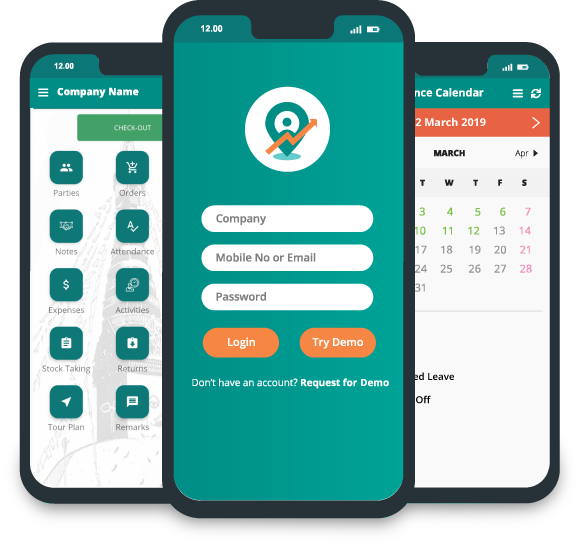
Delta Sales App is a field sales automation platform designed to help FMCG manufacturers, distributors, wholesalers, and sales teams manage their everyday field operations from one centralized system. Instead of handling attendance, retailer visits, orders, collections, inventory, and sales reports through separate spreadsheets or manual processes, teams can connect these activities through a single sales force automation software solution.
Here’s how Delta Sales App brings the different parts of field sales management together:
-(1)-1787029208.png)
1. Automates Attendance and Field Activity Tracking
Delta Sales App empowers businesses to streamline attendance and oversee field operations using innovative features like mobile attendance, GPS-based employee tracking, selfie verification, and geo-fencing. This allows sales managers to gain enhanced insights into the starting points of their representatives' days and the progress of their field activities, minimizing reliance on manual attendance records and frequent follow-up communications.
2. Simplifies Beat and Route Planning
Handling daily retailer visits by hand can pose challenges in ensuring steady outlet coverage. The Delta Sales App makes this easier by offering features for beat planning, tour planning, and territory management, which guide sales representatives in sticking to organized visit schedules. This not only minimizes unnecessary travel but also brings a sense of order to field sales route planning. Additionally, managers can keep an eye on whether the planned visits are actually happening, fostering a more connected and accountable sales environment.
3. Digitizes Retailer Visits and Order Taking
Sales representatives no longer need to jot down retailer orders in notebooks and input them later. With the mobile application, they can effortlessly capture orders on the spot. This approach to mobile order management not only minimizes the chances of entering the same data twice but also makes it much simpler to record essential details like products, quantities, schemes, and order specifics during their visits with retailers.
4. Connects Sales Orders With Inventory Visibility
Placing an order becomes much simpler when sales representatives can easily access up-to-date product and inventory details. The Delta Sales App seamlessly integrates order management with inventory tracking, empowering sales teams to make well-informed choices during their visits to retailers. This not only minimizes mistakes that arise from outdated stock data but also enhances the entire order-to-sales process, making it smoother and more efficient.
5. Centralizes Retailer and Customer Information
Keeping track of retailer information across various spreadsheets can complicate access to customer data and make maintenance a hassle. The Delta Sales App simplifies this by offering a centralized platform for retailer and party management. This allows businesses to neatly organize outlet information and easily retrieve important details about sales, visits, orders, and payments, all from one user-friendly system. As a result, field sales teams can enjoy a more cohesive and connected approach to managing relationships with both customers and retailers.
6. Automates Sales Reporting and Performance Monitoring
Creating daily sales reports by hand can be a time-consuming task for field teams and managers alike. By utilizing centralized sales reporting and analytics, the data gathered during field activities can be effectively used to keep track of sales performance, retailer visits, orders, collections, and other important sales metrics. This allows managers to focus less on merging spreadsheets and more on understanding performance and pinpointing areas that require attention.
7. Simplifies Payment Collection and Tracking
Payment collection is another field activity that can become difficult to manage through manual records. Delta Sales App supports payment collection management, helping sales representatives record collections while managers gain better visibility into outstanding payments, ageing, and party ledgers. This connects field collection activities with the broader sales management process instead of keeping payment information separate.
8. Brings Secondary Sales Into the Picture
In the fast-paced world of FMCG, relying solely on primary sales figures can leave businesses with an incomplete understanding of market dynamics. The Delta Sales App goes beyond this by enabling secondary sales tracking, allowing companies to keep a close eye on the journey of products from distributors to retailers. This enhanced visibility into sales at both the retailer and territory levels empowers managers to grasp how products are moving after the initial order. With this insight, they can make smarter decisions regarding distribution and inventory, ultimately leading to a more responsive and effective sales strategy.

9. Reduces Dependency on Spreadsheets and Manual Reporting
By integrating these activities, teams can streamline their processes and work more cohesively. Instead of juggling attendance, beat plans, retailer visits, orders, inventory, collections, expenses, secondary sales, and performance data across multiple systems, everything can be handled within a single field sales management platform. This creates a more fluid workflow, allowing information gathered in the field to transform into valuable insights for managers, all while minimizing the need for repetitive manual data entry.
10. Keeps Field Teams Productive Even When Connectivity Is Limited
Field sales teams often find themselves in areas where internet connectivity is spotty or non-existent. The Delta Sales App understands this challenge and offers robust offline capabilities, enabling sales representatives to carry on with their essential tasks even when they're disconnected. Once they regain internet access, the app seamlessly synchronizes all the data collected during their offline work. This thoughtful feature makes the platform an ideal solution for FMCG sales teams operating in diverse regions and varying market conditions, ensuring they remain productive no matter where they are.
Conclusion
None of these twelve tasks require a rep's judgment, relationship-building skill, or sales instinct, which is exactly why they're prime candidates for automation. Every hour saved on data entry, paperwork, or manual coordination is an hour a rep can spend in front of a customer instead.
The field sales teams pulling ahead right now aren't necessarily working harder than everyone else. They've simply automated the parts of the job that never needed a human in the first place and redirected that time to the one thing software still can't do: build the relationship that closes the deal.
If your team is still relying on spreadsheets, paper forms, and end-of-week status emails to run field sales, you already know which of these twelve tasks is costing you the most. The fix doesn't have to be complicated; it just has to start.
Ready to see what a fully automated field sales workflow looks like for your team? Book a free demo of the Delta Sales App today and find out how much time your reps could get back.