How to Compare Two Field Sales Apps Without Focusing Only on Features
One of the most important decisions for companies that need to manage sales reps in the field is choosing the right field sales app. If you work in FMCG, pharma, consumer goods, manufacturing, or distribution, the software you choose has a direct impact on sales team efficiency, data capture accuracy, and the speed at which managers make good decisions.
When organizations begin to compare options for field sales management software, the comparison usually begins and unfortunately ends with a list of features. One app has GPS tracking. Another manages order management. Some include beat planning, attendance tracking, dashboard reporting, expense reporting, or distributor management. Many platforms seem very similar at first glance, promising to automate field sales operations.
But the reality is that two field sales apps can have almost identical features and still yield very different results.
Why? Because success in software is not about how many features you have. It depends on how well those features match your business, how easily your sales team will take to the application, how responsive the support team is when you need help, and how smoothly the entire implementation process goes.
In this blog we’ll explore the key factors you should consider when comparing two field sales apps, helping you make a decision based on long-term business value rather than a simple feature comparison.
Why Feature Comparison Isn't Enough
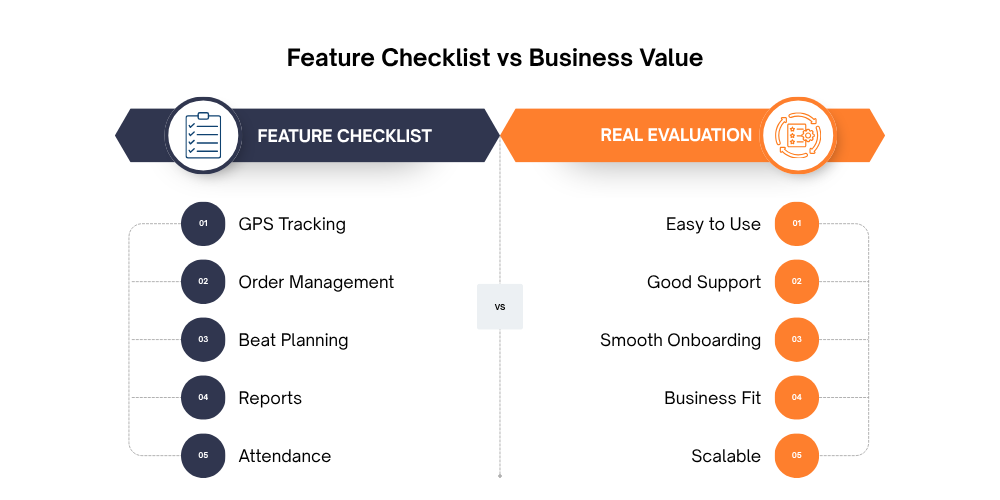
When businesses start looking for a field sales app, the first instinct is usually to compare feature lists. One platform offers GPS tracking, another highlights beat planning, while others promote order management, attendance tracking, reporting dashboards, or distributor management. On paper, these comparisons seem like the easiest way to identify the "best" solution.
However, this approach can often lead to the wrong decision.
Most modern field sales management software today offers a similar set of core features. In fact, if you put two leading solutions side by side, you will likely see that both have features like sales order management, customer management, route planning, reporting, and location tracking. Today, the question is not whether a feature exists, but how well it performs in real-world business situations.
When every vendor claims to offer the same capabilities, comparing features alone becomes difficult.
Instead, ask questions like:
- How quickly can my team learn the app?
- How responsive is the support team?
- Will implementation be smooth?
- Can the software adapt to our workflow?
- Will employees actually use it every day?
These questions often determine whether your software investment succeeds or fails.
Beyond Features: 10 Factors You Should Evaluate
1. Compare How Easy the App Is to Use
A field sales app should make your team's job easier, not more complicated. Your sales representatives spend most of their day visiting customers, taking orders, and updating information on the go. If the app is confusing or requires too many steps for simple tasks, they are less likely to use it consistently.
When comparing two apps, don't just ask if they offer the same features. Instead, ask your sales team to try both applications. An easy-to-use interface, simple navigation, and quick access to important functions can make a big difference in daily productivity.
Look for an app that allows your team to create orders using order management, update customer details through retailer management, and record visits with GPS tracking without unnecessary effort. The easier the software is to use, the faster your team will adopt it and the more accurate your sales data will be.
2. Evaluate the Complete Onboarding Experience
Choosing the right software is only the first step. The way the software is implemented is just as important as the features it provides.
A good software provider will walk you through the setup. This includes migrating your existing data, setting up the system for your business, training your employees, and answering questions as you proceed through implementation.
Before you dive in, find out how long onboarding takes, if training is involved and if you'll have a dedicated team to support you. Proper onboarding allows your team to feel confident using modules like Sales Force Automation, Distributor Management System, and Beat Plan Management from day one.
Smooth implementation saves time and confusion and gets your business starting to see results way sooner.
3. Don't Ignore Customer Support

Customer support becomes most valuable after you start using the software. Even the best field sales app may require assistance when adding new users, resolving technical issues, or configuring reports.
That's why it's important to understand what kind of support each vendor provides. Check whether they offer phone, email, or WhatsApp support, how quickly they respond, and whether you'll have a dedicated account manager.
A responsive support team minimizes downtime and ensures your sales operations continue without interruption. In many cases, businesses stay with a software provider because of the quality of support rather than the number of features available.
4. Check Whether the Software Fits Your Business
Field sales is managed differently by each company. The perfect software solution for one business may not be suitable for another.
Don't change your sales process to fit the software; pick a solution that adapts to your business. If you have multiple distributors, a built-in Distributor Management System should help you with your workflow. If your sales reps follow fixed routes, Beat Planning software should make it easy to plan and track visits.
Also check whether the software supports different sales hierarchies, approval flows, territories, and reporting structures. A flexible sales force automation software will grow with your business rather than cramp your operations.
5. Ask About Product Updates
Business needs and technology continue to evolve, so your field sales app should evolve too.
Before choosing a software provider, ask how often they release updates and whether customer feedback is considered when introducing new features. Regular updates improve security, fix issues, and ensure the software keeps up with changing business requirements.
Choosing software that is continuously improved means your investment remains valuable for years instead of becoming outdated after a short period.
6. Measure Adoption, Not Just Implementation
Successfully installing software doesn't mean the project is complete. The real success comes when your sales team uses it every day.
A user-friendly application encourages employees to record customer visits, update information, place orders, and submit reports consistently. Features like attendance management, GPS-based employee tracking, and sales order management become valuable only when your team actively uses them.
When comparing field sales apps, consider how easy it is for employees to learn and adopt the software. Higher adoption leads to better data, improved reporting, and greater returns on your investment.
7. Compare Reporting Quality
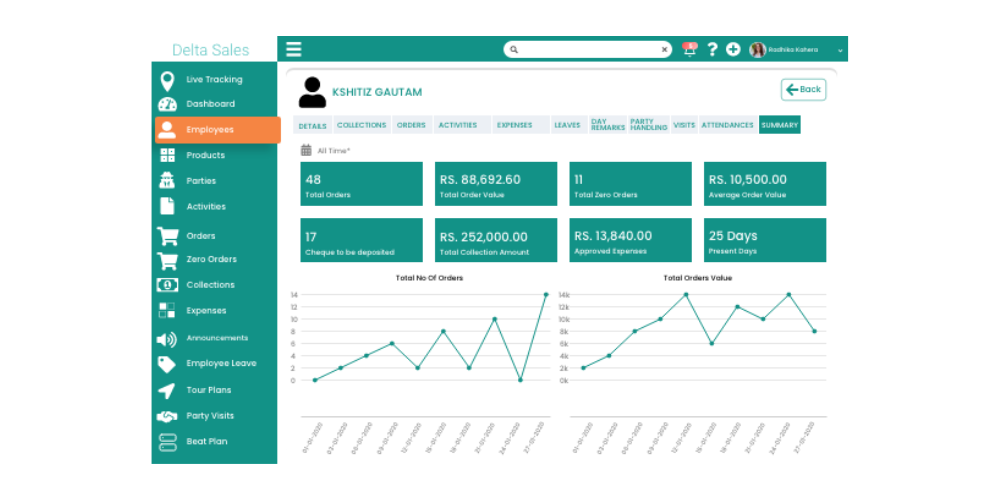
Collecting data is only useful if it helps you make better business decisions. That's why reporting should be one of the key factors when comparing field sales apps.
A good reporting system should provide clear insights into sales performance, beat compliance, attendance, retailer coverage, productivity, and secondary sales. Instead of manually creating spreadsheets, managers should be able to access information instantly through a sales reporting dashboard.
The right reports help identify opportunities, improve decision-making, and allow managers to monitor field activities more effectively.
8. Look Beyond Today's Requirements
Your business may have a small sales team today, but what about next year?
Choose software that can grow with your business without requiring you to switch platforms later. A scalable solution should support more users, additional territories, multiple distributors, and expanding product lines as your company grows.
Investing in software that can scale saves both time and money while ensuring your operations continue smoothly in the future.
9. Consider the Total Cost of Ownership
When you compare software, price is never the only factor. Lower subscription fees may hide costs for set-up, training, customization, or ongoing support.
Get a complete breakdown of costs from each vendor before you decide. Knowing the total investment will save any unpleasant surprises down the line.
The right field sales app should add long-term value through increased productivity, visibility, and streamlined sales operations, not just the lowest upfront cost.
10. Read Customer Reviews and Success Stories
Finally, take time to learn from businesses that already use the software. Product pages often highlight features, but customer reviews reveal the real experience.
Look for feedback about implementation, ease of use, customer support, product reliability, and overall satisfaction. Case studies can also show how businesses improved sales performance after implementing the software.
Positive customer experiences are often a strong indicator that the software delivers value beyond its feature list. When many businesses consistently praise usability, support, and long-term results, you can feel more confident in your decision.
Why Businesses Choose Delta Sales App Beyond Features
Picking a field sales app isn’t about choosing the software with the longest feature list; it’s about choosing a solution that provides value every single day. Though many field sales applications offer similar core functionality, it's the overall experience of using the software that really distinguishes one from another.
The Delta Sales App is designed to streamline the operations of field sales and to provide the support needed before, during, and after implementation. Every touchpoint of the platform, from easy onboarding to ongoing product enhancements, is designed to make sales teams more efficient and businesses more successful.

Here are some of the reasons businesses choose Delta Sales App beyond features:
- Easy-to-use interface:
The application is designed in a simple, intuitive way, so sales reps can get up to speed and use it with minimal training. Sales order management, retailer management, and GPS tracks are all easily accessible, so sales reps can spend more time selling and less time navigating the app.
- Smooth onboarding and implementation:
The Delta Sales App team helps with software setup, data migration, configuration, and user training. This allows businesses to start using modules like Sales Force Automation, Beat Plan Management, and Distributor Management System with minimal disruption.
- Responsive customer support:
Questions and technical issues are inevitable with any software. Delta Sales App provides reliable customer support to help businesses resolve issues quickly, ensuring field sales operations continue without unnecessary downtime.
- Built to fit different business needs:
Whether you're managing a small sales team or a large distribution network, the platform can be configured to match your sales process, reporting structure, and operational requirements instead of forcing you to change the way you work.
- Regular updates and continuous improvements:
The platform is continuously enhanced with new features, performance improvements, and updates based on customer feedback, helping businesses stay ahead of changing market requirements.
- Powerful reporting and business insights:
Managers can monitor sales performance, field activities, beat compliance, and team productivity through the Sales Reporting Dashboard, enabling faster and more informed decision-making.
- Scalable as your business grows:
As your sales team expands or your business enters new markets, Delta Sales App grows with you, making it a long-term solution rather than one you'll outgrow in a few years.
Conclusion
Selecting a field sales app is so much more than feature comparison. Features such as GPS tracking, order management, reporting, and beat planning are important, but they don’t guarantee that the software will be the right fit for your business. Things like ease of use, smooth onboarding, responsive customer support, scalability, and the overall user experience all play a much bigger role in the long-term success of your investment.
Before you decide, take time to think about how each solution fits into your sales process, supports your team, and grows with your business. A field sales app should do more than help your sales reps work more efficiently; it should also give managers the visibility and insights they need to make better business decisions. If you look beyond the features, you will find a solution that can really add value and serve your business for many years to come.
Ready to See in Action?
Schedule a free demo and discover how Delta Sales App can simplify your field sales operations, improve team productivity, and help your business grow with confidence.