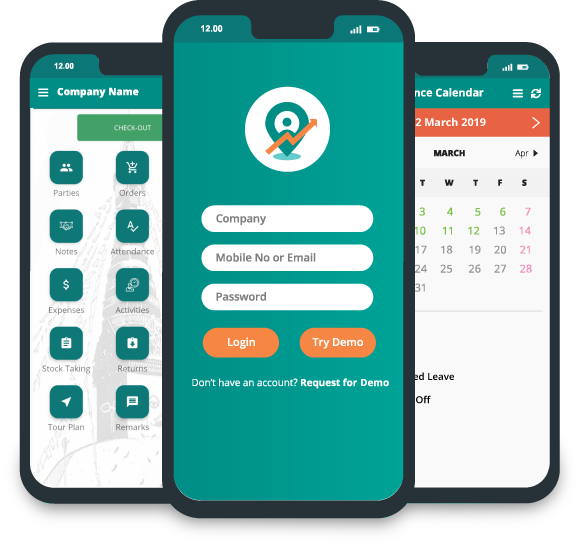

How to Evaluate Field Sales Software for 50 or More Representatives
Managing 10 field reps is nothing like managing 50. Once a team covers multiple territories, works with different distributors, and visits hundreds of retailers, coordinating daily activity gets much more complicated.
A regional manager needs to check whether reps are following their beat plans. A sales supervisor needs to review orders and retailer visits. Senior management needs a clear picture of territory coverage, sales performance, and whatever operational issues are still open. Three different people, three different questions, and spreadsheets, phone calls, and separate reporting tools struggle to answer any of them well.
Information arrives late. Customer records drift out of sync with each other. Managers end up spending more time collecting updates than actually analyzing performance.
That's the point where field sales software for 50 sales reps becomes worth seriously evaluating. As field teams grow, management processes need to evolve too. Learn more about the challenges of managing a team of 5 vs. 50 before evaluating the tools that can support a larger team. But picking the right platform takes more than finding an app with GPS tracking, order booking, and attendance features checked off. It has to support your actual reporting structure, daily field workflows, data requirements, and implementation plan. Here's what to look at before committing to one.
1. Check Whether the Software Fits Your Team Structure
A field sales team of 50 or more rarely operates as one flat group. It usually includes regional managers, area sales managers, territory supervisors, and field reps, all working across different markets with different scopes of responsibility. The software should fit that existing structure, not force you to redesign your reporting process around whatever the app happens to assume.
Start by writing down how responsibilities actually split across your organization. Who assigns the work? Who supervises field activity day to day? Who needs a consolidated report, and at what level? A regional manager probably needs an overview spanning several territories. An area manager usually only needs visibility into the reps directly under them, nothing broader.
During the software demonstration, ask the vendor to show:
-
How users and teams are organized.
-
How representatives are assigned to managers or territories.
-
Which users can view or manage specific records.
-
How management reports can be reviewed at different organizational levels.
-
What happens when an employee changes territories or reporting managers.
Pay close attention to user permissions and reporting visibility specifically. Don't assume a platform supports your required hierarchy just because it calls itself enterprise-ready; that word gets used loosely, and the actual permission structure underneath it varies a lot.
What to verify: Ask the vendor to configure a sample hierarchy similar to your own and demonstrate how managers access the information they need.
2. Evaluate Territory Management and Beat Planning
When 50 reps operate across multiple markets, territory assignment directly shapes customer coverage, travel time, and how sales responsibilities get split. Without a clear system, two reps end up visiting the same outlet while another retailer goes days without one. Staff changes make it worse, creating confusion over who actually owns which customer and which route.
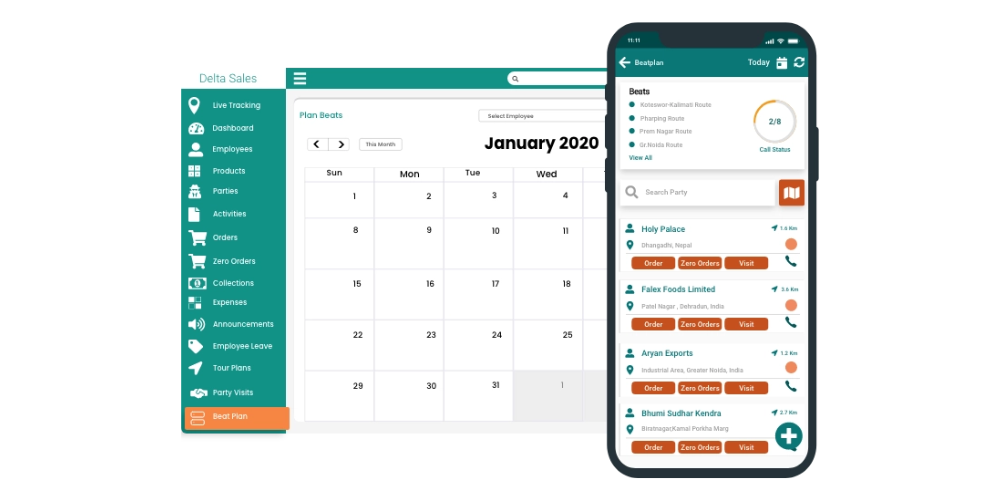
The field sales software needs to support the territory and beat planning process your business actually follows, not a generic version of it. For FMCG companies, that might mean assigning retailers to reps, organizing outlets into beats, and setting planned visit schedules. Manufacturers and distributors might need something different, organizing dealer visits, contractor meetings, or other account-based field activity.
Evaluate whether the software can:
-
Organize customers or outlets by territory.
-
Assign beats and planned visits to the appropriate representatives.
-
Display planned activities alongside completed visits, where supported.
-
Accommodate changes in territories and customer assignments.
-
Provide visibility into coverage gaps and missed planned activities.
Route optimization is another consideration. If representatives travel long distances between outlets, evaluate whether the platform supports your routing requirements and whether those capabilities are included in the proposed package. Remember that a planned route and an actual field journey are not the same thing. Managers need to understand both when reviewing execution.
What to verify: Use a sample territory with real-world outlet distribution. Ask the vendor to demonstrate how a manager would assign beats, update responsibilities, and review field execution.
3. Standardize Customer and Outlet Records
A growing field sales team generates more customer data, and if reps keep separate spreadsheets or enter information their own way, duplicate records and incomplete customer details pile up fast. Take a distributor serving 800 retailers across several territories. One rep records an outlet under its registered name. Another enters a shortened version, or just the shop owner's name. Months later, nobody can tell for certain whether two entries are the same customer or two different ones.
Inconsistent records bleed into order history, visit reporting, territory coverage, and customer ownership. Before evaluating software, decide which system is the authoritative source for customer information. Then work out which fields reps actually need during daily visits, not every field the software offers.
Depending on your business, these may include:
-
Customer or outlet name and unique identifier.
-
Address and assigned territory.
-
Distributor or dealer association.
-
Customer category and relevant contact information.
-
Sales history or other available account information.
Ask how the platform handles new customer creation, duplicate prevention, record updates, and access permissions.
Also clarify how existing records will be imported and cleaned during implementation. Software cannot automatically solve every data-quality issue if the underlying customer database is already inconsistent.
What to verify: Request a demonstration using representative customer records, including a duplicate, an incomplete record, and a customer whose territory assignment needs to change.
4. Test the Order-Capture Workflow
For most field sales teams, order booking is the one activity that happens every single day. It needs to be simple enough for reps to use mid-visit while still capturing consistent information for managers and back-office teams.
In FMCG distribution, a rep might select a retailer, review available products, enter SKU quantities, apply pricing rules, and submit the order. Depending on the business, that workflow might also involve promotions, credit limits, or distributor-specific product availability, each one adding a step.
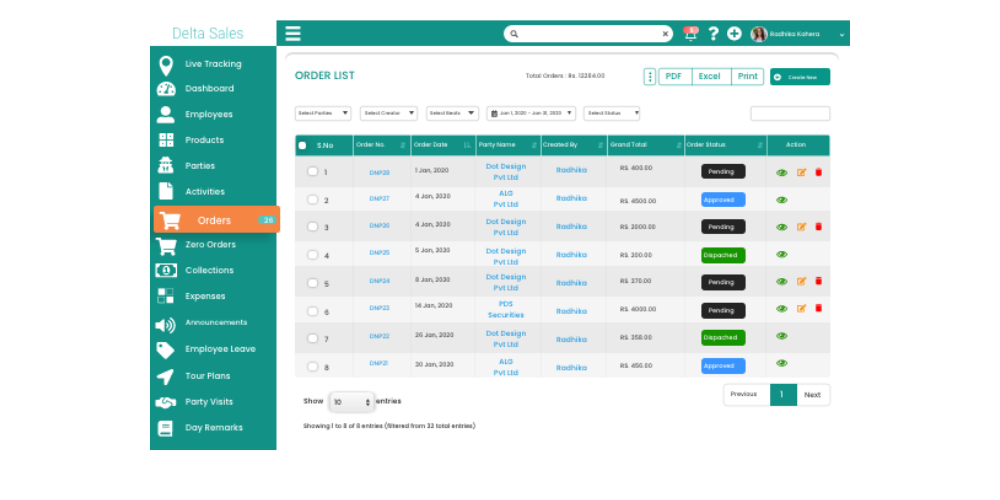
A clunky order-entry process slows down visits and pushes reps back to recording orders elsewhere first: paper, a notes app, or whatever's faster- and entering them properly later. During evaluation, ask the vendor to walk through the complete workflow, not just the final order screen that looks clean in a demo. Check whether it supports your product catalogue, customer-specific requirements, order status visibility, and reporting process as they actually exist in your business.
If you track primary and secondary sales separately, get clear on how the software represents each. Primary sales are company-to-distributor. Secondary sales are distributor-to-retailer. The two aren't interchangeable, and performance reviewed under one label when it's really the other will mislead everyone reading it. Also confirm whether orders captured by reps flow into an ERP, accounting platform, or distributor management system, or just sit in the sales app on their own.
What to verify: have a rep create an order during the demo. Follow it through submission, manager review, reporting, and whatever downstream integration is supposed to happen next.
5. Evaluate Reporting for Every Management Level
Collecting field data is only part of the job. The information must help managers identify operational problems and decide what needs attention. For businesses with 50 or more field representatives, different management roles require different levels of reporting detail.
Field supervisors need reports showing planned versus completed activities, customer visits, and representatives who have missed scheduled visits. Regional managers may focus on sales performance across territories, outlet coverage, attendance, and order summaries by representative or product. Senior management typically needs consolidated reports that reveal broader sales trends, market coverage, and operational performance across teams.
For FMCG businesses, reporting requirements may also include SKU-level order analysis, distributor-wise performance, retail execution, and secondary sales visibility, depending on the software's capabilities and available data sources. It is important to distinguish booked orders from fulfilled orders, invoiced sales, and collected payments, as each represents a different stage of the sales process.
GPS location data can help managers understand field activity, but location alone does not confirm that a productive customer interaction occurred. Before selecting software, verify which reports are available by default, which require configuration, and which depend on external data integrations.
What to verify: Ask the vendor to demonstrate three reporting scenarios relevant to your business and show how field supervisors, regional managers, and senior management can access the information they need to investigate issues and make informed decisions.
6. Assess Mobile Usability and Offline Functionality
Reps will use the software while traveling between customers, standing inside a retail outlet, or working somewhere the network just isn't reliable. A feature-rich app is worth nothing if an ordinary task takes too many steps, or if the workflow breaks the moment connectivity drops.
Evaluate the mobile experience on the actual devices your employees use, not a demo phone the vendor hands you. Include reps with different levels of technical comfort in the test, not just managers who'll give polite feedback. Have them try common tasks like
-
Finding an assigned customer.
-
Viewing the day's planned visits.
-
Recording a customer visit.
-
Entering an order.
-
Checking relevant customer or product information.
-
Reviewing their activity records.
Watch where they hesitate, make a mistake, or ask for help; that's the real signal, not whether they finished the task eventually. Offline functionality needs its own separate test. Don't settle for a vendor's general claim that the app "works offline." Pin down the exact tasks that must stay available without a connection. Ask what happens to locally saved records once the network comes back, how synchronization actually works, and how the app handles conflicting updates or submissions that failed partway. Also find out which functions still require a live internet connection regardless; GPS availability, for instance, depends on device settings and environment and doesn't always work the way people assume offline.
What to verify: Test the required workflows in a controlled offline scenario and confirm how records are synchronized once connectivity is restored.
7. Check GPS Tracking and Field Activity Verification
When a company has 50 or more reps, calls and end-of-day updates stop being enough for managers to actually understand field execution. GPS-based location tracking gives useful visibility into field movement, and visit records let managers compare planned activity against what reps report they did. But the evaluation should focus on how these capabilities support your actual operating process, not just whether a map view exists somewhere in the app.
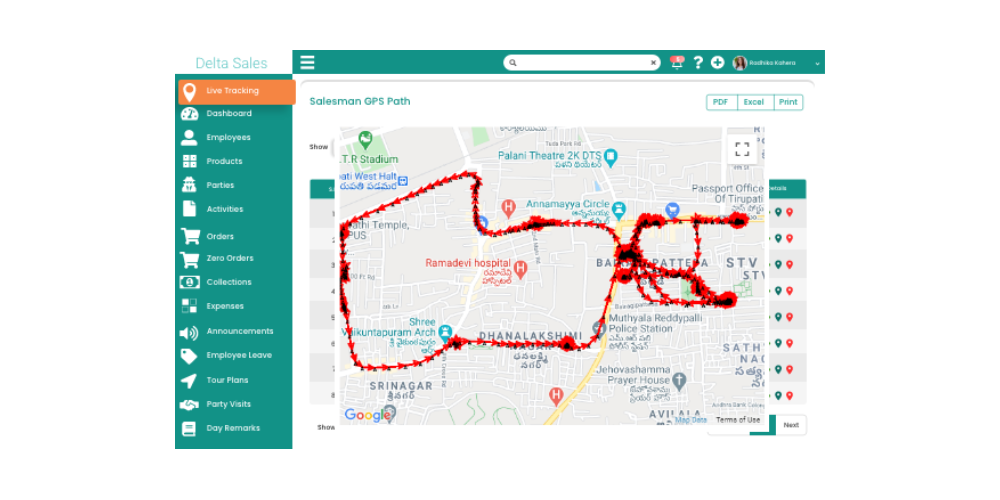
Ask the vendor to demonstrate:
-
How location information is collected and displayed.
-
Whether managers can review relevant location history.
-
How planned visits are compared with recorded visits.
-
Which visit-verification options are available.
-
How attendance and field activity records are presented.
-
What permissions, device settings, and connectivity conditions affect tracking.
Set clear expectations upfront on location collection, employee notification, access to the records, and whatever privacy requirements apply. Also understand the limits of what the data actually proves. GPS accuracy varies by environment, and a location record shouldn't automatically count as evidence a sales interaction actually happened. The useful setup for a field sales organization connects location visibility to customer assignments, visit reporting, and the sales workflow itself, not a GPS dot treated as the whole story.
What to verify: Ask the vendor to demonstrate a representative's assigned route, available visit records, and the manager's process for reviewing a missed or disputed visit.
8. Review Integrations and Data Ownership
Larger sales organizations often use multiple systems to manage orders, accounting, inventory, customer information, and business reporting. Introducing field sales software creates another data source. Unless responsibilities are clearly defined, the same information may be maintained in multiple places, creating inconsistencies and unnecessary manual work. Start by mapping the systems your team already uses. For example, your ERP may own product and pricing records, your accounting software may manage financial transactions, and your field sales platform may capture customer visits and orders. The exact arrangement depends on your organization, but every important record should have a clear source of truth.
Ask the vendor:
-
Which integrations are already supported?
-
Which data can move between systems?
-
How frequently is information synchronized?
-
How are failed transfers or duplicate records handled?
-
Is the integration included in the quoted price?
-
Who is responsible for setup, testing, and ongoing maintenance?
If an integration genuinely matters, put it in the product demo and the implementation scope directly; don't leave it as a side conversation. A vendor saying "yes, that's possible" is not a confirmed technical plan; get it written down and tested. And ask about API availability too, if your IT team expects to build or maintain custom connections on top of this.
What to verify: Document the required data flows, system owners, synchronization expectations, and responsibilities for resolving errors before signing the agreement.
9. Evaluate Scalability Beyond 50 Representatives
A platform can meet your needs today and still become hard to manage as the organization grows. If you expect to add territories, distributors, product lines, or management layers down the line, check how the software actually handles that.
Scalability isn't just about adding more user accounts. It's whether reports stay usable, administration stays manageable, data flows stay reliable, and workflows stay consistent as the business gets bigger. Think through what happens if your team goes from 50 to 100 reps or starts operating in a new region entirely.
Ask the vendor how new users get provisioned, how new territories get configured, and whether any of that needs significant technical support each time. If a much larger deployment is realistic for you, ask for documented user limits, performance considerations, or any service commitments in writing. Don't assume a product handles every future requirement just because the vendor describes it as scalable; that word means different things to different vendors.
What to verify: Ask for a written explanation of relevant user limits, configuration requirements, pricing changes, and any technical constraints that could affect your expansion plans.
10. Assess Implementation, Training, and Ongoing Support
Rolling out software to 50 representatives requires coordination across sales management, IT, operations, and the employees who will use the application every day. A successful implementation begins before the first representative logs in. Customer records need to be prepared, territories need to be configured, and managers need to understand the reporting process. Without a clear rollout plan, even suitable software can encounter adoption problems.

Your implementation plan should identify:
-
An internal project owner.
-
Responsibilities for preparing and importing data.
-
Territory and user configuration requirements.
-
Training for representatives and managers.
-
A pilot group and agreed success criteria.
-
A process for reporting and resolving issues.
-
A review date before wider deployment.
Training should reflect actual job responsibilities. Representatives need to understand daily workflows, while managers need to review reports, handle exceptions, and support employees who encounter problems. Ask what support is included after launch, how issues are reported, and whether additional training or configuration work incurs separate charges. For a larger team, it is also useful to appoint internal champions who can help colleagues understand the new process.
What to verify: Request a written onboarding plan with responsibilities, training scope, support arrangements, and clear milestones.
11. Compare the Total Cost of Ownership
Subscription price matters, but it rarely represents the full cost of deploying field sales software. A platform with a lower sticker price can need extra spending on setup, integration, training, or customization that another platform bundles in already. Compare vendors using the same expected number of users and the same list of required capabilities, apples-to-apples, and factor in these costs where they apply:
-
User subscriptions and required feature packages.
-
Initial setup and configuration.
-
Data migration or preparation.
-
Integration development and maintenance.
-
Training and onboarding.
-
Ongoing support or additional service fees.
-
Internal staff time spent on implementation and administration.

Ask how the pricing actually changes as you add reps, managers, or territories; that scaling curve matters more than the entry price. Clarify whether every user needs a paid account and whether the functionality you actually need sits locked behind a higher-tier plan. Get a written quotation that spells out the proposed scope and names the additional charges explicitly. The goal was never picking the cheapest software. It's understanding what you'll actually pay to support the workflows you need, over however long you expect to run this system.
What to verify: Compare written quotations using the same user count, configuration requirements, integrations, support expectations, and contract period.
12. Run a Pilot Before Rolling Out to Everyone
A product demonstration shows what the software can do under controlled conditions. A pilot helps establish whether it works for your team and business processes. Instead of immediately deploying the application to all 50 representatives, start with a group that reflects your operating environment. Include representatives from different territories, a manager who reviews their activity, and relevant back-office staff if order processing or integration is part of the test.
Agree on the pilot's objectives before it begins. These may include:
-
Representatives can complete required daily workflows.
-
Territory and customer assignments are accurate.
-
Order records are captured consistently.
-
Managers can access the required reports.
-
Offline behavior meets defined requirements.
-
Integration issues are identified and documented.
-
Employees understand the process and know where to get support.
Gather feedback from users and managers. Review the errors, the missing information, the confusing workflows, and the gaps between what the vendor demoed and what the team actually experienced day to day. Set clear criteria upfront for what moves the pilot to the next stage. Some issues are just configuration tweaks. Others reveal real limitations that need fixing before wider rollout. The pilot should give decision-makers actual evidence the setup fits the organization, not just confirmation that 50 people can successfully log in.
How Delta Sales App Can Help Manage a Larger Field Sales Team
Managing 50 or more field sales representatives requires clear visibility into daily activities, consistent reporting, and better coordination between field teams and managers. Delta Sales App is a field sales force automation and employee tracking platform that helps FMCG companies, distributors, manufacturers, and wholesalers manage field operations through a centralized system.
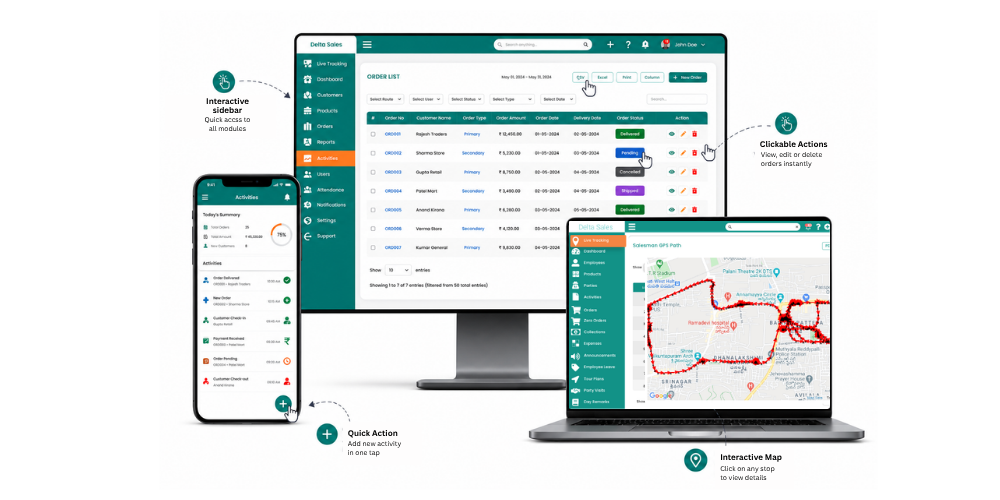
Instead of relying on phone calls, spreadsheets, and manually collected Daily Sales Reports (DSRs), businesses can use Delta Sales App to monitor field activities, organize customer visits, capture orders, and review sales performance.
Here is how Delta Sales App can support larger field sales teams:
-
GPS-Based Employee Tracking: Monitor field representatives' locations and gain visibility into their field movements to help managers review daily activities.
-
Beat Planning and Route Management: Organize customer visits and assign beat plans to representatives, making it easier to manage territory coverage and review planned activities.
-
Order Management: Allow representatives to record customer orders during field visits and help managers access order-related information without waiting for manual reports.
-
Attendance and Leave Management: Manage field staff attendance and leave records alongside other field operations, reducing dependence on separate manual tracking processes.
-
Sales Reporting and Analytics: Review available sales and activity reports to understand representative performance, monitor orders, and identify areas that need management attention.
-
Customer and Distributor Management: Organise customer and distributor information to help representatives manage their assigned accounts and support more consistent field execution.
Conclusion
Choosing the right field sales software for 50 or more representatives requires more than comparing features. You need a platform that fits your team structure, simplifies daily field operations, provides reliable reporting, and supports your business as it grows.
Before making a decision, evaluate the software against your actual workflows, test essential features, and clarify implementation requirements and total costs. The right solution should help managers spend less time chasing updates and more time improving territory coverage, sales execution, and team performance.
Ready to improve visibility across your field sales team? Book a free demo of Delta Sales App and speak with our team to explore how it can support your sales operations.
Frequently Asked Questions
1. What should I prioritize when choosing field sales software for 50 representatives?
Start with team structure, territory management, customer data, order capture, reporting, mobile usability, and integration requirements. Then evaluate implementation, support, and total cost. Prioritise mandatory business requirements before comparing optional features.
2. Is field sales software suitable for larger teams?
Yes, many field sales platforms are designed to support growing organizations. However, suitability depends on the specific product's user limits, configuration options, reporting capabilities, integration support, and ability to accommodate your operating processes.
3. Should managers receive separate training?
Yes. Representatives need to learn their daily workflows, while managers need to understand team administration, reporting, exception handling, and performance reviews. Separate role-based training helps each group use the system effectively.
4. How long should a pilot run?
The pilot should last long enough for the selected team to complete normal workflows and encounter relevant exceptions. The appropriate duration depends on visit frequency, order cycles, integration requirements, and the complexity of the rollout. Agree on success criteria before selecting the duration.
5. What is the difference between field sales software and a CRM?
CRM software generally focuses on customer relationships, account information, sales opportunities, and pipeline management. Field sales software focuses more directly on field execution, including territory assignments, customer visits, order capture, attendance, and sales activity reporting. Some platforms combine capabilities from both categories.
6. How should I evaluate Delta Sales App for a 50-person team?
The best way to evaluate Delta Sales App for a 50-person team is to book a free demo and speak with our team about your business requirements. Our team can walk you through relevant features, including field force tracking, beat planning, order management, and sales reporting, to help you understand how the platform can fit your sales operations.