
How to Move an Industrial Sales Team From Excel and WhatsApp to a Field Sales App

Industrial sales teams often run on Excel for customer lists and WhatsApp for order updates, visit reports, and follow-up reminders. That works fine for a small team. As the distributor network grows, tracking orders, quotations, and territory coverage gets a lot harder.
The problem isn't Excel or WhatsApp themselves; Excel is genuinely good for analysis, and WhatsApp is genuinely good for communication. The trouble starts when these tools become the primary system running field sales operations. Customer information gets duplicated across sheets, order updates vanish into chat threads nobody can search, and managers spend hours just collecting reports that should've taken minutes.
A field sales app for industrial distributors provides a structured way to manage customer visits, order booking, territory assignments, and daily reporting. However, successful adoption requires more than installing an app. Customer data must be organized, workflows need to be defined, and representatives must understand how the new process benefits their daily work.
This blog explains how industrial distributors can move their sales teams from Excel and WhatsApp to a field sales app, manage the transition, and improve visibility into field operations.
Why Excel and WhatsApp Stop Working for Industrial Sales Teams
Industrial sales involve multiple customer accounts, product SKUs, quotations, payment follow-ups, and repeat orders. When this information is scattered across spreadsheets and chat groups, maintaining accurate records becomes difficult.
-1792126889.png)
-
Orders and quotes get buried in chat threads
Reps often get order requests and quotation inquiries over WhatsApp, then copy the details into a spreadsheet or send them to the office separately. That doubles the work and raises the odds of missing product quantities, prices, or order updates. A field sales app gives reps one structured place to record customer visits and sales orders, so they don't have to rely on scattered conversations.
-
Visit history stays with individual reps
Reps often keep customer preferences, previous orders, and follow-up notes in personal files or chat histories. When someone changes territories or leaves the company, important account information can disappear with them. Centralized visit records let managers and authorized team members pull up customer history and keep accounts running smoothly through a handover.
-
Managers get reports late and can't verify them
End-of-day spreadsheets often leave managers combining several files and chasing down missing information. Reported visits can also lack the supporting details needed to verify field activity. A field sales app centralizes visit records, order activity, and daily reports, so managers see field operations the same way every day.
-
Customer and territory data ends up in personal files
Separate spreadsheets tend to collect duplicate dealer names, outdated contact details, and territory assignments that don't match. Those errors lead to overlapping visits and missed customers. A centralized CRM standardizes dealer information, assigns clear account ownership, and improves territory coverage.
A Practical Plan for Moving Your Team Off Spreadsheets and Chat Groups
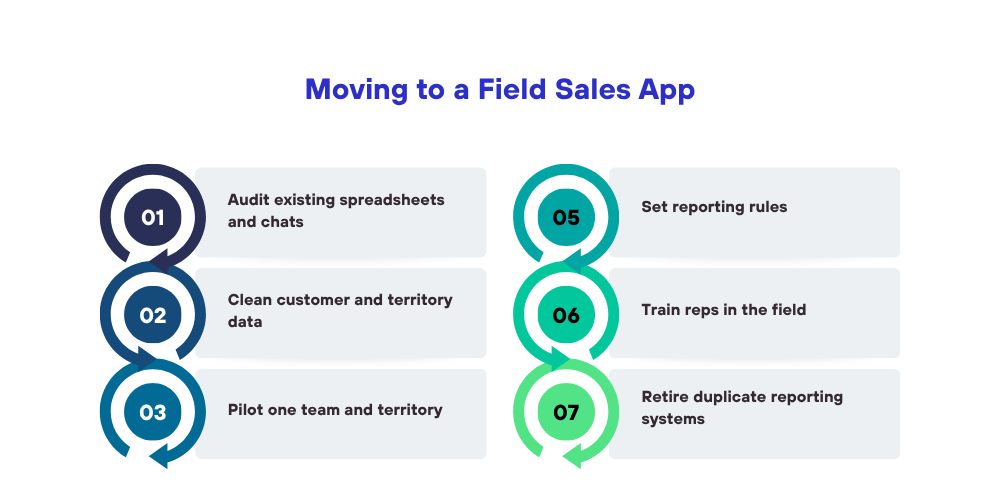
A successful migration should follow the existing sales process while removing unnecessary manual work. Start with the essential workflows rather than transferring every spreadsheet into a new system.
-
List what currently lives in Excel and WhatsApp
List the files, chat groups, and reporting formats you currently use to manage customer records, orders, visits, quotations, collections, and territory assignments. Then separate what belongs in the field sales app from what should stay in accounting or inventory software. That avoids duplicate data entry and makes it clear which system holds the official record.
-
Clean your customer, dealer, and territory data before importing
Before importing, clean up the data: remove duplicate customer records, standardize dealer names, verify contact details, and check territory assignments. Make sure product SKUs and units of measurement are consistent too. Then import a small sample first and confirm that customer details, product information, and assignments show up correctly in the app.
-
Pilot with one team and one territory
Pick one territory with a manageable customer base and a sales manager who will give honest feedback. Have the reps use the app for their regular visits, order booking, and daily reporting. Then review the results and fix any workflow problems. Only expand the rollout once the team can handle the essential tasks reliably.
-
Set simple rules for visits, orders, and daily reports
Decide what reps must record after each visit, which order details are mandatory, and when daily reports are due. Keep the required fields tied to the sales process, and don't pile on extras. For industrial distributors, that might mean customer details, products discussed, order status, visit outcomes, and follow-up dates.
-
Train reps in the field, not in a conference room
Train reps with real customer visits and order scenarios. Show them how to find dealers, record visits, book orders, and submit reports. Give them short reference guides, and make sure someone can help with the common problems: weak connectivity, wrong customer assignments, and order corrections.
-
Stop using the old sheets and groups once the pilot works
Once the pilot meets the agreed requirements, set a transition date after which official field activity gets recorded in the app. Keep the old spreadsheets as read-only references where you still need them, and let reps keep using WhatsApp for general communication. Just don't make them enter the same information in both systems.

How to Get Reps to Use the App Every Day
Adoption depends on whether the app fits the representative's daily routine. If it creates extra work without simplifying field activities, employees may continue using familiar spreadsheets and chat messages.
-
Make order bookings faster than sending a WhatsApp message
Reps have to record orders fast, between one customer visit and the next. A clear product list, standardized customer records, and a simple order-entry process cut down on repeated typing and errors. During the pilot, time how long order booking takes, then remove any steps or fields that aren't earning their place.
-
Make sure it works in low-network areas
Industrial reps may visit rural dealers, warehouses, and factories where mobile coverage is patchy. If the app stops working when the connection drops, they'll slip back to paper notes or chat messages. Choose a solution that supports the offline workflows you need, and test how data syncs once connectivity returns. Delta Sales App supports offline-first mobile functionality for supported field activities.
-
Show reps what they get out of it
Explain to reps how the app helps them: it puts customer history in their pocket, keeps follow-ups from slipping, cuts repeated reporting, and means fewer calls from the office asking for missing order details. Be open about GPS tracking, attendance policies, and how the information collected will be used. Raising those concerns early builds trust, and trust is what gets people to actually use the app.
-
Have managers review from the app only
Managers should review visits, orders, follow-ups, and daily reports through the new system instead of asking for duplicate Excel reports. The data can show missed customer visits, pending quotations, and territories where order activity is falling. Look at sales outcomes alongside activity records, too, so performance isn't judged by visit counts alone.
How Delta Sales App Supports Industrial Distributors During the Move
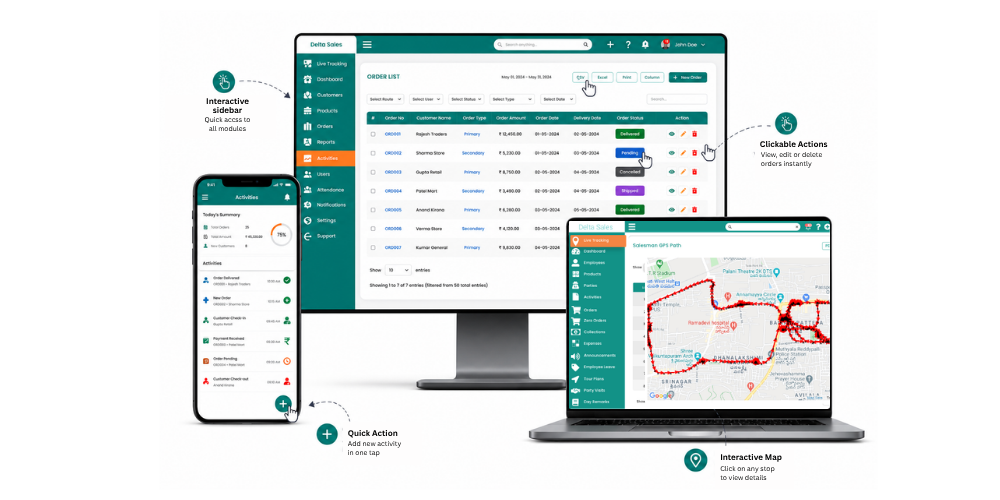
Delta Sales App helps field sales teams manage customer visits, order booking, territory planning, employee tracking, and reporting through a mobile platform. These capabilities can support industrial distributors moving away from disconnected spreadsheets and chat-based reporting.
-
Order booking and visit tracking in one app
Delta Sales App puts customer visit tracking and order booking into one structured mobile workflow. Reps can record field activity and capture sales orders without leaning on messages and separate spreadsheets. Managers get a more consistent record of customers' interactions and sales activity, which makes follow-ups and account handovers easier to manage.
-
Beat plans and territory-wise assignments
Structured beat plans help reps organize customer visits and stick to their assigned territories. Delta Sales App supports beat planning and field activity monitoring, so managers can review coverage and spot missed accounts. Distributors can then use those records to adjust visit schedules based on customer priorities, geography, and sales opportunities.
-
Field tracking and daily reports for managers
Delta Sales App provides GPS-based employee location tracking and reporting capabilities to help managers monitor field operations. Managers can review available attendance, visit, and sales activity records to identify reporting gaps and follow up on customer coverage. Location data should be used alongside sales outcomes and clear company tracking policies.
-
A simple rollout for teams used to spreadsheets
Start with the essential workflows: customer records, visit tracking, order reporting, and daily reporting. Train the reps, gather their feedback, and expand gradually once the process works reliably. Before implementation, confirm how the app will work alongside your existing accounting and inventory systems, especially if the business needs stock synchronization, invoicing, or financial reconciliation.
Conclusion
Moving an industrial sales team off Excel and WhatsApp and onto a field sales app takes a clear process, organized customer data, and steady backing from management. A small pilot, practical training, and well-defined reporting rules help reps adopt the new workflow without much disruption. Delta Sales App supports that transition with field visit tracking, order booking, beat planning, GPS-based employee tracking, and reporting. Those tools help industrial distributors cut manual reporting and see field activity more clearly.
Request a personalized demo of Delta Sales App to see how its field sales capabilities fit your territory structure, customer workflows, and reporting requirements.