
Manual vs Automated Field Sales Management: A Comparison

Leading a field sales team is not an easy task. Sales representatives are always on the move, visiting customers, taking orders, updating stock, and taking payments. But, for managers, it’s quite a challenge to keep track of all this activity in real-time.
Many businesses still run field sales operations using manual methods such as Excel sheets, phone calls, WhatsApp updates, and end-of-day reporting. This may work for small teams, but as your business grows, it quickly becomes inefficient. Reports are delayed, data becomes inaccurate, and managers lose visibility on what’s really happening in the field.
But now the trend is towards field sales management automation through sales force automation software. Digital reporting and centralized dashboards, with real-time tracking, allow companies to get the lowdown on field activities on the fly and make faster, data-driven decisions.
This blog is going to look at the main differences between manual and automated field sales management, the pros and cons of each, and how automation is changing how sales teams work in the real world.
What Is Manual Field Sales Management?
Manual field sales management is the old style of sales operations management where the majority of processes are carried out without the use of digital automation. Managing a mobile sales team is heavily dependent on human effort, paper-based records, and basic communication tools.

The usual way of recording daily activities of field sales representatives is through phone calls, WhatsApp messages, emails, or handwritten notes. This information is manually compiled by managers using Excel sheets or registers to track visits, orders, and performance.
Common practices in manual field sales management include:
- Maintaining Excel-based sales reports
- Recording customer visits manually
- Tracking attendance through calls or spreadsheets
- Collecting orders via paper forms or offline notes
- End-of-day reporting from sales representatives
While this method may seem simple and cost-effective at the beginning, it becomes increasingly difficult to manage as the sales team grows. Data delays, missing information, and reporting errors are common challenges in manual systems. Most importantly, manual field sales management does not provide real-time visibility. Managers often find out what happened in the field only after the day is over, which limits their ability to take immediate action or make quick decisions.
This lack of speed, accuracy, and transparency is one of the main reasons businesses are shifting toward automated field sales management systems.
What Is Automated Field Sales Management?
Automated field sales management is a modern approach to handling sales operations using sales force automation software instead of manual processes. It digitizes and centralizes all field activities, allowing businesses to track, manage, and optimize their sales teams in real time.
Every activity done by a sales representative is automatically recorded through a mobile app or dashboard in an automated field sales management system. This includes customer visits, order booking, attendance, expenses, location tracking etc.
Unlike manual processes that rely on delayed reporting, automated systems provide instant visibility into field operations. Managers can monitor sales performance, track employee movement, and analyze productivity as it happens.
Key components of automated field sales management include:
-
Real-time GPS-based employee tracking
-
Digital attendance management
-
Mobile-based order management
-
Customer visit tracking and history
-
Sales reporting dashboards
-
Route and beat planning
-
Task and activity management
The implementation of a field sales automation software helps the business to get rid of manual reporting and reduces the errors that happen due to human entry. Data is auto-synched to ensure accuracy and consistency across all points of sale.
Manual vs Automated Field Sales Management: A Comparison
Here’s a detailed comparison of manual field sales processes vs. automated systems powered by modern field sales management software and sales force automation software. The comparison is made on real-life operational workflows and shows the impact of each approach on planning, execution, monitoring, and overall business performance.
1. Field Planning and Route Optimization
-
Manual: Field planning is generally informal and inconsistent. Sales reps choose their own routes, or managers assign visits via Excel sheets or WhatsApp messages. There is no systematic way to rank customers by geography, sales potential, or frequency of visit. The result is inefficient travel, overlapping routes, missed high-value customers, and uneven territory coverage. It eats away at productivity and drives up operational costs over time.
-
Automated: Beat Plan and Tour Plan modules organize field planning with data-driven inputs. Managers can pre-define customer visit schedules, assign territories, and optimize daily routes based on business priorities. This ensures systematic coverage, reduces travel fatigue, improves time utilization, and guarantees that high-priority customers are consistently engaged.
2. Real-Time Sales Team Tracking and Control
-
Manual: Managers depend on phone calls, manual check-ins, or WhatsApp messages to track field activity. This creates blind spots in operations, making it impossible to verify whether employees are actually visiting assigned locations or following planned schedules. It often leads to low accountability and poor productivity control.
-
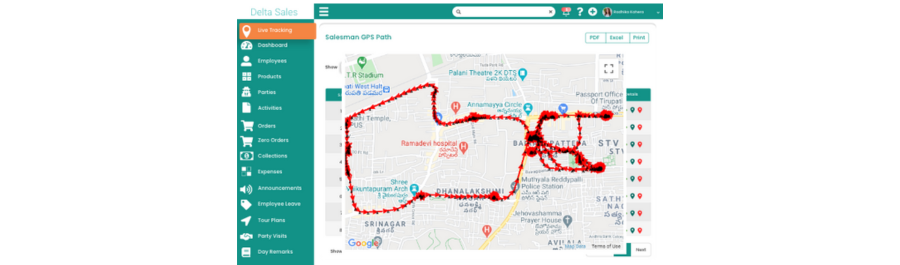
Automated: With GPS-based Employee Location Tracking, every movement of the sales team is captured in real time. Managers can view live location, travel history, and visit status throughout the day. This improves operational transparency, reduces idle time, discourages route deviations, and ensures better execution discipline across the entire sales force.
3. Attendance Accuracy and Workforce Transparency
-
Manual: Attendance is recorded using physical registers, Excel files, or informal confirmations. This system is highly unreliable, as it depends on manual input and can be easily manipulated or delayed. Managers often lack accurate visibility into actual working hours or field presence.
-
Automated: With Mark Attendance & Leave Management, employees can mark attendance digitally through mobile devices, often with GPS verification. This ensures accurate time tracking, eliminates proxy attendance, improves workforce discipline, and provides managers with real-time attendance insights for better workforce planning.
4. Customer Visit Execution and Validation
-
Manual: Customer visits are self-reported at the end of the day, often based on memory or rough notes. This leads to incomplete data, inaccurate reporting, and lack of verification. Managers cannot confirm visit timing, duration, or outcome, making it difficult to evaluate field effectiveness.
-
Automated: Customer Visit Tracking records every visit in real time with precise timestamps and location data. This ensures that each customer interaction is verifiable, improves accountability, and allows managers to analyze visit effectiveness instead of relying on assumptions or delayed reports.
5. Order Capture and Processing Efficiency
-
Manual: Orders are collected through paper forms, verbal communication, or offline notes and later entered into systems. This introduces delays, duplication errors, incorrect pricing entries, and communication gaps between field and office teams.
-
Automated: With Order Reporting, sales representatives can capture orders instantly during customer visits using mobile devices. Orders are synced in real time with backend systems, ensuring accuracy, faster processing, reduced errors, and improved customer satisfaction through timely fulfillment.
6. Expense Reporting and Field Cost Management
-
Manual: Field expenses are recorded manually in notebooks or spreadsheets, often submitted after several days. This leads to missing receipts, inaccurate claims, delayed reimbursements, and lack of financial control.
-
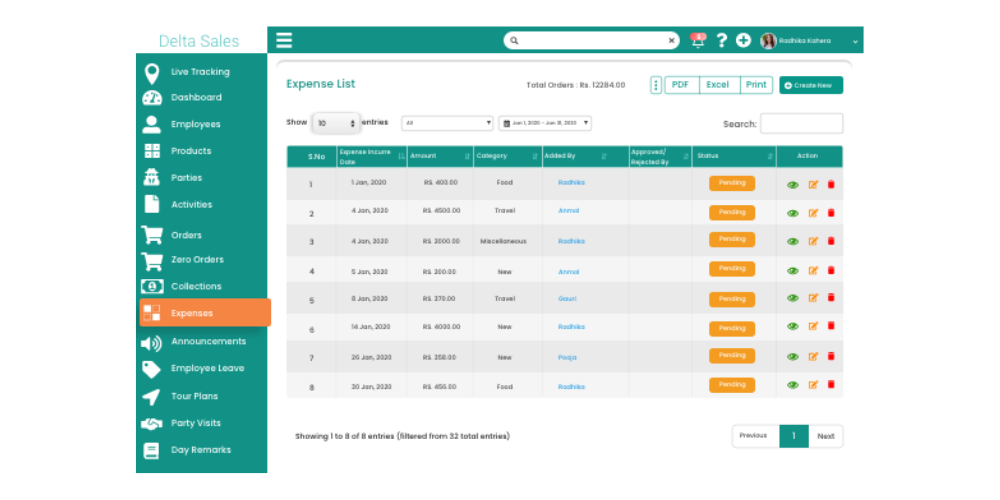
Automated: Expense reporting allows field staff to log expenses instantly with supporting details. Managers can review, approve, and track expenses in real time, ensuring transparency, reducing fraud risk, and improving financial governance.
7. Payment Collection and Revenue Tracking
-
Manual: Payment collection is tracked manually, increasing the risk of mismatch between collected amounts and recorded entries. Reconciliation becomes time-consuming, and outstanding payments are often difficult to track accurately.
-
Automated: Payment Collection Management ensures that every payment collected in the field is recorded instantly against customer accounts. This improves cash flow visibility, reduces reconciliation errors, and ensures accurate tracking of receivables.
8. Customer Data Management and Continuity
-
Manual: Customer data is scattered across multiple sources such as notebooks, Excel files, or individual salesperson records. When employees leave, critical customer information is often lost, creating gaps in business continuity.
-
Automated: A centralized Customer Relationship Management (CRM) system consolidates all customer data, including visit history, order history, and communication records. This ensures data continuity, improves follow-ups, and enables personalized customer engagement strategies.
9. Product Availability and Stock Accuracy
-
Manual: Stock updates are often delayed or inaccurate, relying on manual reporting from field staff or warehouse communication. This leads to stock mismatches, missed sales opportunities, and poor demand planning.
-
Automated: With product management and stocktaking, businesses gain real-time visibility into inventory levels. Field teams can verify product availability instantly, reducing stockouts, preventing over-ordering, and improving supply chain coordination.
10. Task Management and Field Coordination
-
Manual: Task assignments are communicated verbally or through messaging apps, which often leads to misinterpretation, missed instructions, or lack of clarity. Tracking task completion is also difficult.
-
Automated: Using Assign Activities, managers can assign structured tasks with deadlines, priorities, and clear instructions. Field teams receive real-time updates, and task completion can be monitored transparently, improving coordination and execution discipline.
11. Reporting, Analytics, and Business Visibility
-
Manual: Reporting is done manually using spreadsheets, usually at the end of the day or week. These reports are often delayed, inconsistent, and lack actionable insights for decision-making.
-
Automated: Automated Reports & Analytics provide real-time dashboards covering sales performance, visit frequency, productivity metrics, and territory coverage. This enables faster, data-driven decisions and eliminates dependency on outdated reports.
12. Field Sales Performance Measurement
-
Manual: Performance evaluation is subjective and based on incomplete or delayed data. Managers often struggle to identify top performers or underperforming areas accurately.
-
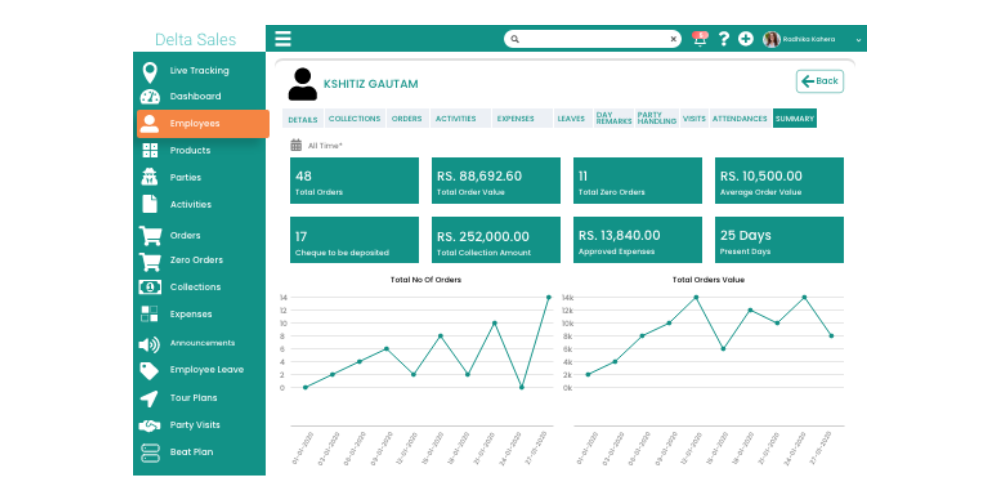
Automated: Field sales team performance tracking provides real-time KPIs such as visits completed, orders booked, collections made, and daily productivity. This ensures fair, transparent, and data-backed performance evaluation across the entire sales team.
Benefits of Switching to Automated Field Sales Management
The shift from manual processes to a modern field sales management software is a complete transformation of how field teams operate, report and perform. Instead of spreadsheets, calls, and fragmented updates, businesses get a centralized system that connects planning, execution, tracking, and analytics in real time. This change makes a huge difference to efficiency, transparency and sales performance in general.
Here are the key benefits in detail:
-
Increased Field Productivity and Selling Time
One of the biggest advantages of automation is the removal of non-selling activities. Sales representatives no longer need to spend hours preparing reports, updating Excel sheets, or sending manual updates. With features like Daily Work Logs and Automated Reports & Analytics, they can quickly record activities and focus more on customer visits, conversions, and relationship building. This directly increases productive selling time in the field.
-
Complete Real-Time Visibility and Control
Real-time visibility into field operations is provided to managers with GPS-based employee location tracking and customer visit tracking. They can see where each rep is, which customers have been visited, and which tasks are outstanding. This type of control helps companies move faster, manage teams better, and make sure sales strategies are correctly implemented in the field.
-
Better Accuracy for All Field Operations
Orders, attendance, and reporting are often subject to data errors because of manual systems. As every process becomes digital, this problem is taken away with automation. Order Reporting, Product Management, Stock Taking, etc. modules can be used to capture data from the field with 100% accuracy and in real time. This makes forecasting, planning, and overall decision-making more reliable.
-
Stronger Discipline and Team Accountability
When field activities are tracked digitally through attendance & leave management, task assignment, and performance monitoring tools, transparency naturally increases. Sales representatives become more accountable for their daily visits, routes, and productivity. Managers can also evaluate performance based on real activity data instead of assumptions or delayed reports.
-
Faster and Smarter Decision-Making
Automated dashboards and Analytics & Reporting tools provide real-time insight into sales performance, territory coverage and team productivity. Managers can see gaps quickly, compare performance by region, and change strategies without waiting for end-of-day summaries. This results in faster and better business decisions.
-
More efficient ordering and payment
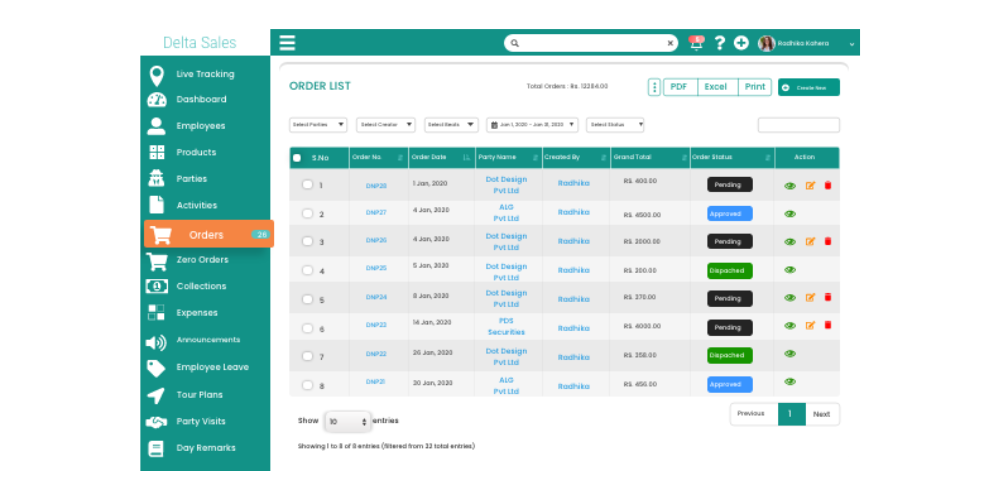
Features like Order Reporting and Payment Collection Management ensure that transactions from the field are recorded instantly and accurately. This reduces delays, prevents data loss, and speeds up the entire order-to-cash cycle, improving overall operational efficiency.
-
Scalable and Future-Ready Sales Operations
As businesses grow, managing larger field teams manually becomes increasingly difficult. Automated systems are built to scale seamlessly, whether handling a small sales team or a large distributed workforce. With consistent processes across all modules, businesses can expand without losing control or efficiency.
-
Reduced Operational Costs and Hidden Inefficiencies
By eliminating manual reporting, redundant communication, and administrative overhead, businesses significantly reduce operational waste. Automation minimizes errors, improves coordination, and reduces the need for additional supervisory effort, leading to long-term cost savings.
Which Businesses Should Use Field Sales Automation?
Field sales automation is not industry dependent. Sales force automation software and Field sales management software is useful for any business which depends on mobile sales team, on-field representatives, or distributor networks. This is especially true for companies where the field activity, visits to customers, orders and payments need to be tracked in real time.

Businesses that should adopt field sales automation include:
-
FMCG and consumer goods companies with large field sales teams
-
Pharmaceutical companies managing medical representatives (MRs)
-
Beverage, food, and packaged goods distributors
-
Manufacturing companies with dealer and distributor networks
-
Retail and wholesale distribution businesses
-
Van sales and route-based selling operations
-
B2B companies with on-field customer acquisition teams
-
Companies using in-store promoters and merchandising teams
-
Businesses with multi-location or regional sales teams
-
Fast-growing startups scaling their field operations
In all these cases, manual processes like spreadsheets and WhatsApp reporting quickly become inefficient. As teams expand, visibility decreases, reporting delays increase, and managing performance becomes more complex.
How Delta Sales App Helps Automate Field Sales Management
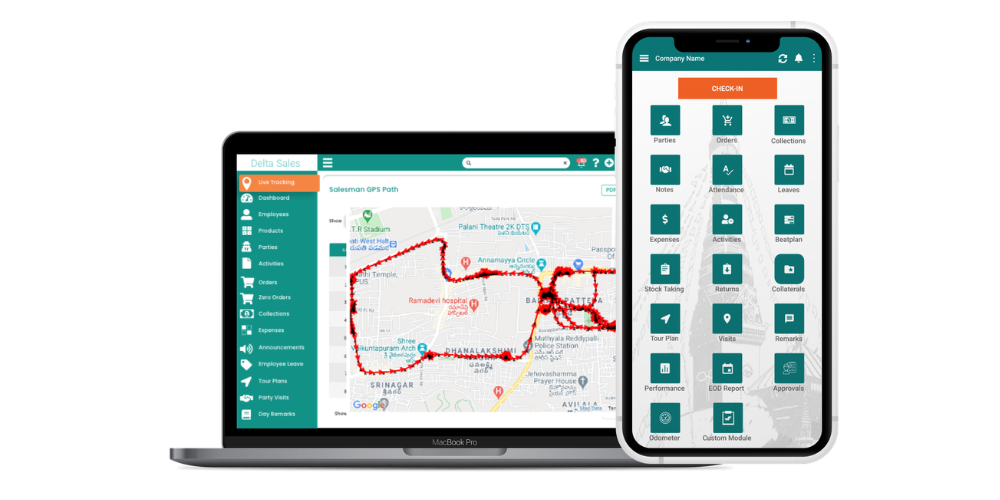
Delta Sales App is a complete field sales management software designed to replace manual, error-prone processes with a fully automated, real-time system. Instead of juggling spreadsheets, WhatsApp updates, paper records, and disconnected tools, businesses get one unified platform that handles planning, execution, tracking, reporting, and performance management in a structured way.
Here’s how Delta Sales App automates and improves every part of field sales operations:
-
Real-Time Sales Team Tracking and Visibility
GPS based Employee Location Tracking gives the managers a complete view of the field operations. They can see live locations, track movement throughout the day and verify customer visits live. This helps to eliminate uncertainty in field operations and also allows managers to ensure that sales teams are following assigned routes and schedules in an efficient manner.
-
Structured Field Execution Using Beat and Tour Plans
One of the major challenges in manual systems is unplanned and inefficient field movement. Delta Sales App solves this with Beat Plan and Tour Plan features that help structure daily field activities. Managers can assign optimized routes, plan customer visits in advance, and ensure better territory coverage. This reduces travel time, avoids missed visits, and improves overall field efficiency.
-
Fast and Accurate Digital Order Management
The Order Reporting module enables sales representatives to capture customer orders instantly through their mobile devices. Orders are recorded with complete accuracy, eliminating manual entry errors and delays. This improves order processing speed, reduces communication gaps, and ensures smoother coordination between field teams and backend operations.
-
Transparent Attendance and Workforce Management
Manual attendance tracking leads to inconsistencies and lack of trust. Mark Attendance & Leave Management enables the employees to mark their attendance digitally on their mobile phones, with location verification in most cases. This helps with discipline and gives managers reliable data on the workforce and accurate records of working hours.
-
Centralized Customer Relationship Management
The built-in Customer Relationship Management (CRM) system helps businesses maintain complete customer profiles in one place. Sales teams can access visit history, order records, and interaction details instantly. This improves follow-ups, strengthens customer relationships, and ensures more personalized engagement across all accounts.
-
Efficient Task Assignment and Field Coordination
With the Assign Activities module, managers can distribute daily tasks clearly and efficiently. Instead of relying on verbal instructions or scattered messages, all responsibilities are assigned through the platform. This reduces confusion, improves accountability, and ensures that every field representative knows exactly what needs to be done each day.
-
Integrated Expense and Payment Tracking
Field operations often involve expenses and on-the-go payments. The Expense Reporting and Payment Collection Management modules enable immediate reporting of expenses and collections by employees. This improves financial transparency, reduces reconciliation issues, and ensures that all monetary transactions are properly tracked and recorded.
-
Product, Stock, and Distributor Management
Delta Sales App also supports complete supply chain visibility through Product Management, Stock Taking, and Distributor Management System features. This ensures that field teams always have updated product information, accurate stock data, and seamless coordination with distributors, reducing operational delays and improving execution accuracy.

-
Data-Driven Decision Making with Analytics
Automated Reports & Analytics provides real-time dashboards to track sales performance, field productivity, visit frequency, and territory coverage. Managers no longer have to wait for end-of-day summary reports. Instead, they get immediate insight to help them make faster, better, and more strategic business decisions.
Conclusion
The comparison between manual and automated field sales management clearly shows how much field operations have evolved. While manual processes may still work for very small teams, they become inefficient at scale, resulting in delayed reporting, poor visibility, and lack of control over field activities. On the other hand, modern field sales management software driven by sales force automation software converts the whole sales process into a systematic, real-time, and data-driven system. With features like GPS-based employee location tracking, beat plans, tour plans, order reporting, customer relationship management, and automated reports & analytics, businesses get full visibility and control over their field workforce.
Now, rather than responding to problems after the fact, managers can monitor, guide, and optimize field performance in real time. It's a change that makes us more productive, more accountable, covers more customers, and drives consistent sales growth.
If your sales team is still working with spreadsheets, calls, and manual reporting, it’s time to upgrade to a smarter system. Automate your complete field sales process, increase team productivity, and get real-time visibility into every field activity with Delta Sales App.
Book a free demo of Delta Sales App to control your field operations automatically with less effort.