
How SFA and QuickBooks Integration Eliminates the “Double Data Entry” Trap for Distributors
The cost of manual data entry time in distribution companies is greater than most companies realize. Multiple industry studies have shown that employees can spend up to nearly 20% to 30% of their workday inputting or correcting data into multiple systems. For FMCG distributors and wholesalers this often means the same order is entered twice, one time by the sales team in the field, and again in accounting software like QuickBooks.
This “double data entry” process creates delays, billing errors, stock mismatches, duplicate invoices and reporting confusion. Over time it throttles the whole cycle of distribution and directly impacts profitability.
This is the place where a modern field sales automation software like Delta Sales App turns into a necessity. By integrating a powerful distributor management software with QuickBooks, distributors can automate order processing, synchronize accounting data, improve inventory accuracy and simplify daily operations with a connected order management system.
In this blog, we'll look at how SFA and QuickBooks integration helps distributors avoid the double data entry trap, creating a faster, smarter, and more profitable distribution process.
What Is the Double Data Entry Problem in Distribution?
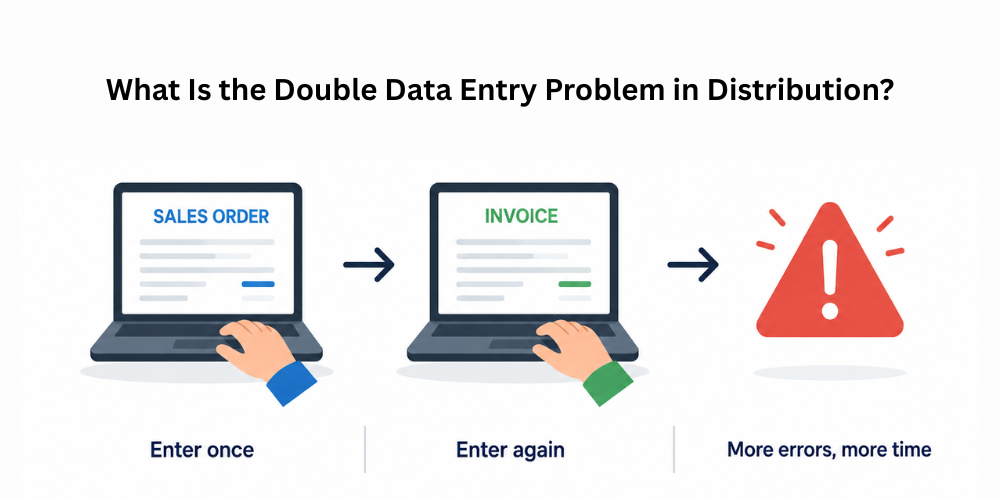
The double data entry problem happens when the same business information has to be entered into multiple systems manually.
In distribution businesses, this usually occurs between the field sales team and the accounting department.
For example, a salesperson visits a retailer and takes an order using paper, WhatsApp, Excel sheets, or a separate mobile sales app. Later, the back-office or finance team manually enters the same order again into accounting software like QuickBooks to create invoices, update stock, or record sales.
This means the same order is typed twice.
At first, this may seem manageable, but as distributor networks grow and daily order volumes increase, the process becomes slow, inefficient, and error-prone.
Common Problems Caused by Double Data Entry
-
Human Errors in Order and Billing Management
If you are entering data into multiple systems by hand, the chances of errors are much greater. Incorrect amounts, pricing mistakes, duplicate invoices, or wrong data on retailers can lead to delivery problems and payment disputes. Without connected inventory management software and a connected billing workflow, data accuracy is often a challenge for distributors.
-
Delayed Order Processing
Manual data transfer impedes the whole order-to-invoice cycle. Once the field sales reps have taken the orders, the office staff may have to spend additional time keying the same information into accounting software like QuickBooks. This has the effect of delaying invoicing, dispatch planning, and delivery times and so reducing operational efficiency.
-
Increased Administrative Workload
Double data entry creates extra work for the sales team and the finance team. Employees spend hours entering, verifying, and correcting information instead of focusing on productive business activities such as engaging with customers, growing sales, or expanding into new markets. Over time this reduces the overall productivity of the team.
-
Lack of Real-Time Business Visibility
Sales and accounting systems are separate, and managers struggle to get accurate, real-time information. Distribution businesses can suffer from slower, less reliable decision-making because sales reports, outstanding payments, inventory levels, and order status may not be updated in real time.
-
Poor Coordination Between Departments
Manual workflows can often create communication gaps between field sales teams, warehouse staff, and finance departments. Teams rely on phone calls, spreadsheets, or follow-up messages to verify orders and inventory availability, leading to more confusion and operational inefficiencies.
-
Inventory Mismatches and Stock Confusion
Disconnected systems often result in erroneous inventory records as stock updates are not reflected in real time. The sales team sells a product that is not yet in the accounting or warehouse system, leading to stock shortages, overstocking, or wrong commitments to retailers.

Why Distributors Need SFA and QuickBooks Integration
A modern sales force automation system helps you run your field sales more efficiently, while QuickBooks keeps your accounting and financial records. By running the two systems together, distributors have one workflow that automatically syncs sales data with accounting data.
It reduces repetitive manual work and offers an end-to-end order-to-cash process.
Key Benefits of SFA and QuickBooks Integration
-
Faster and More Accurate Order Processing
Distributors process a lot of orders every day, and handling them manually can create a bottleneck for the business. Sales Force Automation (SFA) software is integrated with QuickBooks so that orders gathered by field sales teams are automatically synced with the accounting system. This reduces manual work, speeds up invoicing and improves order accuracy across the business.
-
Elimination of Manual Data Entry
One of the biggest advantages of integrating SFA and QuickBooks is that it eliminates duplicate data entry. Businesses can automate the whole flow of sales, invoice and customer data instead of having to key in the same information repeatedly across different systems. This reduces human errors and saves precious operational time.
-
Better Inventory Management
Inventory accuracy is important for distributors. The integration automatically synchronizes sales and stock data in real time, ensuring that inventory records are always up to date across departments. This helps to avoid stock mismatches, reduces overstocking or stock-out situations, and improves fulfillment efficiency.
-
Improved Coordination Between Sales and Finance Teams
If sales and accounting systems are not integrated, it is common for communication problems to arise between departments. Integration creates a connected workflow, where both teams are now working off the same real-time information. This allows for better coordination of invoicing, tracking of payments, verification of orders and management of customer accounts.
-
Real-Time Business Visibility and Reporting
Integrated systems give distributors access to centralized, accurate business data. Managers can monitor sales performance, outstanding payments, inventory movement and field activities from one platform. This allows businesses to make faster and more informed operational decisions.
-
Increased Field Sales Productivity
Field sales representatives become more productive when they no longer need to spend time on manual reporting or follow-ups with office teams. With integrated systems, sales reps can focus more on retailer engagement, order collection, and market expansion while administrative processes run automatically in the background.
-
Scalability for Growing Distribution Businesses
As the distributor’s retailer network grows and order volumes increase, manual processes become difficult to handle. SFA and QuickBooks integration enables businesses to scale their operations efficiently through automated workflows, eliminating bottlenecks in operations, and ensuring process accuracy despite business being on a roll.
Common Problems Solved by SFA and QuickBooks Integration
Many distributors suffer from operational inefficiencies due to their sales, accounting and inventory systems working in silos. Manual processes can lead to delays, mistakes and miscommunications between departments. By integrating Sales Force Automation (SFA) software with QuickBooks, businesses can streamline workflows, improve data accuracy, and automate routine operations. Here are some of the most common distribution challenges integration can tackle.
-
Manual Errors in Billing and Data Entry
When businesses depend on manual data entry, errors in invoices, pricing, quantities and customer records are common. The combination of SFA and QuickBooks mitigates these risks by automatically synchronizing sales and accounting data, allowing distributors to improve billing accuracy and reduce costly operational errors.
-
Delayed Invoicing and Order Processing
Without integration, office teams need to manually copy orders from sales systems to accounting software before they can create invoices. This delays the order fulfillment process. Automatic synchronization speeds up invoicing and enables faster order processing and delivery.
-
Inventory Mismatches and Stock Inaccuracy
Where isolated systems can cause discrepancies between actual warehouse stock and recorded inventory levels. Real-time inventory adjustments when sales orders or invoices are created will also be a feature of integration, helping distributors to keep accurate stock visibility.
-
Lack of Real-Time Business Visibility
Getting current information on sales, inventory, and finances across different departments in separate systems is often a challenge for managers. Integrated platforms consolidate real-time data, enabling businesses to monitor operations more closely and make decisions more quickly.
-
Poor Communication Between Teams
Sales teams, warehouse staff and finance departments often share information via spreadsheets, phone calls or manual updates. Integration creates a connected workflow where all departments access synchronized data, improving coordination and reducing communication gaps.
-
Increased Administrative Workload
Manual order processing and redundant data-entry eat up precious employee time. Automating workflows between SFA and QuickBooks allows distributors to cut back on redundant administrative tasks and allow teams to dedicate more productive time to business activities.
-
Difficulty Managing Business Growth
As the number of distributor networks and orders increase, manual operations become more difficult to control. Integrated systems enable businesses to scale faster and better by automating processes, improving operational accuracy and eliminating workflow bottlenecks.
How Delta Sales App Simplifies Distribution Operations
Delta Sales App is a robust field sales automation & distribution management software for FMCG brands, wholesalers, manufacturers & distributors.
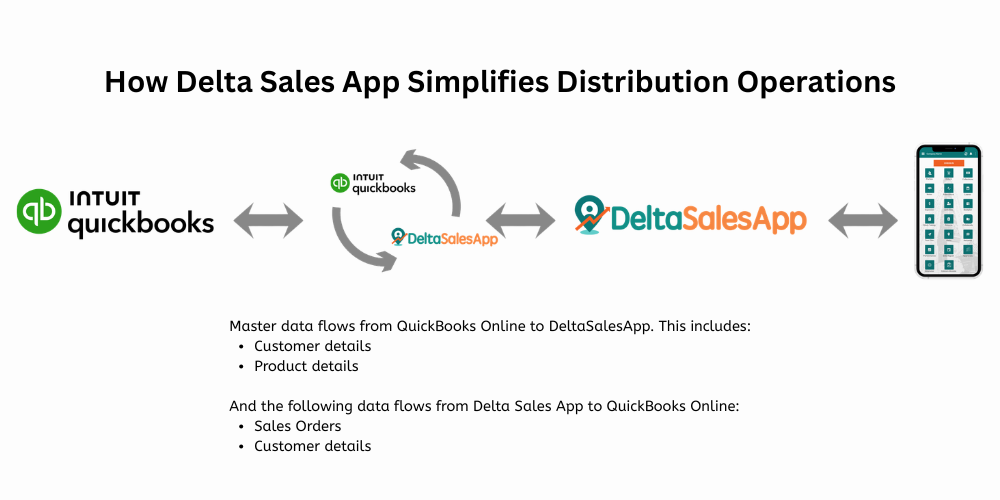
It enables companies to digitize the entire field sales process and offers enhanced visibility, productivity, and sales execution. The Delta Sales App integrates QuickBooks and field sales activity for a seamless connection to financial management.
Key Features That Help Eliminate Double Data Entry
-
Real-Time Order Management
Sales representatives can capture retailer orders directly through the mobile application during market visits. The data syncs automatically with the accounting system, eliminating manual re-entry and improving operational speed. A connected order management software helps distributors process orders faster while improving order accuracy and retailer servicing.
-
Automated Invoice Synchronization
Invoice data automatically syncs to QuickBooks and other accounting systems upon order approval. It eliminates the repetition involved in creating invoices for finance teams, while reducing billing errors, duplicate entries and processing delays.
-
Centralized Customer and Product Data
Integrated systems use one database for customer details, pricing, product catalogs and retailer information. That means the sales, finance and warehouse teams all work off the same up-to-date information, removing the inconsistency that can happen when info is manually updated across multiple systems.
-
Real-Time Inventory Updates
It automatically updates inventory levels when an order is placed or invoice is generated. This helps distributors maintain accurate stock visibility across warehouses and sales teams, reducing stock mismatches, overselling and inventory confusion.
-
Outstanding Payment and Ledger Tracking
The payment and accounting data automatically syncs with QuickBooks, and field sales teams can see the updated customer outstanding balances directly in the app. This improves collection efficiency and allows sales reps to make informed decisions when visiting retailers.
-
Automated Reporting and Analytics
Manual reporting is often riddled with inaccuracies, the data being collected from disparate and disconnected sources. Integrated SFA systems utilize synchronized data to auto-generate sales, inventory and financial reports so management can take advantage of accurate insights in real time.
-
Mobile Access for Field Sales Teams
The CRM for distributors, which is mobile-enabled, gives sales reps the ability to manage orders, collections, visits to retailers, and product information directly from their smartphones. Integrated sales employee tracking app features, GPS-based employee tracking for sales teams, and beat planning software enable the managers to keep tabs on field activities and improve sales productivity.
-
Reduced Dependency on Spreadsheets and Manual Coordination
Integration cuts down on Excel sheets, WhatsApp order sharing and repeated follow-ups between departments. Automated workflows allow information to flow seamlessly between sales, accounting and inventory systems without manual intervention.

Best Practices for Successful Integration
Integrating Sales Force Automation (SFA) software with QuickBooks can significantly improve distribution efficiency, but businesses must follow the right implementation practices to achieve the best results. Proper planning, team training, and data consistency help distributors avoid operational issues and ensure smooth synchronization between sales and accounting systems.
-
Standardize Product and Customer Data
Distributors should ensure that product names, pricing structures, SKU codes and customer records are consistent across all systems before integrating. Standardized data helps to prevent duplicate data, invoice mismatches, and reporting inaccuracies and improves synchronization accuracy between SFA software and QuickBooks.
-
Train Sales and Finance Teams
The success of the integration largely depends on how well the employees understand the system. Training for sales reps, finance teams and operational staff on synchronized workflows, order processing, invoice management and data handling processes will help reduce confusion and increase system adoption.
-
Use Mobile-First Sales Automation
A mobile-first field force management software helps sales teams manage orders, collections, and retailer servicing in real time. This increases productivity and reduces paperwork and manual coordination at the same time.
-
Monitor Data Accuracy Regularly
Automation eliminates many manual errors but distributors should periodically check the synchronized data for accuracy. Ongoing tracking can find pricing errors, duplicate records, inventory errors or synchronization errors before they cause any business impact.
-
Choose Scalable Software Solutions
Using scalable secondary sales management software and route management software helps distributors manage growing retailer networks and increasing order volumes efficiently.
The Future of Distribution Is Connected and Automated
The distribution industry is quickly moving down the path of digital and automated operations. Those old methods of doing things – paperwork, spreadsheets, phone calls, and data entry – are not scalable for the modern distribution business. As customer expectations increase and competition intensifies, distributors need faster, more accurate, and more connected systems to manage their day-to-day operations.
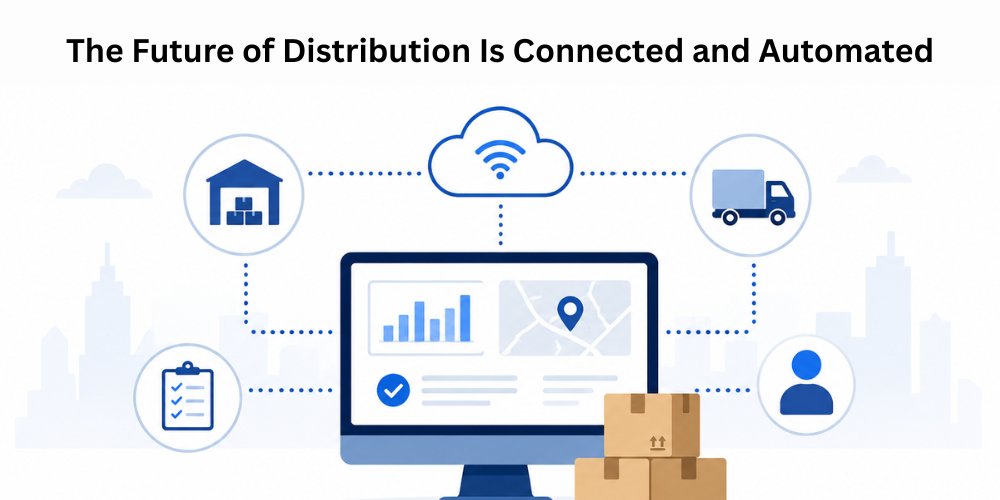
Today’s distributors are leveraging integrated technologies that combine field sales automation, accounting, inventory management, reporting and servicing of retailers into one seamless workflow. Advanced DMS software and retail execution software give real-time visibility into operations and reduce delays and manual coordination.
Automation is also important for productivity improvement. Order entry, invoice creation, payment tracking, inventory updates, and report generation are now automated and no longer require repeated manual involvement. This cuts down on administrative work, reduces the chances of human error, and lets teams focus more on sales growth, customer relationships, and market expansion.
Speed and accuracy have become critical competitive advantages, especially for FMCG distributors. Retailers want faster delivery, correct invoices, better stock-outs, and efficient service. Continued use of disconnected systems by companies often results in late operations, inventory confusion, and poor communication between departments.
With connected platforms such as Delta Sales App, distributors can create a smarter, more scalable business model integrated with QuickBooks. Sales force automation combined with accounting and inventory synchronization can allow companies to run their operations more efficiently and prepare for future growth.
“Distributors will not have the luxury of avoiding automation and system integration in the coming years.” They will be key to enabling operational efficiencies, customer satisfaction, and competitive advantages in an increasingly digital distribution environment.
Conclusion
The “double data entry” problem may seem like a minor operational issue, but for distributors it creates major inefficiencies that affect revenue, productivity and customer satisfaction.
Integrating an advanced SFA solution like Delta Sales App with QuickBooks helps eliminate repetitive manual work while improving order accuracy, invoicing speed, inventory visibility, and business reporting. For FMCG distributors looking to scale operations and improve the efficiency of field sales, automation is no longer an option. It’s a competitive necessity.”
If your distribution business is still running sales and accounting separately, now’s the time to streamline operations with an integrated solution.
Book a free demo today and see how Delta Sales App can help you simplify distribution management, improve sales productivity, and scale your business with smarter automation.