
Do Industrial Distributors Need a CRM or Sales Force Automation App?
-1792906895.png)
Industrial distributors often juggle long sales cycles, repeat orders, multiple customer accounts, field reps, and payment collections. A distributor supplying pumps, bearings, electrical components, industrial machinery, or maintenance supplies may need to track everything from the first inquiry and quotation through delivery, repeat orders, and outstanding payments. Running that through spreadsheets, phone calls, WhatsApp messages, and paper Daily Sales Reports (DSRs) gets harder as the business grows. Customer information ends up scattered, follow-ups get missed, and sales managers lose track of what's happening across territories.
That's where sales software comes in. But picking the right system means understanding how Customer Relationship Management (CRM) software differs from Sales Force Automation (SFA) apps. A CRM helps industrial distributors organize customer information, manage leads, track sales opportunities, and keep communication histories. An SFA app leans toward field execution: sales rep tracking, customer visits, order booking, beat planning, and payment collection. Some platforms combine both, so a distributor can manage customer relationships and daily field operations in one place.
Which one fits depends on how the distribution business earns its revenue, how often customers reorder, how reps actually work, and how much visibility managers need into field activity. This blog explains the differences between CRM and SFA, the features industrial distributors should evaluate, and how to choose the system that fits their sales process.
Why Industrial Distributors Struggle to Manage Sales Without a System
Industrial distribution involves more than finding customers and selling products. Sales teams must maintain relationships with purchasing managers, contractors, maintenance teams, procurement departments, retailers, dealers, and other business buyers. Each account may have different pricing arrangements, purchasing cycles, product requirements, and payment terms.
When these activities are managed manually, even an experienced sales team can struggle to maintain consistent coverage and follow-up.
1. Customer and Lead Data Scattered Across Spreadsheets, WhatsApp, and Notebooks

Industrial sales reps usually pick up customer details through phone calls, site visits, email threads, WhatsApp messages, and trade inquiries. One rep keeps a prospect list in Excel, another saves contacts on a phone, and a third jots quotation requirements in a notebook.
That scattered setup makes a reliable customer database hard to maintain. When a rep leaves the company or moves to another territory, important account information can walk out with them. The problem goes beyond contact details, too. Managers may not know which products a customer buys, when the last quotation was sent, what price was offered, or whether a prospect is ready to order.
2. No Visibility Into What Field Reps Are Doing
Industrial distributors often depend on reps who travel between factories, workshops, construction sites, dealers, warehouses, and purchasing offices. Managers need to know whether planned visits are happening, which accounts have been covered, and where reps need support.
A manually submitted visit report only gives part of that picture. It might say a customer was visited without showing the actual visit time, the location, what came out of the discussion, or what happens next. Without structured field activity tracking, managers have a hard time telling productive customer engagement apart from unnecessary travel or patchy territory coverage.
3. Missed Follow-ups, Reorders, and Payment Collections
Industrial customers often buy on a schedule set by production runs, maintenance needs, project timelines, or stock replenishment cycles. A customer who asked for a quotation last week might be ready to buy today, while another needs a reminder about an overdue payment.
If follow-up dates live only in a rep's memory, opportunities slip by. Repeat orders have the same problem. A distributor can have regular buyers and still lack a reliable way to spot the accounts that haven't reordered within their usual cycle.
Collections need steady coordination between reps, customers, and the accounts team as well. Without a shared record of outstanding balances and payment commitments, reps can walk into a customer visit with no idea which payments need attention.
CRM vs. Sales Force Automation (SFA): What's the Difference?
CRM and SFA are closely related, but they cover different parts of the sales process. A CRM mainly manages customer relationships and sales opportunities. SFA helps teams run and monitor sales activity, especially in the field. The difference matters for industrial distributors because a business can have a tidy pipeline and still struggle with field execution. The reverse happens too: a distributor can track daily orders and visits well and still have no clear view of long-term opportunities.
What a CRM Does for an Industrial Distributor
A Customer Relationship Management system organizes the information and activity tied to prospects and existing customers. For an industrial distributor, that can mean recording inquiries from manufacturers, contractors, procurement departments, and maintenance teams, assigning leads to reps, tracking quotations, and documenting every conversation with each account.
Take a distributor supplying industrial motors. A factory asks for a quotation on several motor models. The rep records the inquiry, adds the required specifications, shares the quotation, and schedules a follow-up. If the factory comes back asking for revised pricing, the rep updates the opportunity and logs the next action.
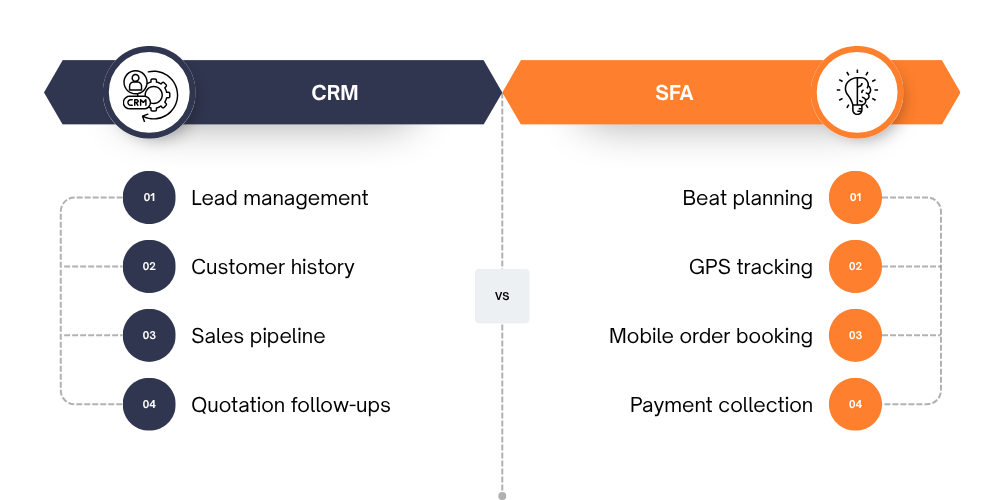
A CRM gives everyone a shared view of that process. Managers can see which opportunities are waiting on quotations, which deals are close to a decision, and why some potential customers never converted. Typical CRM capabilities include:
-
Lead capture and qualification
-
Customer and contact management
-
Sales pipeline tracking
-
Quotation and follow-up management
-
Communication and activity history
-
Task reminders and sales forecasting
-
Customer segmentation and account reporting
CRM is particularly valuable when sales involve multiple discussions, technical evaluations, approvals, negotiations, and longer buying cycles. However, CRM functionality varies between products. Some CRMs also support field activities, inventory visibility, and order processing, while others require integrations or additional modules to handle these requirements.
What an SFA App Does for an Industrial Distributor
A Sales Force Automation app helps automate and standardize the work sales representatives perform while serving customers. It is especially useful when representatives regularly visit customer locations, take orders, collect payments, and cover defined territories. For an industrial distributor, an SFA workflow might begin with a daily beat plan listing the customers to visit. The representative travels to each location, records the visit, checks available product information, books an order, and records any payment collected. Managers can then review visit completion, order activity, and sales performance through reports or dashboards. Instead of treating each customer visit as an isolated activity, SFA connects field execution with the distributor's broader sales process. Typical SFA capabilities include:
-
Beat planning and visit scheduling
-
GPS-based employee location tracking
-
Mobile order booking
-
Customer and distributor management
-
Payment collection reporting
-
Attendance and leave management
-
Expense reporting
-
Sales targets and performance dashboards
-
Offline data capture and synchronization
Some platforms also support van sales, invoicing, schemes, stock visibility, and integration with ERP or accounting software. SFA is particularly valuable when sales performance depends on consistent customer coverage, timely reorders, accurate field reporting, and coordination between representatives and the office. The key distinction is that CRM manages the customer relationship while SFA ensures planned sales activities are carried out and recorded. Industrial distributors with both requirements may benefit from a combined platform rather than operating separate systems. If field execution is your biggest gap, see our guide on how industrial distributors can automate field sales, including which tasks to automate first and how to run a pilot.
Features to Look for If You Choose a CRM
If customer acquisition, quotation management, and long-term account relationships are the main challenges, a CRM may be the right starting point. However, industrial distributors should evaluate how well the system supports their actual sales process rather than choosing one based on the number of features advertised.
-
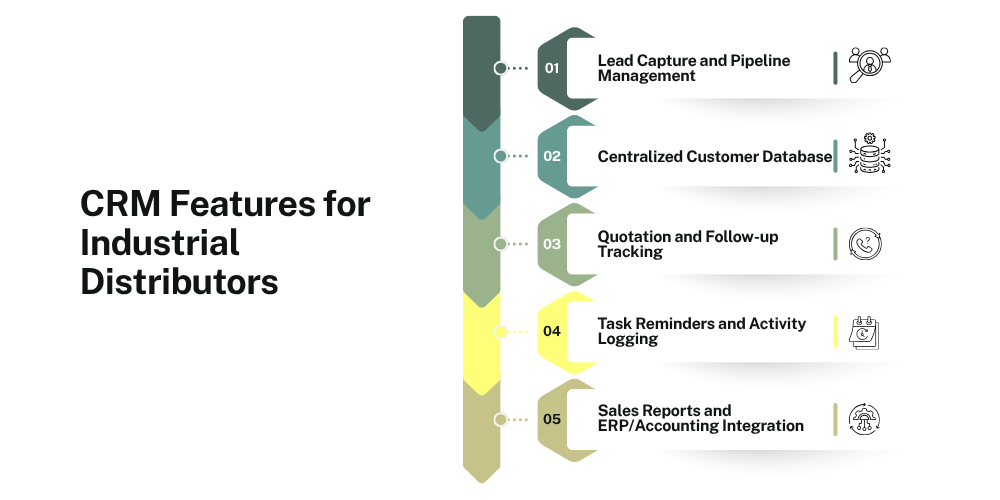
Lead Capture and Pipeline Management
Industrial sales opportunities can come from website inquiries, referrals, trade exhibitions, distributor networks, and direct prospecting. A CRM should capture all of those leads in one place and let managers assign ownership, record requirements, and track progress. Pipeline stages might run from new inquiry to qualified lead, technical evaluation, shared quotation, negotiation, and confirmed order. Those stages show managers where each opportunity stands and which deals need attention.
-
Centralized Customer Database With Full Interaction History
A useful CRM keeps a complete account record: contact details, purchasing requirements, past discussions, quotations, and follow-up commitments. That matters most when several reps serve the same customer or an account moves between territories. The next rep should be able to pick up the relationship without asking the customer to repeat earlier conversations.
For industrial distributors, the record may also need purchasing contacts, technical decision-makers, delivery locations, preferred product specifications, and agreed commercial terms. How much detail to keep depends on how complex the customer relationship is.
-
Quotation and Follow-up Tracking
Quotations are a big part of industrial sales, especially when customers ask for customized pricing, bulk discounts, technical specifications, or sign-off from several departments. A CRM should let reps record when a quotation went out, where it currently stands, and when the next follow-up is due. Managers should be able to spot quotations still waiting on a response and opportunities that have sat inactive for too long.
-
Task Reminders and Activity Logging
Reps can end up handling dozens of customer conversations and follow-ups across different accounts at once. A CRM should let them create tasks, schedule reminders, and record the outcome of each interaction. Activity logging helps most when a customer asks for a revised quotation, wants a product demonstration, or needs time to get internal approval. The next action stays visible instead of living in someone's memory. For managers, activity records give a clearer picture of how opportunities are moving. They can spot stalled deals, overdue tasks, and reps who need help with difficult accounts.
-
Sales Reports and ERP/Accounting Integration
CRM reports can show lead conversion rates, pipeline value, quotation outcomes, sales forecasts, and account activity. They help managers see whether opportunities are moving forward and where the sales process needs work. Integration matters once customer information, product prices, invoices, or payment records already sit in an ERP or accounting system. Without it, employees end up entering the same information in more than one place.
Features to Look for If You Choose an SFA App
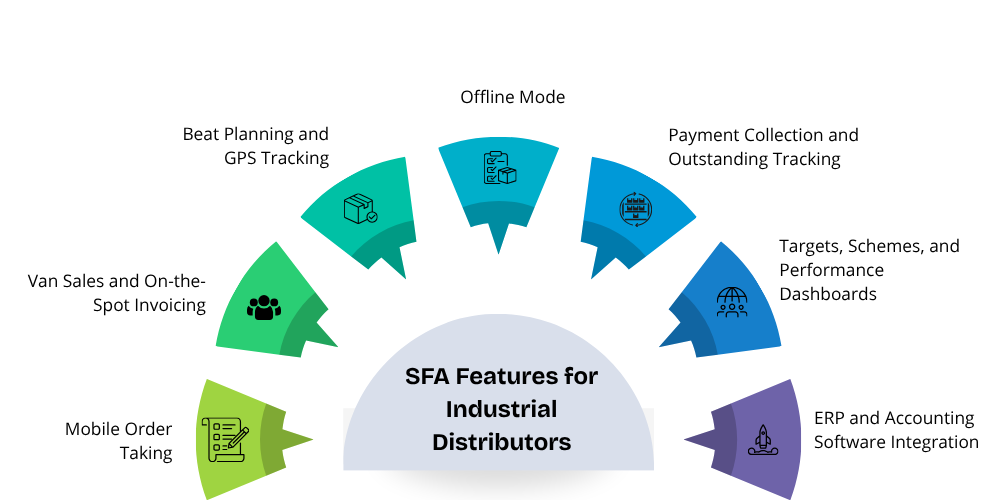
If reps spend much of their working day visiting industrial customers, taking orders, and managing collections, field execution features deserve more weight in the decision. An SFA app should make the work done during customer visits simpler, and it should give managers reliable information about territory coverage and sales activity.
-
Mobile Order Taking With Real-Time Stock and Pricing
Reps should be able to create customer orders straight from a mobile device instead of writing them down and entering them into the office system later. A mobile order-taking workflow cuts transcription errors and shortens the time between placing an order and processing it. The rep selects the customer, adds the required SKUs, enters quantities, and applies approved pricing or schemes where supported. For industrial distributors, stock visibility and pricing accuracy matter most. A customer ordering specific bearings, electrical components, pumps, or spare parts needs accurate information before confirming the purchase.
-
Van Sales and On-the-Spot Invoicing
Some industrial distributors deliver through sales vehicles that carry inventory for immediate sale. In those operations, reps may sell directly from the van, record the quantities sold, collect payments, and issue invoices during the customer visit. Van sales software ties those transactions to vehicle stock, sales records, and payment information. Depending on the platform, it may also cover stock loading, returns, and end-of-day reconciliation.
-
Beat Planning, Visit Scheduling, and GPS Tracking
A beat plan defines which customers' reps should visit and when. In industrial distribution, it may be organized by geographic territory, customer priority, expected demand, or how often a customer needs service. An SFA app helps managers schedule visits, assign territories, and check completion through recorded field activity.
GPS-based location tracking adds visibility into field movement and visit locations, subject to the right permissions and company policy. Route optimization can also cut unnecessary travel between factories, workshops, dealers, and customer sites, so reps spend more time on productive visits and less time planning routes by hand.
-
Offline Mode for Low-Connectivity Areas
Field reps may work in industrial estates, remote manufacturing locations, warehouses, or areas where mobile connectivity isn't reliable. An app that stops working whenever the connection drops interrupts order booking and visit reporting. Offline functionality lets supported activities be recorded on the device and synced once connectivity returns. That makes it possible to capture customer visits, orders, and other field information without depending on a continuous internet connection.
-
Payment Collection and Outstanding Tracking
For many distributors, completing the sale is only one part of the process. Reps may also have to collect payments, remind customers about outstanding invoices, and pass collection commitments on to the accounts team. An SFA app lets reps record collections and keeps a history of payment-related activity. When it's integrated with accounting software, it can also show outstanding balances and relevant invoice details. That lets managers plan field visits around collection priorities instead of making separate calls to the accounts department.
-
Targets, Schemes, and Performance Dashboards
Industrial distributors need to know whether field teams are meeting sales targets and covering customers adequately. An SFA dashboard can pull together order values, sales volumes, visit completion, collection performance, and other operational indicators in one place. Where the platform supports it, targets can be assigned by rep, territory, product category, or period. Schemes and incentives can also help reps pass approved offers on to eligible customers. That helps most when pricing or promotional conditions vary by SKU, quantity, or customer category.
-
Integration With ERP, Tally, or Accounting Software
An SFA app should fit into the distributor's existing technology setup. Product masters, customer records, inventory, invoices, and payment information may already live in an ERP or accounting platform such as Tally. Integration cuts duplicate entry and improves coordination between field reps, sales managers, warehouse teams, and accounts staff. An order captured in the field, for example, may need to flow into the order processing system, while updated stock or outstanding balances need to flow back to the rep's app.

How to Decide Between a CRM and an SFA App
The decision should begin with the problems that affect daily operations and revenue. Buying a CRM when the main issue is missed field visits may leave the underlying problem unresolved. Choosing an SFA app without sufficient opportunity tracking may also leave complex industrial sales cycles difficult to manage. Use the following checklist to identify which capabilities should receive priority.
-
Choose CRM as the starting point if lead management, quotation follow-ups, and customer interaction history are the main gaps.
-
Prioritize SFA if representatives need mobile order booking, beat planning, field visit tracking, or daily reporting.
-
Look for both if the business needs pipeline management alongside field execution, collections, and repeat-order management.
-
Check ERP and accounting integration if inventory, invoicing, or outstanding balances must stay synchronized.
-
Test offline workflows if representatives regularly work in areas with unreliable internet access.
-
Compare the total cost of ownership, including licenses, integrations, implementation, training, and ongoing support.
The best system is the one that addresses the most expensive operational gaps without adding unnecessary complexity. A practical evaluation should include real sales scenarios, such as recording a customer visit, booking an order, scheduling a follow-up, and reviewing a collection report.
Conclusion
Choosing between a CRM and an SFA app depends on how an industrial distributor manages customer relationships and field sales operations. A CRM is suitable for businesses that primarily need lead management, quotation tracking, and customer follow-ups, while an SFA app is better suited to teams that need beat planning, GPS tracking, order management, payment collection, and sales performance monitoring. For distributors that need both, Delta Sales App combines CRM and SFA capabilities to help manage customer data, automate field activities, and improve visibility across sales operations.
Ready to simplify industrial distribution sales? Request a personalized demo of Delta Sales App to explore how it fits your team's workflow.