How does SFA differ from Regular CRM Software?
In today’s competitive business environment, companies are constantly looking for ways to improve sales efficiency, strengthen customer relationships, and gain better visibility into their sales operations. Two commonly used solutions are Sales Force Automation (SFA) and Customer Relationship Management (CRM) software.
Understanding SFA vs. CRM is essential because, while both solutions support sales teams, they serve different purposes and address different business needs. Choosing the wrong solution can lead to inefficient workflows and underutilized technology investments.
In this guide, we’ll compare SFA and CRM software, explore their key differences and use cases, and help you understand when CRM is sufficient, when Sales Force Automation software is more suitable, and when businesses may benefit from using both.
What is CRM Software?
Customer Relationship Management (CRM) software is a centralized system designed to manage interactions with customers and prospects across the entire customer lifecycle. Its primary purpose is to organize customer data, track communication history, and support relationship-driven sales and marketing activities.
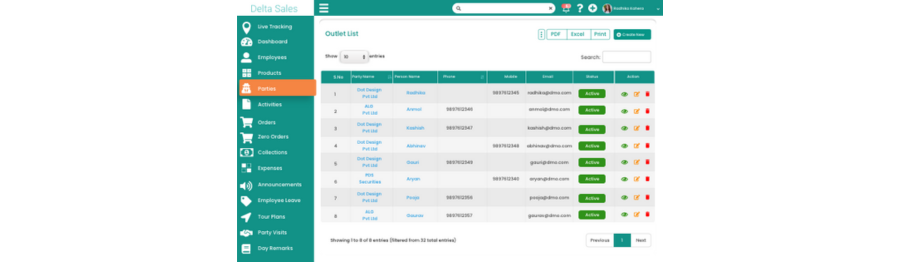
CRM platforms act as a single source of truth for customer information, enabling teams to maintain consistency, improve follow-ups, and deliver personalized experiences.
Core Functions of CRM Software
Traditional CRM systems typically focus on the following areas:
-
Customer and account data management: Centralizes customer profiles, account details, purchase history, and preferences, enabling sales and service teams to access accurate, up-to-date information across all customer interactions.
-
Lead and opportunity tracking: Tracks potential customers from initial inquiry through qualification and conversion, helping sales teams prioritize prospects, monitor deal progress, and improve overall conversion rates.
-
Sales pipeline visibility: Provides a clear view of deal stages, values, and probabilities, enabling managers to assess pipeline health, identify bottlenecks, and make informed revenue forecasts.
-
Contact history and communication logs: Maintains a complete record of emails, calls, meetings, and notes, ensuring consistent communication, better follow-ups, and continuity across sales and support teams.
-
Email integration and reminders
Integrates email communication within the CRM and triggers automated reminders, helping sales representatives follow up on time and maintain consistent customer engagement. -
Basic reporting and forecasting: Generates standard sales reports and forecasts using historical data and pipeline insights, supporting management decisions, performance tracking, and revenue planning.
CRM tools are widely used by inside sales teams, account managers, customer support teams, and marketing departments to ensure structured engagement with customers.
Primary Strengths of CRM
The key strength of CRM lies in its ability to support relationship management and strategic sales planning. It provides visibility into customer interactions, deal stages, and revenue forecasts, making it ideal for businesses with longer sales cycles and office-based sales operations.
However, CRM systems are not inherently designed to manage complex, on-ground sales activities or operational execution in the field.
What Is Sales Force Automation (SFA)?
Sales Force Automation (SFA) is a specialized software solution focused on automating and optimizing day-to-day sales execution, particularly for field sales teams. Unlike CRM, which emphasizes customer data and relationship tracking, SFA concentrates on improving productivity, discipline, and efficiency in sales operations.
-1785053058.png)
SFA tools are commonly used in industries such as FMCG, pharmaceuticals, food and beverage, consumer goods, and distribution-driven businesses where sales representatives operate in the field on a daily basis.
Core Objectives of SFA
The primary objectives of SFA include:
-
Reducing manual sales tasks: Automates routine activities such as order entry, reporting, and data synchronization, minimizing paperwork, reducing errors, and allowing sales representatives to focus more on selling.
-
Improving field sales productivity: Optimizes daily sales activities through structured routes, automated workflows, and mobile access, enabling representatives to cover more outlets and achieve higher sales efficiency.
-
Enforcing sales processes and compliance: Standardizes sales execution by ensuring mandatory steps such as visit check-ins, pricing adherence, and promotion compliance are consistently followed across all field teams.
-
Providing real-time visibility into field activities: Delivers live insights into sales visits, orders, location tracking, and performance metrics, enabling managers to monitor execution and take immediate corrective actions.
-
Ensuring accurate order capture and reporting: Captures orders digitally at the point of sale with real-time validation, ensuring accurate invoicing, inventory updates, and reliable sales data for reporting.
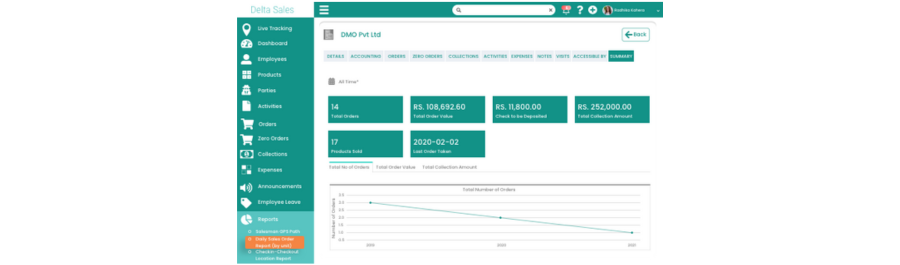
SFA systems are typically mobile-first, designed to function seamlessly in on-ground sales environments.
Primary Strengths of SFA
The primary strength of Sales Force Automation lies in its ability to streamline and control daily sales execution in the field. SFA enables real-time order capture, route optimization, and activity tracking, ensuring consistent sales processes and higher productivity. By automating manual tasks and providing live visibility into field operations, SFA improves data accuracy, enhances compliance, and empowers managers to make faster, informed decisions that directly impact sales performance and operational efficiency.
Key Differences Between SFA and Regular CRM Software
Although SFA and CRM overlap in certain areas, their focus, functionality, and business value differ significantly. Understanding these differences is critical for selecting the right solution.
-1785053058.png)
CRM Focus: Managing Customer Relationships
-
Customer profiles and history: CRM systems store detailed customer information, including purchase history and interactions, helping organizations understand customer behavior, preferences, and lifetime value for long-term relationship management.
-
Communication records: CRM tracks all customer communications across calls, emails, and meetings, ensuring consistent messaging, better follow-ups, and improved coordination between sales, marketing, and service teams.
-
Deal progression: CRM monitors sales opportunities through pipeline stages, enabling managers to forecast revenue, identify bottlenecks, and guide strategic sales decisions based on long-term customer engagement.
-
Long-term relationship nurturing: CRM supports ongoing relationship building through engagement tracking, loyalty insights, and personalized interactions, helping businesses improve retention, upselling, and customer lifetime value.
SFA Focus: Driving Sales Execution
-
Daily sales activities: SFA tools manage representatives’ daily tasks such as calls, order booking, invoicing, and collections, ensuring structured execution and improved productivity in day-to-day field operations.
-
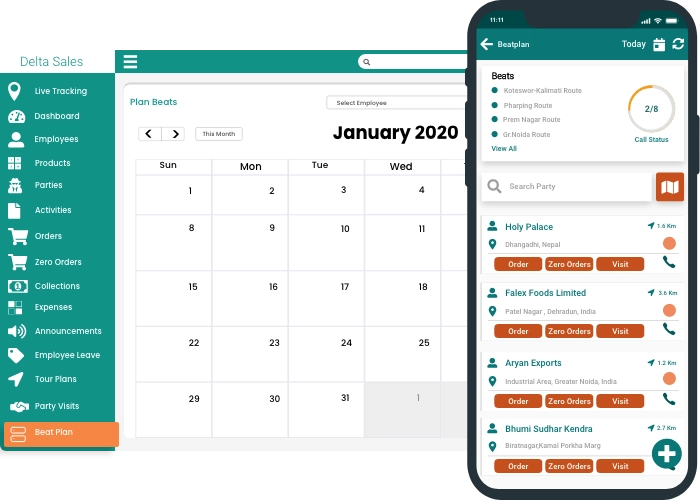
Store visits and beat plans: SFA organizes outlet visits through predefined beat plans, ensuring consistent coverage, optimized routing, and disciplined execution of sales activities across assigned territories.
-
Orders, invoices, and collections: SFA enables real-time order capture, instant invoicing, and payment tracking in the field, reducing delays, errors, and manual paperwork in sales transactions.
-
Product visibility and merchandising compliance: SFA tracks product availability, shelf placement, and promotional compliance at stores, ensuring brand standards are maintained and execution aligns with planned merchandising strategies.
Sales Process Coverage
CRM: High-Level Sales Pipeline Management
-
Lead qualification: CRM systems help evaluate and prioritize leads based on predefined criteria, enabling sales teams to focus efforts on prospects with the highest conversion potential.
-
Opportunity stages: CRM tracks opportunities through defined pipeline stages, providing visibility into deal progress and helping managers identify delays, risks, or acceleration opportunities.
-
Deal value and probability: CRM assigns expected deal values and win probabilities, supporting revenue forecasting and helping leadership assess pipeline health and potential business outcomes.
-
Sales forecasts: CRM uses pipeline data and historical trends to generate sales forecasts, supporting strategic planning, budgeting, and performance goal setting.
SFA: Detailed Sales Workflow Automation
-
Route planning and visit scheduling: SFA optimizes daily routes and visit schedules, ensuring efficient territory coverage, reduced travel time, and consistent execution of planned sales activities.
-
Mandatory check-ins at customer locations: SFA enforces location-based check-ins, ensuring sales representatives visit assigned outlets and providing real-time visibility into field execution and compliance.
-
Product catalog management: SFA provides digital product catalogs with pricing, promotions, and availability, enabling accurate order taking and consistent product presentation during customer visits.
-
Order booking and invoicing: SFA automates order capture and instant invoice generation in the field, reducing errors, accelerating billing, and improving overall transaction efficiency.
Field Sales Enablement
CRM Limitations in Field Operations
While many CRM platforms offer mobile access, they are often optimized for data viewing rather than execution. Field representatives may still rely on manual notes, spreadsheets, or separate systems for operational tasks.
CRM does not typically handle:
-
Offline order booking: CRM platforms generally lack robust offline capabilities, making it difficult for sales representatives to capture orders reliably in low-connectivity or remote field locations.
-
GPS-based visit verification: Most CRM systems do not support GPS-based check-ins, limiting visibility into whether sales representatives actually visit assigned outlets as planned.
-
Daily productivity tracking: CRMs typically do not measure daily field productivity metrics such as visits completed, orders booked, or time spent per outlet.
-
Field compliance monitoring: CRM systems lack tools to monitor merchandising standards, pricing compliance, or execution consistency across distributed field sales teams.
SFA as a Field-First Solution
SFA systems are designed specifically for field sales teams. Key capabilities include:
-
Offline functionality for remote locations: SFA platforms allow sales representatives to work fully offline, capturing visits, orders, and payments, then synchronizing data automatically once connectivity is restored.
-
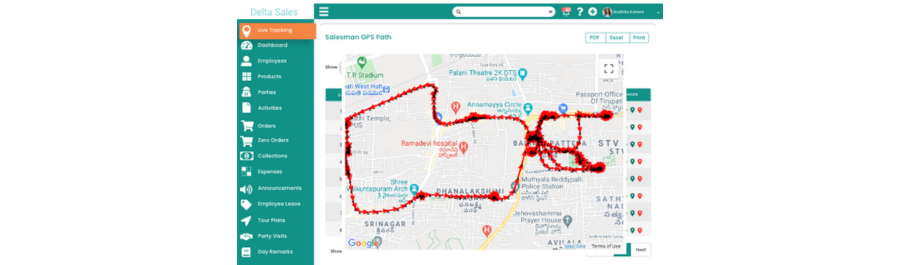
GPS tracking and geo-fencing: SFA uses GPS tracking and geo-fencing to validate outlet visits, ensuring route adherence, execution accountability, and accurate field activity reporting.
-
Automated visit logs: Every field visit is automatically logged in SFA systems, eliminating manual reporting and providing managers with real-time visibility into field execution.
-
Real-time activity dashboards: SFA dashboards display live sales activities, visits, and performance metrics, enabling managers to monitor execution and intervene immediately when issues arise.
These features ensure transparency, accountability, and higher field productivity.
Order Management and Transactions
CRM: Limited Transactional Capabilities
Traditional CRM systems are not built to handle high-frequency order processing. While they may track deal values, they usually lack features for:
-
Instant order booking: CRMs generally do not support real-time order capture during field visits, slowing order processing and increasing dependency on back-office teams.
-
Invoice generation: CRM platforms usually lack instant invoice creation, delaying billing cycles and increasing the risk of pricing or documentation errors.
-
Inventory synchronization: Without inventory integration, CRM systems cannot confirm real-time stock availability, making them unsuitable for inventory-dependent sales operations.
This makes CRM insufficient for distribution-heavy sales models.
SFA: End-to-End Sales Transactions
SFA platforms integrate sales execution with transactions by enabling:
-
Real-time order capture: SFA enables instant order booking at customer locations, ensuring accurate demand capture and faster fulfillment cycles.
-
Dynamic pricing and promotions: SFA applies pricing rules and active promotions automatically, ensuring consistent pricing execution across all field sales transactions.
-
Stock checks at van or warehouse level: Sales representatives can verify live stock availability, preventing over-ordering, stock-outs, and missed delivery commitments.
-
Instant invoice creation: Invoices are generated immediately after order confirmation, improving billing accuracy, payment speed, and customer trust.
This capability is critical for businesses that depend on fast order fulfillment and accurate billing.
Reporting and Visibility
CRM Reporting: Strategic Insights
CRM reports are designed for management-level analysis, such as:
-
Pipeline health: Provides visibility into deal stages and movement, supporting long-term planning and opportunity management.
-
Revenue forecasts: CRM forecasts estimate future revenue based on pipeline data and historical performance trends.
-
Sales conversion rates: Measures how effectively leads convert into deals, supporting performance evaluation and strategy refinement.
-
Customer engagement metrics: Tracks communication history and engagement frequency to support relationship management strategies.
These insights support strategic planning and performance reviews.
SFA Reporting: Operational Intelligence
SFA provides real-time, execution-level visibility, including:
-
Daily sales performance: SFA reports show daily orders, sales values, and outlet productivity, enabling immediate performance assessment.
-
Route adherence: Managers can track whether sales representatives follow planned routes and visit assigned outlets consistently.
-
Outlet coverage: SFA monitors outlet reach and visit frequency, ensuring complete market coverage and identifying gaps.
-
SKU-wise sales trends: Provides product-level insights to identify fast-moving items, slow movers, and merchandising opportunities.
-
Field activity compliance: Tracks execution compliance against defined standards, enabling quick corrective action when deviations occur.
This operational intelligence allows managers to take corrective actions immediately.
Automation Level
CRM Automation Scope
CRM automation focuses on:
-
Email reminders: Automated reminders help sales teams follow up on opportunities and customer interactions.
-
Follow-up alerts: CRM alerts notify sales reps about pending tasks or stalled opportunities.
-
Task assignments: Managers can assign tasks digitally, improving coordination but not execution enforcement.
-
Lead routing: Automatically distributes leads but does not control how field work is performed.
SFA Automation Scope
SFA automates core sales activities, such as:
-
Visit scheduling: SFA automation daily visit planning, ensuring structured execution and optimal outlet coverage.
-
Order entry: Orders are captured digitally, eliminating paperwork and reducing data entry errors.
-
Data synchronization: All field data syncs automatically with central systems, ensuring real-time visibility.
-
Performance tracking: Sales performance is tracked continuously, enabling proactive management and improvement.
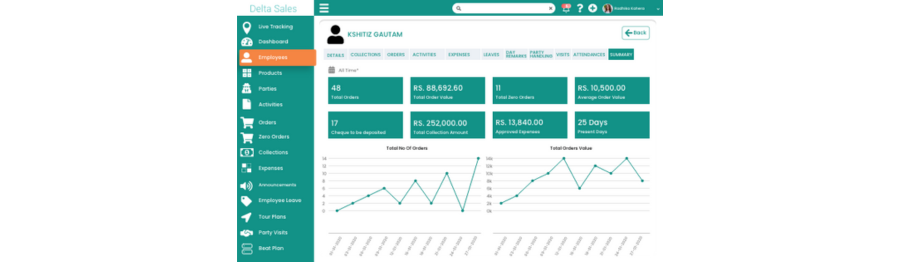
This significantly reduces manual effort and errors in field sales operations.
Sales Force Automation (SFA) and Customer Relationship Management (CRM) serve distinct purposes. CRM focuses on managing customer relationships, tracking detailed profiles, communications, deal progress, and long-term engagement, supporting strategic sales planning and forecasting. In contrast, SFA emphasizes daily sales execution for field teams, automating activities like route planning, store visits, real-time order booking, invoicing, and merchandising compliance.
SFA offers offline capabilities, GPS-based visit verification, and detailed workflow automation that CRM typically lacks. While CRM provides strategic insights into pipeline health and revenue forecasts, SFA delivers real-time operational visibility into sales performance, route adherence, and compliance. CRM automates reminders and task assignments; SFA automates core sales tasks, making it crucial for businesses with active, transaction-heavy productional compliance.
Can CRM Replace SFA for Field Sales Teams?
A CRM can support certain field sales activities, but whether it can fully replace an SFA solution depends on the complexity of your field sales operations.
For teams that primarily manage customer relationships, sales opportunities, and follow-ups, a CRM with a mobile application may be sufficient. However, businesses with large field sales teams often need more specialized capabilities to manage daily market execution.
Field sales teams may need to:
-
Plan daily routes and customer visits using route planning software
-
Follow predefined beat plans
-
Track sales representative visits with GPS sales tracking
-
Monitor outlet coverage and territory performance
-
Capture orders directly from the market using field order management
-
Work in areas with limited internet connectivity using offline sales software
-
Submit automated daily sales reports
-
Monitor sales team productivity
-
Track sales execution across different territories
While some CRM platforms offer these capabilities through native features, customizations, or integrations, Sales Force Automation (SFA) software is typically designed around these operational requirements from the beginning.
For example, an FMCG company may have sales representatives visiting dozens of retailers every day. The manager needs to know which outlets were visited, how much market coverage was achieved, what orders were captured, and whether the planned route was followed. These requirements go beyond simply managing customer records or tracking sales opportunities.
Therefore, CRM software can replace SFA for simpler field sales operations in some cases, but businesses with complex, high-volume, and transaction-heavy field operations may benefit more from specialized field sales automation software.
The right choice depends on your sales process, team structure, number of outlets, transaction volume, and the level of real-time sales visibility required.
When Should You Choose CRM Software?
CRM software is generally the right choice when your primary business need is to manage customer relationships, leads, opportunities, and sales pipeline management.
You may want to choose CRM software if your sales team:
-
Manages a relatively small number of high-value accounts
-
Has longer and more complex sales cycles
-
Relies heavily on lead management and opportunity tracking
-
Needs detailed customer interaction histories
-
Tracks sales opportunities through different pipeline stages
-
Requires sales forecasting and pipeline analysis
-
Needs to coordinate sales, marketing, and customer service activities
-
Focuses more on relationship development than daily outlet visits
For example, a B2B company selling high-value products or services may have sales representatives managing a limited number of accounts over several months. In this situation, the ability to track contacts, meetings, emails, opportunities, deal values, and follow-ups can be more important than route planning, field visit tracking, or daily outlet coverage.
Choose CRM software when your primary challenge is managing customer relationships, sales opportunities, and the sales pipeline rather than managing high-frequency field sales execution.
When Should You Choose SFA Software?
SFA software is particularly suitable for businesses that depend on sales representatives visiting customers, retailers, distributors, dealers, or outlets in the market.
You should consider Sales Force Automation software when your business needs better control and visibility over daily field sales activities, such as:
-
Planning sales routes and beat plans
-
Tracking field sales visits with GPS tracking
-
Monitoring sales representative activity
-
Improving retailer and outlet coverage
-
Capturing orders directly from the field through mobile order booking
-
Managing large field sales teams
-
Tracking daily sales representative productivity
-
Generating automated sales activity reports
-
Managing sales operations in areas with limited connectivity through offline field sales
-
Monitoring territory-level sales execution
SFA can be especially valuable for industries such as FMCG, pharmaceuticals, food and beverage, consumer goods, distribution, wholesale, and manufacturing, where sales representatives frequently travel through assigned territories and interact with multiple customers or outlets.
For example, if a distributor has 50 sales representatives visiting hundreds or thousands of retailers, managers need more than customer information. They need visibility into where sales representatives are working, which outlets they are visiting, how many visits are completed, what orders are being generated, and whether the assigned territory is adequately covered.
In such cases, field sales management app can help automate routine field activities and provide managers with real-time operational visibility.
Choose SFA software when your primary challenge is managing, monitoring, and improving the execution of daily field sales activities.
Can SFA and CRM Work Together?
Yes. SFA and CRM software can work together, and for many businesses, combining the two can provide a more complete view of the sales process.
CRM and SFA address different parts of the sales ecosystem:
-
CRM software manages customer relationships, leads, opportunities, communication, and sales pipelines.
-
SFA software manages field sales execution, visits, routes, outlet coverage, order capture, and daily sales activities.
When integrated, these systems can connect strategic sales information with on-ground execution.
For example, a manager may use CRM to track a customer's relationship history and sales opportunity while using SFA to monitor the sales representative's visits, capture orders, and track field activities associated with that customer.
An integrated approach can help businesses:
-
Maintain consistent customer and outlet information
-
Connect sales opportunities with field activities
-
Improve sales performance visibility
-
Reduce duplicate data entry
-
Synchronize customer and sales information
-
Connect field orders with broader sales processes
-
Give managers a more complete view of sales team performance
This approach can be particularly useful for organizations that have both relationship-driven sales processes and large field sales operations.
However, not every business needs both systems. If your primary requirement is field sales execution, a specialized field sales management system may be sufficient. If your primary requirement is customer and opportunity management, CRM may be the better fit. Businesses with more complex sales operations can consider using both, provided the systems integrate effectively.
Choosing the Right Solution for Your Business
When deciding between CRM software, Sales Force Automation (SFA), or a combination of both, business leaders should consider the following factors:
-
Nature of the sales process: Evaluate whether sales are relationship-driven with longer cycles or execution-driven with frequent transactions, as this determines whether CRM, SFA, or both are required.
-
Size and structure of the sales team: Consider the number of sales representatives, their roles, and whether they operate remotely or in the field to identify the most suitable system.
-
Dependency on field operations: Assess how much your business relies on on-ground sales activities such as store visits, route management, and order booking, which may necessitate an SFA solution.
-
Volume and frequency of transactions: High transaction volumes and frequent ordering require automated order capture and real-time processing, capabilities that are better supported by SFA platforms.
-
Need for real-time operational visibility: Determine the importance of live insights into sales activities, inventory, and field performance to enable timely decisions and proactive management.

Selecting the right solution ultimately depends on aligning your technology with your actual sales execution requirements, team structure, and business objectives. The goal is to choose a solution that gives your sales team the right tools to work efficiently while providing managers with the visibility needed to improve overall sales team performance.
Conclusion
Although SFA vs. CRM is a common comparison, both solutions serve different purposes. CRM software focuses on customer relationships, leads, opportunities, and sales pipelines, while Sales Force Automation (SFA) focuses on improving daily sales execution and productivity for field teams.
For businesses with sales representatives visiting retailers, distributors, dealers, or outlets, field sales automation software can provide essential capabilities such as GPS sales tracking, route planning, outlet coverage, and field order management. These tools help businesses improve visibility, accountability, and sales performance across their territories.
The right choice depends on your sales model. If your priority is customer relationship management, CRM may be the better fit. If your business relies on daily market visits and field sales execution, SFA can provide the specialized tools you need.
Ready to improve your field sales operations?
Discover how Delta Sales App can help you track field activities, monitor sales team performance, manage market visits, and capture orders efficiently. Book a demo today and transform your field sales execution.