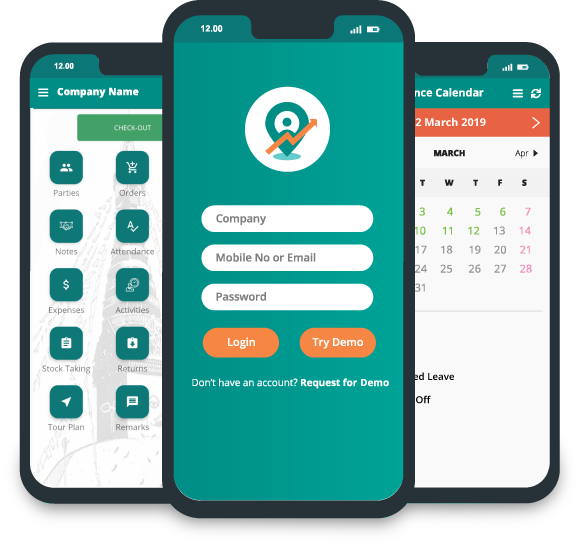

How Legacy SFA Apps Drain Field Batteries by Noon

It’s 2:00 PM, and your field sales rep has eight more retailers to visit. They are not looking to close orders; they are looking for a charging point because their phone battery is almost dead. GPS location services are disabled, battery saver mode is enabled, and the sales application can barely sync basic updates. To many sales managers, this looks like a lack of discipline or productivity. But the real problem often starts much earlier, with the Sales Force Automation (SFA) app itself.
A lot of legacy SFA platforms were built around feature-rich enterprise workflows, not the reality of field sales. They’re always on GPS. They’re always running resource-hungry background processes. They’re always syncing data over and over when there’s poor network coverage. These activities are very battery intensive, particularly on the mid-range Android devices that are common in the field sales team. Thus, what starts as a software performance problem soon becomes an operational one.
A dead phone can mean much more than a dead device when it dies before the end of the workday. Location services can be turned off by sales reps to save battery, attendance records will be incomplete, customer visits cannot be verified, and order updates will be delayed. Managers are losing visibility in real time of field operations, making it harder to measure productivity and improve beat compliance across territories.
The good news is that field sales doesn’t have to equal battery drain. This is largely an issue of software architecture. The modern, lightweight sales force automation solution is designed for efficiency in device resource usage, balancing accurate tracking with all-day performance. Today, the best field sales apps can deliver reliable tracking without draining the user’s device by optimizing GPS use, reducing background activity, and smartly syncing offline data.
In this blog we’ll explore what makes field sales app battery drain so common on legacy SFA platforms, the technical reasons for battery drain, and how a lightweight mobile architecture like Delta Sales App keeps your field teams powered, connected, and productive all day long.
The Compliance Battle: Why Reps Secretly Turn Off GPS Tracking
Low beat compliance is one of the most common pain points for sales managers. Daily reports showing missed retailer visits, incomplete routes, or gaps in location history make it easy to assume field reps are skipping stores or avoiding supervision. But in a lot of instances, it’s not a lack of accountability; it’s a phone that can’t survive the day.
-1784608716.png)
Field sales reps depend on their smartphones to do almost everything, from marking attendance and navigating routes to taking orders, collecting payments, and communicating with managers. As the battery drain of the field sales app gets out of control, it becomes more important to keep the device going until the last customer visit than to keep GPS turned on.
Many reps start making small adjustments throughout the day in an effort to conserve battery, such as:
- GPS disabled after marking attendance
- Turn on Battery Saver mode
- Lowering background activity for the sales app
- Close the app between customer visits
- Waiting to sync data until they find a charger or better network
The moves are generally practical responses to poor app performance, not conscious attempts to get around company policy. It’s natural that if an app is draining your battery in a matter of hours, you’ll want to find a way to stop it.
However, these workarounds have a ripple effect on field operations. Managers lose access to reliable, real-time field data if location services are disabled or background activity is restricted. It may not verify customer visits properly; attendance logs may become inconsistent, and route tracking may become less accurate. This increasingly makes it difficult to improve beat compliance over time as the data no longer reflects what happened in the field.
The issue also affects the accuracy of field team attendance app tracking. Many attendance systems rely on location verification to confirm that employees have checked in from the correct location. When GPS is disabled or restricted to save battery, attendance records may fail to sync properly or generate location mismatches, creating unnecessary confusion for both employees and managers.
Rather than assuming poor compliance is always caused by employee behavior, businesses should also evaluate whether their technology is contributing to the problem. A modern field force management system should be designed to collect accurate location and attendance data while using device resources efficiently. By reducing unnecessary GPS activity and optimizing background processes, organizations can maintain reliable field visibility without forcing sales representatives to choose between battery life and compliance.
The Anatomy of a Battery Hog: What Enterprise Software Gets Wrong
Not every sales force automation application is designed with mobility efficiency in mind. Many legacy enterprise platforms were designed for desktops and then retrofitted for smartphones. They have many features, but they often lack one key element, the limitations of the tools that field sales teams actually use.
Most field reps use mid-range Android smartphones that have enough processing power and battery capacity. Apps that run fine on a high-end device can be too resource-hungry on these phones, causing them to run slow, get hot, and drain the battery fast. Over time, these issues can impact user adoption, productivity, and overall success of an SFA implementation.
Here are the three biggest reasons legacy enterprise field sales apps are draining your battery.
-
Continuous GPS Pinging
GPS is one of the biggest power hogs on any smartphone. But many older SFA apps still ping for high-accuracy location updates every few seconds, regardless of whether the rep is on the task or not. Rather than collecting location data only when needed (e.g., during attendance, customer check-in, or order creation), these applications leave the GPS on all day. This constant communication between the app and the device's GPS hardware greatly increases battery consumption. The constant tracking of your location also adds additional stress on the processor, making the phone work harder even when the user is simply moving between customer locations. By noon, non-stop GPS generally translates into field reps looking for a charger, not closing sales.
-
Heavy Local Processing
Another common issue with legacy enterprise software is the amount of processing it performs directly on the smartphone. Many traditional SFA platforms handle large databases, generate reports, process business rules, and render complex user interfaces locally. Some also include unnecessary animations, background services, and multiple active modules running simultaneously. While these features may appear impressive, they place a heavy workload on the phone's CPU and memory. On budget and mid-range Android devices, this often results in slower response times, delayed screen loading, frequent app freezes, and excessive heat generation. As the device struggles to keep up with these demands, battery consumption increases even further. In severe cases, users may also experience the SFA app crashing, forcing them to restart the application repeatedly during their workday.
-
Constant Uncompressed Syncing
Data synchronization is another major contributor to battery drain when it's handled inefficiently. Many legacy SFA applications immediately upload every attendance record, customer visit, image, sales order, and activity log the moment it's created. In areas with weak or unstable mobile networks, these uploads frequently fail, causing the application to retry continuously. Each retry keeps the phone's cellular modem active, forcing it to consume additional power while searching for a stable connection. If the data being transmitted includes high-resolution images or large files without compression, the problem becomes even worse. The result is an application that consumes battery, not because the user is actively working, but because it's constantly attempting to communicate with the server. Over the course of a full working day, these unnecessary synchronization cycles significantly reduce battery life and negatively impact the overall user experience.
If you're evaluating SFA performance, also read Why App Speed is the Most Critical SFA Metric to understand why application responsiveness directly impacts field productivity.
The Danger of GPS Sync Errors in Poor Network Patches
Field sales rarely happens in places with perfect network coverage. Sales representatives frequently visit wholesale markets, rural distributors, construction sites, warehouses, and remote retail outlets where mobile signals are weak or inconsistent. A reliable Sales Force Automation (SFA) app should be able to handle these conditions without affecting the user's productivity or device performance.
Unfortunately, many legacy SFA applications are not built for unreliable networks.
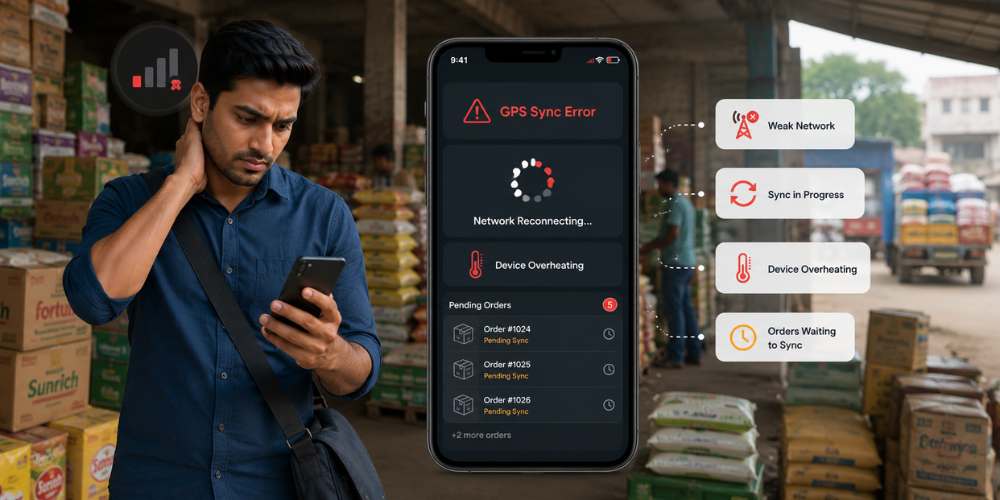
When connectivity drops, these apps often enter an endless cycle of trying to reconnect, verify GPS coordinates, and synchronize pending data. Instead of temporarily storing information and waiting for a stable connection, they repeatedly send the same requests to the server in the background.
-1784608716.png)
As a result, field representatives may encounter frequent GPS tracking error in sales app notifications even when they are physically present at the customer's location. These errors are often caused by unstable connectivity rather than inaccurate GPS data, but they can still interrupt normal field operations.
The impact goes far beyond a simple error message. Repeated GPS sync failures can lead to:
- Attendance check-ins that fail to register
- Customer visits that remain unverified
- Sales orders that don't sync immediately
- Duplicate records caused by repeated upload attempts
- Delayed activity logs and inaccurate reporting
- Frustration among field representatives who must repeat the same tasks
Over time, these issues affect both employee confidence and managerial visibility. Sales representatives become hesitant to rely on the app when they cannot trust it to record their work accurately. Some may postpone order creation until they return to an area with better connectivity, while others may stop using certain features altogether to avoid repeated errors.
For managers, the consequences are equally serious. Missing attendance records, incomplete visit histories, and delayed order updates make it difficult to monitor field performance in real time. Decisions regarding productivity, route efficiency, and improving beat plans are then based on incomplete or outdated information rather than actual field activity.
This is why robust offline order management capabilities have become essential for today's field sales teams. By allowing orders, customer visits, and activity records to be captured even without internet connectivity, businesses can maintain accurate records while eliminating unnecessary battery drain caused by constant synchronization attempts.
The Blueprint for a Lightweight SFA Mobile Architecture
Battery drain doesn't have to be a frustrating reality for field sales teams; it's often a sign of poorly designed software. Today’s Sales Force Automation (SFA) solutions are changing the game by being smarter about how they utilize the phone's GPS, processor, storage, and network capabilities. Rather than keeping all the hardware running all day long, they cleverly activate these resources only when necessary, ensuring that sales professionals can focus on their work without worrying about their battery life. A streamlined sales force automation architecture can truly transform the experience for field teams.
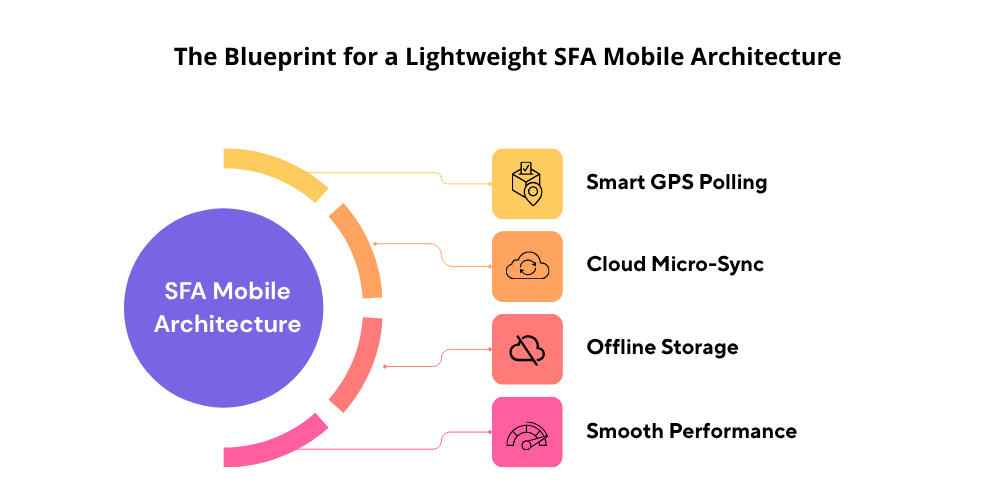
The Delta Sales App is designed with a focus on mobile usability, ensuring that speed, reliability, and battery efficiency are at the forefront, all while keeping the essential features that field teams depend on daily. By minimizing unnecessary background processes and enhancing the way data is handled and synchronized, the app provides reliable performance on both high-end and budget-friendly Android devices.
Here are the core design principles that support battery longevity while ensuring full visibility for field operations.
Smart Location Polling Instead of Continuous GPS Tracking
One of the biggest contributors to battery drain is keeping GPS active throughout the day. Rather than requesting high-accuracy location updates every few seconds, Delta Sales App uses intelligent location polling. The app captures GPS data only when meaningful business activities such as marking attendance and leave, checking in at a retailer or distributor, visiting a customer, creating a sales order, or completing your route occur.
By gathering location data only when it’s genuinely useful for your work, the app helps save battery life while still providing managers with valuable insights into field activities. This thoughtful method also enhances the accuracy of attendance tracking, ensuring that your presence and customer visits are confirmed without constantly draining your device's battery.
Background Micro-Syncs for Efficient Data Transfer
Ensuring that data syncs seamlessly is crucial for field sales, but it shouldn't drain your battery. The Delta Sales App takes a smarter approach by securely storing your information on the device when the network is weak or unavailable. Once a reliable connection is back, the app quietly performs small background syncs, sending only the essential compressed data to the server. This thoughtful method brings several benefits:
-
Saves battery life
-
Minimizes mobile data usage
-
Speeds up synchronization
-
Enhances performance in areas with poor network
-
Reduces sync errors
-
Boosts overall app responsiveness
Most importantly, field representatives can continue working without being interrupted by repeated sync attempts or connection errors.

Optimized Native Performance for Android Devices
Many enterprise applications can bog down smartphones with excessive processing, heavy background tasks, and complex user interfaces. The Delta Sales App takes a different approach by ensuring the application remains lightweight and tailored for the devices that field sales teams rely on. Its user-friendly architecture is designed to use less CPU and memory, leading to:
-
Quicker app launch times
-
Effortless navigation between screens
-
Reduced memory usage
-
Less device overheating
-
Extended battery life
-
Reliable performance throughout the day
This thoughtful design also minimizes the chances of the SFA app crashing, enabling sales representatives to concentrate on engaging with customers rather than dealing with software glitches.
Built for Real-World Field Conditions
Field sales professionals don't always have access to fast internet, charging points, or high-end smartphones. Their software must be able to perform reliably in challenging environments without compromising productivity. Delta Sales App is designed to support real-world field operations by combining intelligent GPS usage, offline functionality, efficient synchronization, and optimized mobile performance. Whether a representative is visiting urban retailers, remote distributors, or rural markets, the app continues to perform efficiently while preserving battery life. By integrating features such as beat planning, GPS-based employee location tracking field sales tracking, and offline order management, businesses gain complete visibility into field operations without placing unnecessary strain on employees' devices. The result is a sales force automation solution that not only improves operational efficiency but also ensures field representatives stay connected, productive, and powered throughout the entire workday.
Conclusion
Legacy SFA platforms often rely on continuous GPS tracking, resource-intensive background processes, and inefficient data synchronization. While these approaches may seem effective on paper, they can quickly lead to excessive field sales app battery drain, poor user experience, and reduced field visibility. Over time, this impacts attendance accuracy, order collection, route tracking, and improving beat compliance, making it harder for managers to make informed decisions.
Modern businesses need a sales force automation (SFA) solution that genuinely grasps the challenges of fieldwork. An effective SFA platform should intuitively handle GPS functionality, support offline access, improve background syncing, and deliver reliable performance, even on cost-effective Android devices. By recognizing the constraints of field hardware, sales representatives can focus on what truly counts, building meaningful customer relationships and increasing their sales. The Delta Sales App embodies this mobile-first approach. By integrating intelligent location polling, effective offline synchronization, sales team performance and strong field tracking features, it empowers businesses to maintain full operational visibility without compromising battery life or user satisfaction.
Are you tired of losing sight of your field operations halfway through the day? Transition to an SFA designed for all-day field efficiency.
Book a free demo today and discover a faster, lighter, and more dependable field sales automation experience.


-1784524399-resized320.png)