7 Proven Strategies to Manage Multiple Sales Clients Simultaneously

Managing multiple sales clients at the same time is no easy feat. Sales professionals often find themselves juggling various client demands, deadlines, follow-ups, and meetings all while trying to close deals effectively. The good news? With the right strategies and tools, it’s possible to stay organized, productive, and keep your clients happy without feeling overwhelmed.
In this blog, we’ll explore 7 proven strategies that salespeople can use to manage multiple clients simultaneously. Along the way, we'll also touch on essential tools every salesperson needs to manage multiple accounts to streamline workflows and increase sales efficiency.
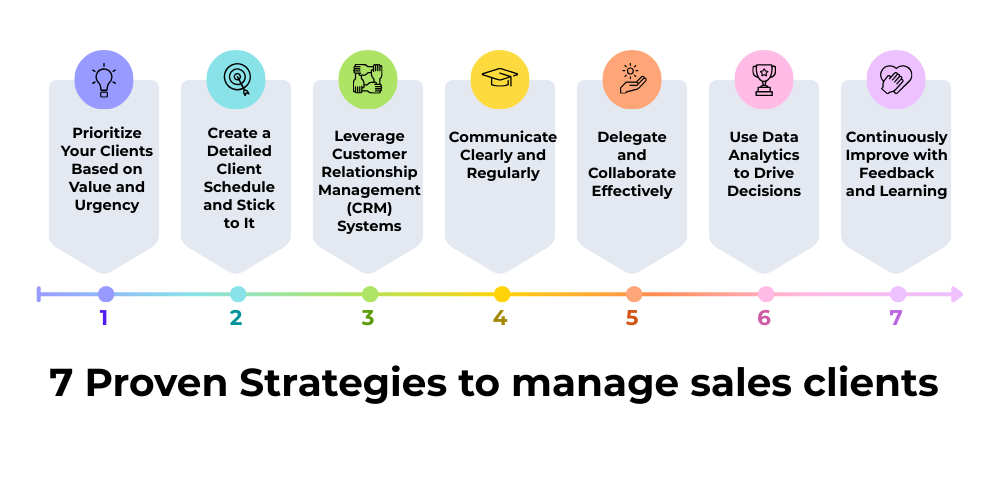
7 Proven Strategies To Manage Sales Clients
-
Prioritize Your Clients Based on Value and Urgency
Not all clients have the same level of urgency or potential revenue impact. To manage multiple clients effectively, start by prioritizing your clients. Rank them according to their purchase potential, current deal stage, and deadlines.
Using this strategy, you’ll know which clients require immediate attention and which ones can be nurtured over time. This prioritization helps prevent last-minute rushes and missed opportunities.
Implement a smart client management system that lets you tag clients by priority, ensuring high-value prospects get your attention first.
-
Create a Detailed Client Schedule and Stick to It
With multiple clients to handle, a chaotic calendar can lead to missed meetings and deadlines. Developing a structured schedule that allocates specific times for client calls, follow-ups, and administrative tasks is essential.
Time-blocking your day will help you maintain a balance between clients and prevent overbooking. Make sure your schedule includes buffer time to handle unexpected client needs or urgent issues.
Use a sales activity tracking tool to sync your calendar and get reminders for upcoming client engagements.
-
Leverage Customer Relationship Management (CRM) Systems
Keeping track of client information, communication history, and sales progress manually is inefficient and prone to error. This is where CRM systems become invaluable.
CRMs help you organize client data, track interactions, and automate routine follow-ups. When managing multiple clients, having a centralized platform to access real-time data about each account enables faster decision-making and more personalized communication.
Integrating a mobile sales tool ensures you have client info on the go, making field visits and remote meetings more productive.
-
Communicate Clearly and Regularly
Transparent and consistent communication builds trust and keeps clients engaged throughout the sales cycle. Make it a habit to provide regular updates, answer queries promptly, and set clear expectations about timelines.
Personalizing communication for each client shows you value their business and understand their unique needs. Use email templates for efficiency but customize them enough to feel genuine.
Adopt automated sales communication platforms to schedule follow-up emails and reminders without losing the personal touch.
-
Delegate and Collaborate Effectively
Handling multiple clients alone can be overwhelming. If you’re part of a sales team, leverage teamwork by delegating tasks such as research, initial outreach, or follow-ups.
Collaboration tools enable seamless sharing of client insights, meeting notes, and action items across the team. This way, you provide a cohesive client experience even if multiple team members interact with the same account.
Using a team collaboration platform within your sales process ensures everyone stays aligned and clients receive timely responses.

-
Use Data Analytics to Drive Decisions
With several clients in your pipeline, it’s easy to lose track of which deals are progressing and which are stalling. Data analytics tools help you monitor sales performance, forecast revenues, and identify bottlenecks.
Analyzing client behaviors and sales metrics allows you to adjust strategies quickly and focus efforts where they matter most.
Access to real-time sales dashboards is crucial to stay ahead and allocate resources efficiently among multiple accounts.
-
Continuously Improve with Feedback and Learning
Managing multiple clients is a dynamic challenge, and there’s always room for improvement. Regularly seek feedback from clients and your sales team to identify what’s working and where gaps exist.
Invest time in training and learning new sales techniques to sharpen your multitasking skills and client management abilities.
Engage with sales enablement tools that provide training modules, best practices, and performance tracking for ongoing development.
Essential Tools Every Salesperson Needs to Manage Multiple Accounts
Managing multiple clients is much easier when you have the right technology stack supporting your efforts. Here are some essential tools every salesperson should consider:
-
Contact Management Systems: These systems help salespeople store, organize, and quickly retrieve client information, ensuring easy access to contact details and communication history for efficient client management.
-
Automated Email Platforms: They enable sending personalized, timely emails at scale, automating follow-ups and nurturing campaigns to maintain engagement without manually drafting every message.
-
Scheduling Software: Scheduling tools prevent double bookings and missed meetings by managing your calendar efficiently, allowing you to allocate dedicated time slots for each client interaction.
-
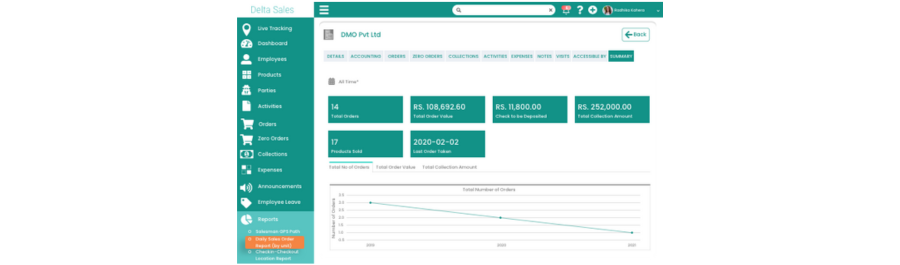
Sales Analytics Dashboards: These dashboards provide real-time insights into key sales metrics, helping forecast revenue, monitor pipeline health, and make data-driven decisions for better sales performance.
-
Mobile Sales Apps: Mobile apps allow sales reps to access client data, update records, and manage tasks anytime, anywhere, boosting productivity and responsiveness during fieldwork or remote meetings.
-
Collaboration Tools: Collaboration platforms enable seamless communication and information sharing among team members, ensuring everyone stays aligned and clients receive consistent, timely support.
-
Training and Enablement Platforms: These platforms offer ongoing education, sales techniques, and best practices, helping salespeople continuously improve skills and adapt to changing market dynamics.
These tools, combined with the strategies above, create a powerful approach to juggling multiple sales clients without losing momentum or quality.
Conclusion
Effectively managing multiple sales clients simultaneously is both a challenge and an opportunity. By prioritizing clients, scheduling carefully, leveraging CRM and automation tools, maintaining clear communication, and continuously learning, sales professionals can improve productivity and grow their accounts successfully. For sales teams seeking an edge, integrating modern mobile sales management tools and analytics platforms can revolutionize how multiple accounts are handled. These solutions streamline workflows, and enable smarter decision-making.
To unlock the full potential of managing multiple clients with ease and efficiency, explore how Delta Sales App supports sales professionals through advanced client management features, automation capabilities, and seamless team collaboration. Discover how this tool can empower your sales process and help you thrive even when juggling numerous accounts.
Ready to elevate your sales management? Request a Demo Today and see how smart sales technology can transform your client management strategy.