
Order-Taking, Attendance, or Route Planning: What Should You Automate First? A Prioritization Framework for Distributors
-1785645604.png)
Imagine investing in a new sales automation platform only to find that, a few weeks later, your field team is barely using it. Orders are still being taken over WhatsApp, attendance is recorded manually, and sales representatives continue following their old routes. Instead of improving productivity, the software becomes another system employees try to avoid. This is a common challenge for distributors beginning their digital transformation journey. The problem is rarely the software itself. More often, it's the implementation strategy.
Successful distributors often take a more thoughtful approach to digital transformation. Rather than attempting to digitize every single workflow from the get-go, they focus on pinpointing the process that is causing the most significant operational delays and tackle that first. Once their teams feel at ease with the new system, they can gradually roll out additional features, making the transition smoother and more effective.
So, where should you begin? Should you focus on streamlining order-taking to cut down on fulfillment delays? Is it more crucial to enhance attendance tracking since managers struggle to see what's happening in the field? Or could optimizing beat and route planning yield the most substantial benefits by boosting market coverage and salesperson efficiency?
The right starting point truly hinges on your unique business challenges. In this blog, we’ll guide you through a practical framework for prioritizing which workflow to automate first. You’ll also discover key indicators to watch for and the potential business impacts of each workflow.
Why "Automate Everything at Once" Usually Fails
As businesses embark on the journey of implementing sales force automation software, it's completely understandable to seek quick outcomes. Many distributors believe that by activating all the features available, from managing orders and tracking attendance to planning routes, reporting expenses, and handling claims, they can accelerate their digital transformation.
However, implementing every workflow at once often has the opposite effect. Rather than trying to automate everything at once, successful distributors focus on one high-impact workflow first. Once their teams become comfortable with that process, they gradually expand automation across other business functions.
Here are the main reasons why an all-at-once implementation usually fails.
-1785645603.png)
1. Change Fatigue Slows User Adoption
Adopting new digital processes can be a significant adjustment for employees. When sales representatives are suddenly asked to record attendance, take orders digitally, follow set routes, submit expenses, and complete reports using a mobile app, it can feel like a lot to take in all at once.
Rather than welcoming the new system, many employees may feel overwhelmed and choose to stick with what they know, like using notebooks, spreadsheets, or even messaging apps like WhatsApp. This struggle, often referred to as change fatigue, is a major factor in why software implementations can fall short.
2. Low Adoption Leads to Incomplete and Unreliable Data
For automation to truly benefit the organization, everyone must use the software consistently. When some team members log attendance digitally while others stick to paper registers, or if only a fraction of orders are entered into the system, it creates gaps in understanding how the field operations are performing.
These gaps in data can lead to challenges such as:
-
Accurately measure sales performance
-
Keeping track of retailer visits
-
Monitoring how productive employees are
-
Predicting inventory needs
-
Make well-informed business decisions
3. Training Becomes More Difficult Than Necessary
Each module within field sales automation software has its own workflow, features, and best practices. Teaching employees to use several modules simultaneously often increases training time and creates unnecessary confusion. Instead of understanding how each feature improves their daily work, employees spend most of their time trying to remember different screens and processes.
4. It Becomes Difficult to Measure Success
When all processes shift simultaneously, it becomes challenging to pinpoint what truly enhances business performance. For instance, if order accuracy goes up but attendance compliance drops, or if retailer coverage improves while user adoption declines, managers might find it difficult to discern which module is yielding positive results and which requires more focus. By rolling out automation gradually, businesses can observe the effects of each workflow on its own, assess ROI with greater precision, and make thoughtful decisions before moving on to additional modules.
A 4-Question Framework to Identify Your Highest-Cost Manual Process
Every distributor has unique operational challenges. For one company, delays in order processing might be hurting sales. For another, the main concern could be a lack of visibility for the field team or inconsistent market coverage. This is why there isn't a one-size-fits-all solution for which workflow to automate first. Rather than relying on assumptions, take a closer look at your current processes by asking the four questions below. These questions will guide you in pinpointing which manual workflow is costing your business the most in terms of revenue, productivity, and operational efficiency. Focus on automating the process that has the greatest overall impact first.
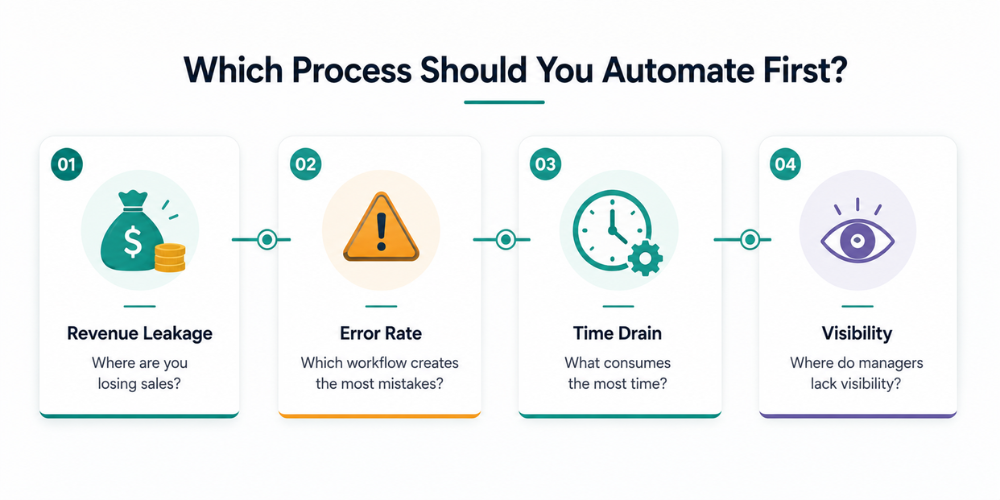
1. Where Is Revenue Leakage Happening?
The initial inquiry to consider is, "What manual process is impacting our sales and profitability the most?"
Revenue leakage can happen when operational hiccups hinder your business from realizing its complete sales potential. While these challenges may appear minor on their own, they can accumulate over time, leading to missed orders, delayed deliveries, unhappy retailers, and ultimately, lost customers.
Consider these important questions:
-
Are your orders taking longer to process because they rely on manual collection?
-
Are your sales representatives losing valuable chances to connect with retailers?
-
Are mistakes in orders causing returns or delivery complications?
-
Are retailers turning to competitors due to unreliable service?
If you find yourself answering yes to any of these, it might be time to prioritize automating your order management process. By moving away from manual order collection, you can ensure that orders arrive at your office without delay, minimize processing times, and enhance the overall satisfaction of your customers.
2. Which Process Has the Highest Error Rate?
Human involvement in processes often leads to errors. Tasks like jotting down orders on paper, keeping attendance logs, or manually scheduling daily routes can introduce mistakes at every step.
Some frequent issues include:
-
Incorrect product quantities
-
Duplicate order entries
-
Miscalculations in pricing or discounts
-
Missing retailer details
-
Attendance inconsistencies
-
Overlooked customer visits
These mistakes not only waste time but also add extra burdens on sales teams, warehouse personnel, and managers, ultimately impacting the customer experience.
If your team finds itself spending more time fixing errors than engaging in sales, it’s a clear sign that automating the workflow should be a priority.
3. Which Activity Consumes the Most Time?
Many manual tasks may not seem to directly impact revenue, yet they play a crucial role in enhancing productivity. Each hour dedicated to repetitive administrative duties is an hour that could have been spent engaging with more retailers, securing additional orders, or nurturing customer relationships.
Reflect on how much time your team invests daily in tasks like:
-
Manually tracking attendance
-
Gathering orders from phone calls or WhatsApp
-
Organizing daily sales routes
-
Compiling end-of-day reports
-
Reaching out to representatives for updates
If a particular process takes up several hours each week across your sales team, automating it can lead to immediate boosts in productivity. Often, the time saved creates a positive ripple effect throughout the entire distribution operation, empowering teams to achieve more without the need for additional staff.
4. Where Do You Have the Least Visibility and Control?
One of the significant challenges of manual operations is the limited visibility into real-time activities. Managers often find themselves depending on phone calls, spreadsheets, or verbal updates to grasp the situation in the field.
Consider these questions:
-
Are you aware of who is currently active in the market?
-
Do you know which retailers your team visited today?
-
Can you quickly spot areas that haven't been covered?
-
Do you have immediate access to field activities and sales information?
If your answer is no, enhancing visibility should be a key focus. By automating processes like attendance tracking or route planning, managers can gain real-time insights into field operations, leading to quicker decisions and improved accountability.
Workflow-by-Workflow Diagnostic: What Should You Automate First?
Understanding your operational challenges is the first step toward improvement. Now, it’s essential to align those challenges with the appropriate workflow. Every distributor stands to gain from comprehensive field sales automation software, but the sequence in which you roll out each module can greatly influence user acceptance, operational effectiveness, and your overall return on investment.
Begin with the workflow that addresses your most pressing business issue. Whether you're facing delays in order processing, a lack of visibility into field activities, or inconsistent coverage of retailers, selecting the right starting point allows you to achieve quick wins and create momentum for future automation efforts.
Let’s explore the following diagnostic to identify which workflow should be your top priority:
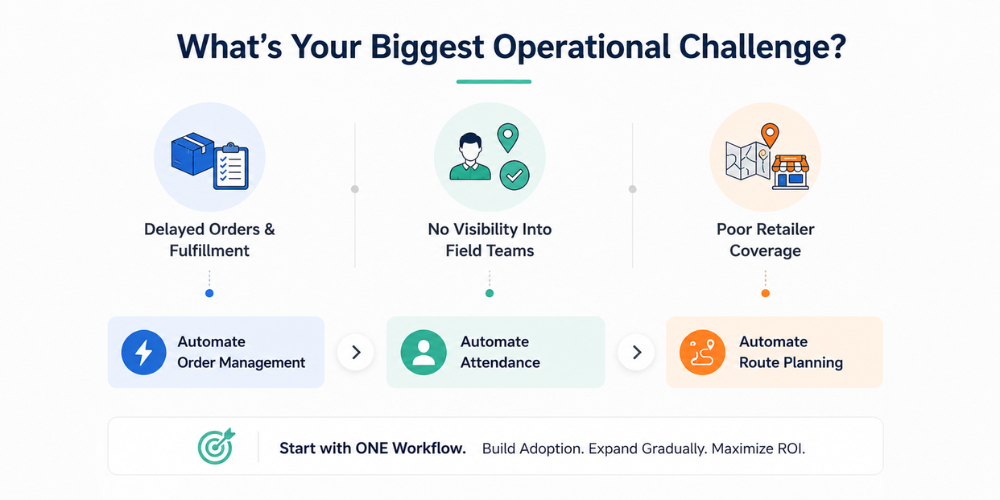
1. Automate Order-Taking First If Fulfillment Delays Are Hurting Sales
For many distributors, the sales process can feel overwhelming, often stumbling before products even reach the customer. Orders are typically gathered through various informal methods like notebooks, phone calls, WhatsApp messages, or spreadsheets, which are then manually entered into another system. Each of these manual steps adds the risk of delays and mistakes.
If your sales team often faces challenges such as:
-
Orders arriving at the office long after they were taken
-
Incorrect quantities or pricing on products
-
Duplicate or missing orders causing confusion
-
Invoicing and dispatch taking longer than expected
-
The back-office team frequently needing to correct orders
-
Retailers expressing frustration due to fulfillment errors
Then prioritizing the automation of order-taking is essential for your success.
By adopting a digital order management system, sales representatives can easily take retailer orders right from the field using a mobile app. This means that orders are quickly synced with the office, which cuts down on manual entry, enhances order accuracy, and accelerates the fulfillment process.
Consider prioritizing order-taking automation if:
-
You're losing revenue due to delays in order processing.
-
Frequent errors arise from manual order entry.
-
Sales representatives find themselves spending more time writing orders than actually selling.
-
Warehouse and billing teams are bogged down correcting order mistakes for hours.
When the order collection process becomes quicker and more precise, businesses often notice immediate boosts in customer satisfaction and overall operational efficiency.
2. Automate Attendance First If You Lack Visibility Into Your Field Team
A lot of distributors face challenges not because of sales issues, but due to a lack of visibility. Managers frequently find it tough to respond to straightforward yet crucial questions:
-
Did all sales representatives show up for work today?
-
Are they making their rounds to the retailers they’re assigned to?
-
How much time are they actually spending productively in the market?
-
Which areas are still without coverage?
Without reliable attendance and location data, it's difficult to evaluate productivity or ensure accountability. If your business relies on manual attendance registers, phone calls, or end-of-day updates, it's time to automate your attendance & leave management process. A modern attendance management system can provide the following:
-
Attendance monitoring through location-based services
-
Geo-tagged check-ins and check-outs for accountability
-
Selfie verification to enhance trustworthiness
-
Instant visibility into the activities of field staff
-
Detailed insights on attendance and leave for better management
3. Automate Route Planning First If Market Coverage Is Inconsistent
Sales representatives, no matter how driven, struggle to reach their full potential without a clear plan in place. When territories are poorly allocated and retailer visits are unplanned, market coverage becomes inconsistent. Some retailers may enjoy frequent visits, while others are left with little to no attention. Additionally, sales reps often find themselves spending too much time on the road instead of engaging with customers. These challenges can lead to:
-
Lost sales opportunities
-
Increased travel expenses
-
Lower daily productivity
-
Imbalanced workloads across different territories
-
Fluctuating relationships with retailers
If this resonates with your experience, it’s time to consider a beat plan solution. A digital beat planning system can empower businesses to
-
Develop organized daily and weekly visit schedules
-
Ensure territories are balanced
-
Streamline travel routes
-
Enhance retailer coverage
-
Track visit completions in real time
4. Claims and Returns Are Usually a Phase Two Priority
Managing product returns, damaged goods, and retailer claims is an important part of distribution operations. However, these workflows depend on accurate data from your field sales processes. If order-taking, attendance, and retailer visits are still being managed manually, digitizing claims first will have a limited impact because the underlying operational data is incomplete. That's why most distributors introduce claims and returns after establishing their core field workflows.
As your sales team becomes adept at utilizing digital tools for managing orders, tracking attendance, and executing their routes, you can enhance automation with a distributor management software solution to simplify:
-
Handling product return requests
-
Managing damage and expiry claims
-
Overseeing credit note processes
-
Streamlining distributor workflows
-
Optimizing secondary sales operations
This gradual approach allows each new feature to be developed based on trustworthy, real-time data from the field, ultimately making the distribution process more precise and effective.
A Simple Phased Rollout Timeline
Once you've pinpointed the workflow that requires urgent attention, the next step is to consider the best way to implement it. Many distributors believe that after investing in sales force automation software, they should quickly roll out every module throughout the organization. While this approach may appear efficient, it often leads to unnecessary complications for both managers and field teams. A more sensible strategy is to adopt a phased rollout. By introducing one workflow at a time, employees can gradually familiarize themselves with new processes, managers gain access to more accurate data, and the business can start experiencing measurable improvements sooner. Rather than disrupting daily operations, automation seamlessly integrates into the team's routine.
Here’s a glimpse of what a typical phased rollout entails.
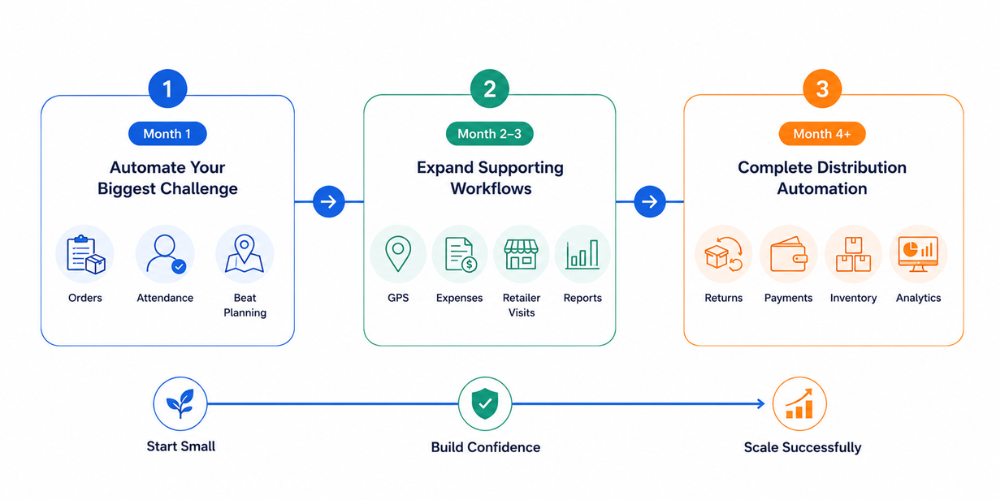
Month 1: Focus on Your Biggest Operational Challenge
Use the first month to focus on the one issue that’s most affecting your business. In the above framework, this could be order taking, attendance tracking or beat planning.
If you have customer satisfaction issues because of delayed and inaccurate orders, then order management has to be your first priority. Attendance & leave management could be more useful if managers struggle to know if field reps are really visiting retailers. Similarly, if poor market coverage and inefficient travel are limiting sales, it is better to start with a beat plan.
During this phase, success shouldn't be measured by the number of features activated. Instead, the goal is to ensure that every user understands the new workflow and uses it consistently. Providing proper training, collecting feedback from field teams, and resolving early challenges are far more important than expanding into additional modules. When employees become comfortable with one workflow, they're much more likely to embrace future automation initiatives.
Month 2–3: Expand Into Supporting Workflows
As your team becomes comfortable with the initial workflow, it's time to explore additional modules that can enhance your operations. For example, a distributor who starts with digital order-taking might find it beneficial to incorporate attendance tracking next. This addition not only provides insights into the number of orders being processed but also sheds light on who is actively engaging in the market and their productivity levels. Similarly, companies that kick off with attendance management often see great value in integrating beat planning, which helps managers link employee presence to actual retailer coverage.
At this point, your teams are already acquainted with the application, making it much easier for them to learn new workflows. The organization starts to recognize how different modules can work in harmony, leading to improved visibility throughout the entire sales process. Instead of juggling multiple tools for various tasks, employees can smoothly transition to a unified platform that streamlines their daily activities.
Month 4 and Beyond: Build a Complete Digital Distribution System
After your core field operations are running smoothly, your business is ready to expand beyond basic sales activities and digitize the wider distribution process.
This is the ideal time to introduce advanced capabilities such as claims and returns management, payment collection, distributor performance tracking, inventory visibility, and detailed sales analytics. Because your field teams are already capturing accurate data through digital orders, attendance, and beat execution, these additional modules become far more valuable and easier to implement.
Instead of managing disconnected processes, you now have a unified system that provides end-to-end visibility into your distribution operations. Managers can monitor field performance, identify operational bottlenecks and make faster, data-driven decisions without relying on spreadsheets or manual reports.
How Delta Sales App Makes Phased Automation Easy
Each distributor’s digital transformation journey is different. One business may have a problem with order processing delays; another may be looking for better visibility into its field sales team or improved retailer coverage. That's why a one-size-fits-all implementation rarely works best.

Delta Sales App is built to be flexible so distributors can automate the workflows that matter most without disturbing existing operations. The platform allows for phased rollouts, so companies don’t have to do everything at once; teams can adopt one module, get comfortable with it, and then gradually ramp up automation on other processes. For example, begin by deploying order management to remove manual order entry and accelerate order processing. If you have issues with managing field teams, begin with Attendance & Leave Management and gain real-time visibility into employee attendance and productivity. Businesses looking to increase market coverage can start by implementing a beat plan to create structured visit schedules and improve sales routes.
As you and your team grow more familiar with the platform, you can automate other workflows, such as distributor operations, claims and returns management, payment collection, inventory tracking, expense reporting, and performance analytics via the Distributor Management Software module. This modular approach reduces implementation risks, drives up user adoption, and ensures your business receives real value throughout the rollout. Whether you’re starting your digital transformation journey or replacing disconnected manual processes with a unified field sales automation software, Delta Sales App grows with your business and aligns to your operational priorities.
To see how the platform works in practice, explore How It Works. If you're planning a rollout across your sales team, visit the Training page to learn how Delta Sales App helps users adopt new workflows quickly and confidently. You can also read DMS vs. SFA: Why Growing Businesses Need Both to understand how combining Sales Force Automation and Distributor Management creates a more connected and efficient distribution ecosystem.
Conclusion
Finding the right starting point for automating processes like order-taking, attendance, or route planning isn't straightforward. It really hinges on identifying which part of your operation is causing the most frustration. If your customers are feeling the pinch from slow or incorrect orders, it makes sense to tackle order management first. On the other hand, if you’re struggling to keep tabs on your field sales team, then attendance tracking should be your priority. And if your sales growth is stunted by inconsistent retailer coverage, focusing on beat and route planning is the way to go. The goal isn’t to automate everything all at once; rather, it’s about choosing the right workflow to automate first. Taking a phased approach helps minimize risks during implementation, encourages user adoption, and allows your team to gradually adjust while seeing tangible results along the way.
With Delta Sales App, you don’t need to completely transform your operations in one go. You can kick things off with the module that tackles your most urgent issue and then expand as your business evolves, building a distribution system that’s both scalable and efficient without throwing your daily operations into chaos.
Are you ready to take the leap into digital transformation? Schedule a free demo with Delta Sales App and see how a well-planned automation strategy can help you streamline your field operations, boost sales productivity, and confidently grow your distribution business.