
Will Location Tracking Kill Your Phone's Battery? Facts, Myths & Tips for Field Sales Teams
For a field sales rep, a phone is more than a communication tool. It is the tool used to check in at stores, do daily routes, take orders, update customer information, check sales data, and stay connected with managers.
That makes battery life a real concern. A sales rep may start the day with a fully charged phone, visit dozens of customers, travel across a city, use mobile data, take photos, make calls, and rely on a field sales tracking app throughout the day. Naturally, the question comes up:
Will the location tracking run the battery down so fast that the phone will die before the sales route is finished? To summarize: location tracking does eat up your battery, but that doesn’t mean your phone will be dead by lunchtime.
In reality, this depends on how often the app asks for your location, what location technologies it uses, how it handles background activity, network conditions, phone settings, and if the app is properly optimized. Both Android and Apple offer developers ways to reduce the energy impact of location services. Android recommends specific update intervals, batching, timeouts, and avoiding unnecessary location requests. Apple recommends choosing the most power-efficient location service that meets the needs of the application.
So let’s cut through the myths and facts before field teams start blaming GPS for every percentage point of battery loss.
The Big Myth: Does Location Tracking Really Drain Your Battery?
What People Believe (The Myth)
The prevailing notion is straightforward: GPS enabled = constant battery drain. This belief is understandable. Tracking location necessitates the phone to ascertain its position, and GPS is frequently linked to significant battery usage. This concern amplifies for field sales teams, as a GPS-based tracking app may need to oversee movements throughout the workday. However, the phone doesn't always operate GPS at peak capacity every moment. Contemporary smartphones can leverage a mix of technologies, such as GPS/GNSS, Wi-Fi, cellular networks, sensors, and system-level location services. The operating system can also assess when location updates are essential and how often they should be provided.
-1787201848.png)
What Actually Happens (The Fact)
Location tracking does use battery power, but the extent varies widely. Key factors include:
-
The frequency of location update requests by the app
-
The required accuracy of those updates
-
Whether the app unnecessarily continues to request location
-
The processing load after each location update
-
Concurrent use of mobile data, navigation, camera, or other resource-intensive features
-
Network conditions and environmental factors
-
The optimization level of the application
For instance, Android suggests implementing appropriate update intervals, batching background requests when suitable, and ceasing location updates when they are no longer necessary. Similarly, Apple indicates that high-precision location services can drain more power and advises reducing the frequency of updates when feasible. Thus, the crucial question isn't merely "Is GPS activated?" but rather, "How effectively is location being requested, processed, and utilized?"
Myths vs. Facts: Breaking 6 Common Battery Drain Myths
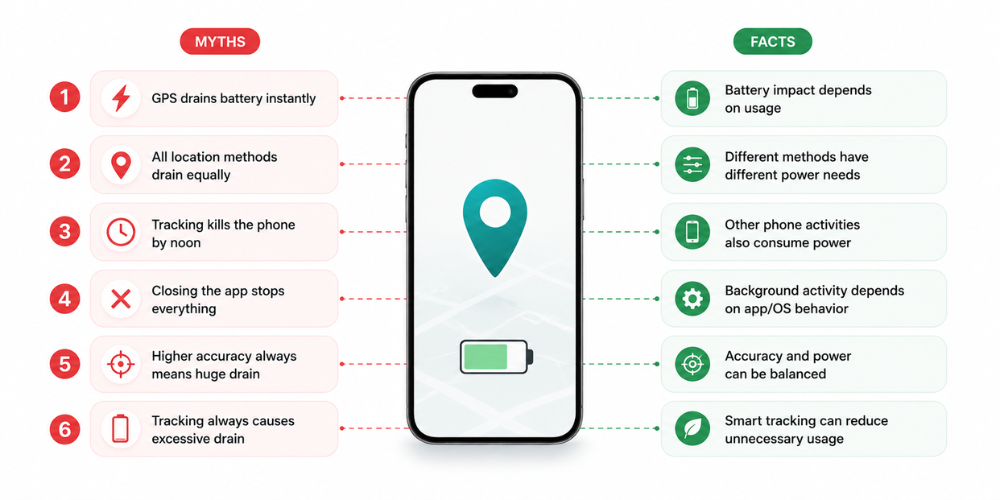
Location tracking often gets a bad rap for draining smartphone batteries, but this view can be overly simplistic. The truth is, how much battery is used hinges on various factors, including how often the app requests location updates, the precision needed for those updates, background activities, network conditions, and the app's optimization. To better understand this, let's explore six prevalent myths about battery drain and uncover what really occurs when field sales teams rely on location tracking during their daily routines.
Myth 1: GPS Tracking Drains Battery Instantly
GPS tracking does consume some battery power, but it won't drain your phone instantly. Smartphones can gather location data from various sources. For instance, Android devices can utilize Wi-Fi and GPS, while Apple's Core Location framework smartly chooses services based on what the app needs. The effect on battery life largely depends on how frequently the location is requested and how the app utilizes that information. For example, an app that asks for location updates every few seconds throughout a workday will have a much heavier battery impact compared to one that requests updates at more reasonable intervals. While GPS tracking does use power, the idea that "GPS equals instant battery death" is simply not true.
Myth 2: All Location Methods Drain Battery the Same Way
Different location methods come with varying energy needs. For instance, Apple's guidelines highlight that standard location services tend to use more power compared to more efficient options like significant-change location monitoring. Similarly, Android offers developers different location request choices that help strike a balance between accuracy and battery usage. Their documentation points out that high-accuracy location requests can consume more power than less intensive methods. This indicates that an app doesn't always have to rely on the most demanding location method. In the context of field sales tracking, the goal is typically not to provide turn-by-turn navigation. Instead, the app should gather sufficient location data to track movement, monitor route progress, log customer visits, and monitor field activities. It's important to note that location tracking isn't just one energy-draining process; the chosen method and its configuration play a significant role.
Myth 3: All-Day Tracking Will Kill Your Phone by Noon
All-day location tracking may use extra battery, but it doesn't mean a phone will be rendered useless by midday. Consider the various activities occurring on a field representative's device. Throughout a standard sales route, the phone might also be:
-
Using mobile data
-
Making phone calls
-
Running messaging applications
-
Taking retailer or visit photos
-
Displaying the screen frequently
-
Using navigation
-
Syncing sales information
-
Running multiple background applications
Google advises against extended GPS usage, lengthy navigation, video streaming, and other power-intensive activities to help prolong Android battery life. Focusing solely on location tracking may mislead field teams. Battery drain accumulates over time, and while location tracking contributes, it is not the sole or primary factor.
Myth 4: Closing the App Stops Battery Drain
Closing an app doesn't guarantee that all location-related activities cease immediately. This behavior varies based on the operating system, app design, permissions, and whether the app has valid reasons for background location access. Android differentiates between foreground and background location permissions, with specific mechanisms for apps that require background access. Additionally, poorly designed apps may continue to request location data unnecessarily. Android highlights that failing to stop unnecessary location updates is a frequent cause of battery drain. Instead of frequently force-closing apps, a more effective approach is to manage background activities properly and set sensible app permissions.
Myth 5: Higher Accuracy Always Means Higher Drain
The connection between accuracy and power consumption is nuanced; it's not just a matter of "higher accuracy always leads to significant battery drain." Achieving greater precision often demands more energy. Android's location APIs offer various quality settings that balance power use and accuracy. The key consideration is whether a business truly requires top-notch precision at all times. For instance, a field sales management app might need just enough location data to confirm customer visits and track a sales rep's route. This doesn't mean it needs the same level of continuous precision as a navigation app. The ideal tracking setup delivers adequate accuracy for the business's needs while minimizing unnecessary location requests.
Myth 6: Battery Drain Is Unavoidable With Tracking Apps
Battery usage is a natural part of using location services on a phone, but it doesn't have to lead to significant battery drain. Developers can minimize unnecessary location requests by adjusting how often updates occur, selecting the right location services, halting requests when they're no longer needed, and grouping updates when appropriate. Android suggests these strategies to enhance battery life while using location features. This is particularly crucial for field sales teams, as a thoughtfully designed sales force automation tool should prioritize battery efficiency as a key aspect of the user experience, rather than relying on sales representatives to always have a charger on hand.
What Actually Causes Battery Drain (Beyond the Myths)
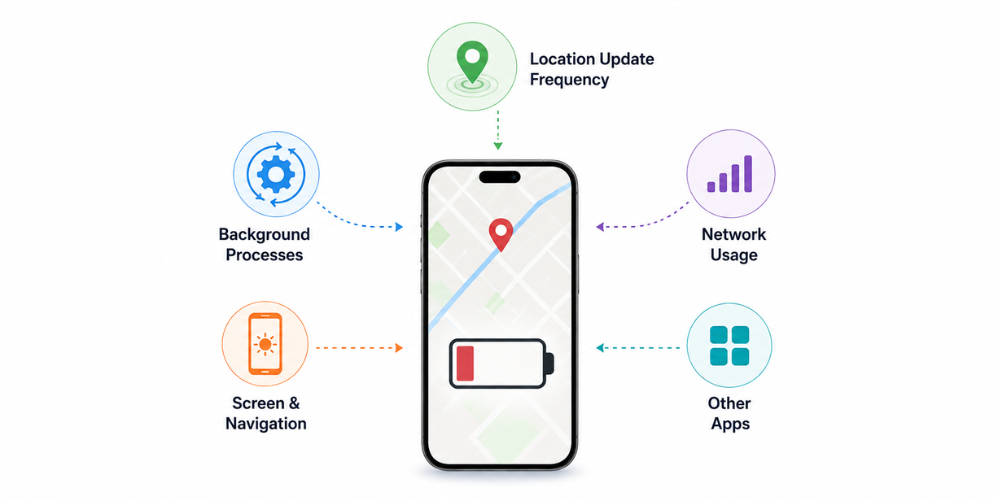
Although location tracking does consume some battery power, it's not usually the sole reason for battery drain on a field sales representative's phone. Several factors come into play, such as how often an app checks for location, the amount of background work it does, the state of the network, how much the screen is used, and other apps running at the same time. By recognizing these elements, field teams can find ways to cut down on unnecessary battery usage while still enjoying the advantages of GPS tracking and field sales automation.
1. Ping Frequency & Update Intervals
One of the biggest factors is how frequently a location tracking system asks for new location information. Imagine two applications:
App A: Requests location every few seconds regardless of whether the representative has moved.
App B: Uses intelligently spaced updates based on the tracking requirement.
They may both be described as "GPS tracking apps," but their impact on the device can be very different. Android's documentation recommends setting appropriate location intervals and using batching for suitable background use cases because fewer device wake-ups can help conserve battery. For field sales teams, this is especially important because representatives may spend eight or more hours moving between retailers.
2. Poorly Optimized Apps vs. Smart Tracking Apps
Different applications can tap into the same smartphone's location services, yet their impact on battery life can vary significantly. When an app is poorly optimized, it may lead to:
-
Unneeded location requests
-
Updates that occur too frequently
-
Location requests persisting even when they're no longer necessary
-
Excessive processing in the background
-
Unwarranted network activity
-
Frequent synchronization efforts
In contrast, smart tracking is all about gathering only the essential information a business needs while minimizing unnecessary tasks. To enhance efficiency, Android suggests implementing timeouts to prevent location requests from running indefinitely due to errors or bugs in the application.
3. Background Processes & Permissions
Background activity plays a crucial role in the functionality of field sales applications. These apps often need to run while sales representatives are on the move between customer locations. However, it’s important to use background location features judiciously, as they can lead to increased battery consumption. Apple highlights that background location updates can significantly drain an app's energy and advises that they should only be utilized when necessary for the app's functionality. Therefore, field teams should take the time to review which applications have access to location services and assess whether those permissions are truly needed. On Android devices, users have the ability to check which apps are accessing their location and can determine if that access is granted all the time or just when the app is actively in use.
10 Battery-Saving Tips for Field Sales Teams
Location tracking doesn't have to mean battery anxiety. A few practical habits can make a noticeable difference during a long sales route.
Optimize App Settings
1. Use the tracking mode your business actually needs.
Don't assume maximum location frequency is necessary for every field activity.
2. Keep the sales application updated.
App updates can include performance and battery optimizations.
3. Avoid unnecessary simultaneous tracking apps.
Running multiple apps that continuously request location can increase the overall workload on the device.
Phone-Level Settings
4. Check which apps have location permission.
Review your location permissions periodically and remove access from apps that do not need it.
5. Reduce unnecessary screen usage.
The display can be a significant battery consumer, particularly when brightness is high or the screen stays on for long periods.
6. Limit long navigation sessions when they aren't necessary.
Navigation can continuously use location and keep the screen active. Google lists prolonged GPS and navigation use as an activity that can reduce Android battery life.
7. Use Battery Saver when appropriate.
Battery Saver can reduce background activity, though teams should note that it may also affect how quickly certain apps and features perform.

Behavioral Tips
8. Start the day with a fully charged device.
It sounds obvious, but it is one of the easiest ways to avoid mid-route battery problems.
9. Carry a reliable power bank for long routes.
A backup power source is especially useful for representatives covering large territories.
10. Identify the real source of battery drain.
Before blaming GPS, check battery usage. If navigation, video, social media, camera usage, or another application is consuming significant power, changing the tracking configuration alone may not solve the problem.
Delta Sales App: Built for All-Day Tracking Without Draining Your Battery
For a field sales team, location tracking must enhance visibility while remaining unobtrusive for sales representatives.
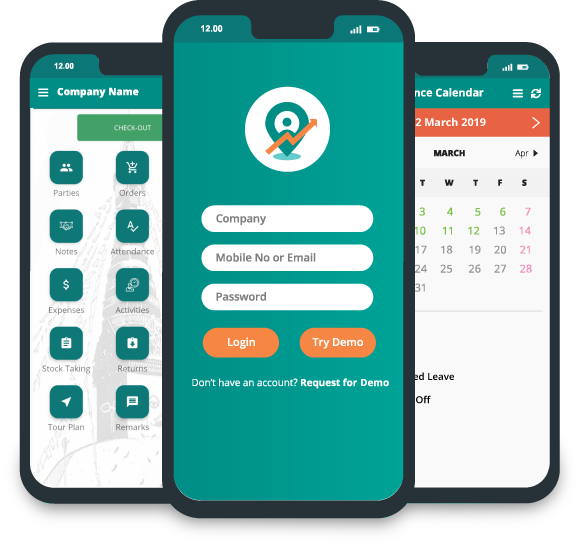
The Delta Sales App serves as a comprehensive field sales and distribution platform, seamlessly integrating location insights with daily sales tasks like customer visits, order management, payment processing, and reporting.
Its tracking features empower managers to oversee representatives' locations, routes, distances covered, and customer interactions. The platform also includes features for visualizing customer locations, geo-fenced check-ins, and activity based on routes.
-
Smart, Low-Impact Location Pings (Not Constant GPS Polling)
Effective GPS field employee location tracking does not mean running your salesperson’s smartphone like a never-stopping navigation device. The aim is to collect useful location information for sales management, such as route progress, customer visits, and field activity, without excessive tracking intensity. That's why the design of the tracking system is as important as the existence of location tracking. Field sales tracking software should also be evaluated based on how well it helps businesses with battery efficiency, tracking accuracy, visit verification, route visibility, and reporting.
-
Optimized for All-Day Use Without Battery Anxiety
-1787201869.png)
A field representative needs the phone for much more than tracking. They may use it to:
-
Check the daily beat plan
-
Navigate between retailers
-
Take customer orders
-
Record payments
-
Capture visit photos
-
Check product information
-
Update customer records
-
Generate or access sales reports
Delta Sales App brings these activities into one field sales workflow, reducing the need to switch between multiple tools during the day. Its offline mode also allows sales representatives to continue working when connectivity is poor and sync data once the connection returns. That matters because efficient field operations are not just about knowing where a sales rep is. They are about helping the rep complete the entire sales process reliably.
Built to Prove the Myth Wrong
The key concern isn't simply whether location tracking consumes battery power because it does. The more insightful question is whether we can implement location tracking in a way that enhances all-day field operations while minimizing battery drain. The answer is a resounding yes. In a contemporary field sales management software solution, location tracking should seamlessly integrate with other essential functions like beat planning, customer visit management, order management, sales reporting, and field activity monitoring. This integration is what distinguishes merely tracking a device from genuinely empowering a field sales team to succeed.
Works With Offline Field Operations
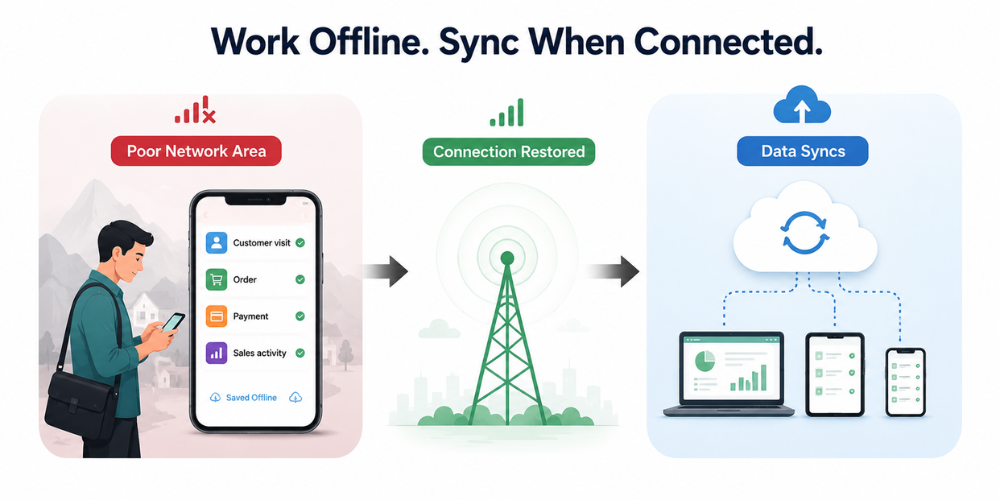
Field representatives often face difficulties due to unreliable network connectivity while traveling. The Delta Sales App enables offline functionality, empowering field teams to log essential sales activities and sync data once a connection is restored.
Tracking With Sales Activity, Not Just Location
The significance of field tracking goes beyond merely pinpointing a salesperson's phone location. Businesses must grasp the events that transpired at each site. By linking location insights with visits, orders, payments, and customer interactions, managers gain richer and more actionable field sales data.
Designed for Field Sales, Not Just GPS Tracking
A standalone tracking application answers one question: Where is the salesperson? A complete sales force automation software solution can answer much more:
-
Which clients were engaged?
-
What orders were processed?
-
Which payments were received?
-
What products were sold?
-
What routes were taken?
-
What tasks are outstanding?
This integration positions location tracking as a vital component of a larger sales process, rather than just a standalone monitoring tool.
Better Visibility Without Constant Battery Anxiety
The purpose of field tracking is to provide meaningful insights rather than excessive device usage. By integrating location tracking with various field-sales capabilities, Delta Sales App empowers businesses to access essential information while offering representatives a unified platform to streamline their daily tasks.
Conclusion
So, will location tracking kill your phone's battery? Not necessarily. Location tracking does use battery power, but the real impact depends on how frequently location is requested, how the app handles background activity, the tracking method used, network conditions, and other tasks running on the device. For field sales teams, the answer isn't to avoid GPS tracking altogether. It's to use a field sales tracking app that is designed to provide useful location visibility without unnecessary battery consumption. With the right approach, sales representatives can track customer visits, follow their routes, record orders, and complete daily field activities without constantly worrying about finding a charging point.
Ready to simplify field sales tracking and management? Book a free demo of Delta Sales App to see how GPS tracking, beat planning, order management, customer visits, and sales reporting can work together in one platform.