
How to Build Daily Sales Reports Automatically with Field Sales Software
“Without data, you’re just another person with an opinion.” - W. Edwards Deming
In field sales, decisions are made every hour, not every three months. A distributor deciding how much stock to push, a sales manager checking how productive their team is, or a business owner keeping an eye on revenue growth, all of these choices depend on one thing: getting the right data on time.
But this is what many businesses are really going through right now.
Even though field sales teams work in a fast-paced, competitive environment, a surprising number of them still use old ways to report. Salespeople write down orders by hand, talk or text about updates, and send in end-of-day reports in spreadsheets. Then, managers spend hours trying to make sense of this information.
By the time the report is ready, the situation on the ground has already changed.
This gap between gathering data and making decisions leads to big problems:
-
Because insights come too late, chances are missed.
-
Mistakes happen when you enter data by hand.
-
Field productivity drops as reps focus on reporting instead of selling
-
Managers work with information that is missing or out of date.
Now imagine a different scenario. Every order placed by a sales rep is instantly recorded. Every outlet visit is tracked in real time. Every payment collected is automatically updated in the system. You can get a full, accurate, real-time sales report at the end of the day or even in the middle of it without having to do anything.
That’s the power of automated daily sales reports for field teams.
With modern field force automation software, reporting goes from a boring, manual job to an easy, automated one. Not only does it save time, but it also changes how businesses work by making decisions faster, giving them better visibility, and giving them more control over field operations.
We'll go beyond theory in this guide and show you step-by-step how to make automated daily sales reports using workflows and features that are similar to those used in real-world field sales management systems.
What Are Automated Daily Sales Reports for Field Teams?
A daily sales report is basically a summary of everything your field sales team does in a day. But when automation is added, this report changes from a static document into a business intelligence tool that is always up-to-date.

Digital systems collect data on field activity, which is then used to automatically create daily sales reports. The system doesn't wait until the end of the day to collect, process, and organize data by hand. Instead, it does this all day long.
This means your reports are no longer:
-
Delayed
-
Incomplete
-
Dependent on human effort
Instead, they become:
-
Instant
-
Accurate
-
Consistent
-
Actionable
How Automated Reports Actually Work
To understand their value, it’s important to look at how these reports are created.
Every action performed by a field sales representative feeds into the system:
-
When a rep checks in at a retail outlet using GPS, the visit is logged
-
When they place an order through a mobile app, the transaction is recorded
-
When they collect a payment, it is updated in real time
-
When they skip a planned visit, the system flags it
All this data flows into a centralized platform, where it is automatically structured into meaningful reports.
There is no need for:
-
Manual compilation
-
Data consolidation
-
Formatting or calculations
The system does it all.
Key Components of a High-Quality Daily Sales Report
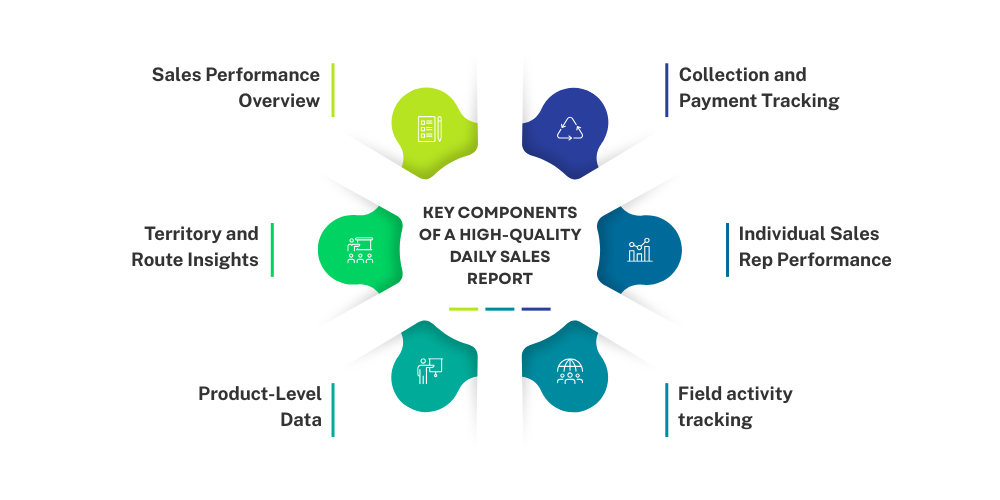
A strong automated report doesn’t just present numbers; it provides a clear and structured view of how your business is performing on a daily basis. When designed correctly, it helps managers quickly understand what is working, what needs attention, and where opportunities exist.
-
Sales Performance Overview
This part of your daily sales report shows the total sales value, number of orders, and overall revenue generated, which is the most important part of the report. With an integrated order management app, every order made by the field team is automatically added to this overview without any delays. This lets managers quickly see if daily goals are being met and how current performance stacks up against past trends.
-
Territory and Route Insights
This component focuses on analyzing performance across different territories and routes, helping businesses understand regional variations in sales and activity. With route management and territory mapping features, companies can track how effectively each area is being covered and whether planned routes are being followed. These insights make it easier to identify high-performing regions as well as underperforming ones that require attention.
-
Product-Level Data
Product-level insights provide a granular view of how each product or SKU is performing in the market. By leveraging digital product catalogs and real-time order tracking, businesses can monitor which products are consistently driving sales and which ones are underperforming. This information plays a crucial role in inventory planning, ensuring that high-demand products are always available while minimizing excess stock of slow-moving items.
-
Collection and Payment Tracking
In field sales operations, managing collections efficiently is essential for maintaining a healthy cash flow. With integrated payment and collection tracking features, every transaction made in the field is recorded instantly and reflected in the daily report. This provides complete visibility into payments received, pending dues, and credit utilization across customers and territories.
-
Individual Sales Rep Performance
This section evaluates the contribution of each sales representative by combining data from sales, visits, and overall activity. With built-in sales force automation capabilities, every action performed by a rep is tracked and linked to performance metrics. This allows managers to assess productivity, efficiency, and effectiveness at an individual level. High performers can be recognized and rewarded, while those facing challenges can be identified early and supported with training or guidance. Over time, this data helps build a more accountable, motivated, and high-performing sales team.
- Field Activity Tracking
Field activity tracking provides a detailed understanding of how effectively your sales team is utilizing their time and efforts on the ground. Through features like GPS-based attendance tracking and visit tracking, every outlet visit and movement is captured in real time. This ensures that the report accurately reflects the number of visits completed, time spent in the field, and the quality of interactions based on productive versus non-productive calls.
Why These Reports Matter More Than Ever
In today’s competitive landscape, speed is everything. Businesses that can respond quickly to changes in demand, customer behavior, or market conditions always have an edge.
Automated reporting enables:
-
Faster decision-making
Automated reporting gives managers access to sales and field activity data in real time, so they can make decisions without having to wait for end-of-day or manual reports. Businesses can quickly find problems like falling sales, missed visits, or stock shortages and fix them right away instead of reacting to old information. This quickness in making decisions helps businesses stay flexible and competitive in markets that move quickly. -
Better resource allocation
When businesses can see how well their sales reps, products, and territories are doing, they can better use their resources. Managers can find areas that are doing well and need more help, as well as areas that are not doing well and need strategic help. This makes sure that time, people, and inventory are used in the best way possible, which leads to higher productivity and profits. -
Improved accountability
Automated reporting keeps track of everything the field team does, from visiting stores to making and collecting orders. This level of transparency makes it easier to monitor individual and team performance, ensuring that everyone is aligned with their responsibilities and targets. When performance is clearly measured and visible, it naturally makes people more responsible and pushes teams to do better. -
Stronger alignment between field teams and management
One of the biggest challenges in field sales is the disconnect between what happens on the ground and what managers perceive. Automated reporting bridges this gap by providing a shared, real-time view of operations. Both field teams and management work with the same data, reducing miscommunication and ensuring that strategies are aligned with actual market conditions. This leads to better coordination, clearer expectations, and more effective execution.
It turns raw data into a strategic asset, rather than just an operational requirement.

Why Manual Sales Reporting Fails in Field Operations
Even though a lot of businesses know how important reporting is, they don't always realize how much it costs to do things by hand.
At first glance, manual reporting might not seem too hard. But as operations grow, the cracks start to show, and they get bigger very quickly.
-
It Consumes Valuable Selling Time
Field sales reps are hired to sell, make connections, and grow the business, not to do paperwork all day. But in manual reporting systems, a lot of their time is spent on administrative tasks like writing notes, updating spreadsheets, sending status updates, and answering questions from managers. This time spent away from selling things makes people less productive overall and has a direct effect on how much money they make. The more time reps spend on reporting instead of talking to customers, the less time they have to close deals or find new ones. This slows down business growth. Many businesses still rely on manual reporting, but it often slows down operations, introduces errors, and limits visibility. To see a detailed comparison, check out Manual vs. Automated Field Sales Reporting.
-
It Introduces Errors and Inconsistencies
Manual reporting is inherently prone to mistakes, especially when sales reps are working under pressure in the field. Common errors include incorrect data entries, missing information, duplicate records, and miscommunication between team members. Even small errors can have serious consequences: inventory may be mismanaged due to inaccurate stock information, performance evaluations may be misleading, and strategic business decisions may be based on flawed data. Over time, these inconsistencies erode trust in the reporting process and make it difficult for managers to rely on manual reports for critical decision-making.
-
It Delays Critical Insights
Timing is very important in sales. There will always be a delay at several points when reports are made by hand. For example, sales reps have to turn in their notes or spreadsheets at the end of the day, and managers have to spend more time putting together and reviewing the data. The information may already be out of date by the time it gets to the people who need to make decisions. This delay can have real effects on business. For example, if a stock-out situation is found too late, it could mean that sales are missed. Also, if performance in a certain area starts to drop, it might go unnoticed for days, letting problems get worse before they are fixed.
-
It Lacks Standardization
Manual reporting often results in inconsistent formats and practices, as each sales rep may use their own way of recording and presenting data. This lack of standardization makes it difficult for managers to compare performance across teams, evaluate metrics consistently, or conduct meaningful analysis. Conflicting data formats and variable reporting methods reduce the reliability of insights and create confusion, ultimately making it harder to make accurate business decisions. Standardized reporting is essential to maintain data integrity, which is nearly impossible to achieve consistently without automation.
-
It Doesn’t Scale with Business Growth
As a business expands, operations become more complex, with more sales reps, territories, products, and orders to manage. Manual reporting systems, which might work for a small team, quickly become unmanageable at scale. The administrative burden grows exponentially, and compiling reports becomes a time-consuming and error-prone task. Without an automated solution, businesses struggle to maintain visibility, efficiency, and control over their growing operations, which can hinder expansion and limit strategic growth opportunities.
The Bigger Problem: Lack of Visibility
In the end, all of these problems lead to one big one: not being able to see.
Managers don’t know:
-
What’s happening in the field right now
-
Which reps are performing well
-
Where opportunities are being missed
And without visibility, control becomes impossible.
How Field Sales Software Enables Automated Reporting
Businesses need more than just digital tools to get past the problems with manual reporting. They need a system that works well in the field.
This is where software for field sales comes in.
Field sales software is like the brain of your sales operations. It connects all of your field activities to a single reporting and analytics engine.
-
Real-Time Data Capture at the Source
The best thing about field sales software is that it records information right when it's happening. Salespeople don't have to rely on memory or wait for updates; they can enter information directly into a mobile app while they are out in the field.
This includes:
-
Orders placed
-
Visits completed
-
Payments collected
-
Notes and feedback
Because data is captured instantly, it is:
-
More accurate
-
More complete
-
More reliable
-
Centralized and Cloud-Based Data Management
All the data collected from the field is stored in a centralized cloud system.
This means:
-
Managers can access reports anytime, from anywhere
-
There is a single source of truth
-
Data is secure and backed up
No more chasing files or consolidating reports from multiple sources.
-
Automated Data Processing and Report Generation
Once data is captured, the software automatically processes it into structured reports.
This includes:
-
Aggregating data across teams and territories
-
Calculating KPIs
-
Generating summaries and insights
What used to take hours now happens in seconds.
-
Visual Dashboards for Better Understanding
Numbers alone are not enough. They need to be presented in a way that is easy to understand.
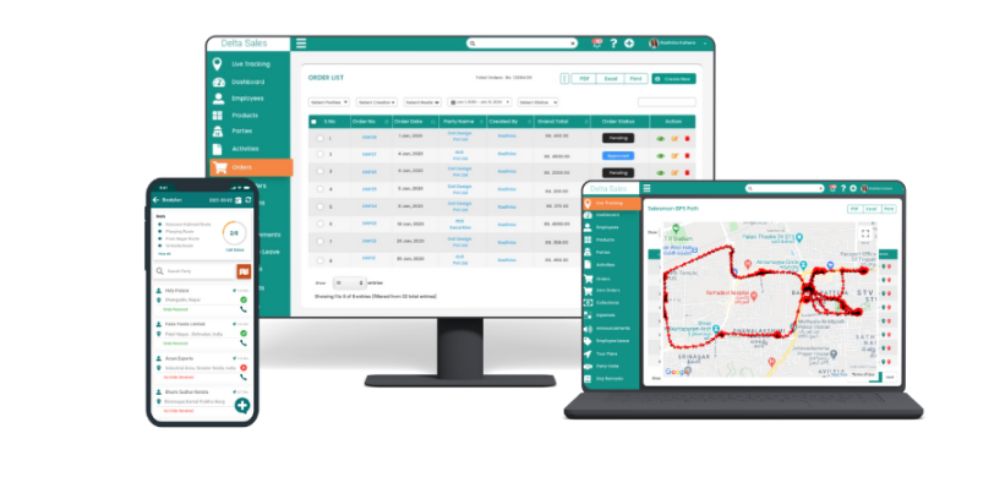
Field sales software provides:
-
Graphs
-
Charts
-
Performance dashboards
-
Comparative views
This makes it easier for managers to quickly identify trends and take action.
-
Seamless Integration with Business Systems
Modern field sales software doesn’t operate in isolation.
It integrates with:
-
ERP systems for inventory and billing
-
Accounting tools for financial tracking
-
CRM systems for customer management
This ensures that all business data is connected and aligned.
All these capabilities together create a powerful system that supports automated reporting in field sales management software. Instead of relying on delayed and manual processes, businesses can now capture, process, and analyze field data in real time. This not only improves accuracy but also empowers managers to make faster, data-driven decisions that directly impact sales performance and operational efficiency.
Instead of reacting to problems after they occur, businesses can:
-
Monitor performance in real time
-
Identify issues early
- Make data-driven decisions quickly
Step-by-Step Guide to Building Automated Daily Sales Reports
Setting up software is only part of making automated daily sales reports. It's about making a system that lets data flow smoothly from the field to the people who make decisions. Every step is very important to making sure that your reports are not only automated but also useful and actionable.
Step 1: Define Your Reporting Objectives
You need to be very clear about what you want your reports to do before you start using tools or dashboards. Even the best reporting system will produce data that doesn't help make decisions if there are no clear goals.
-
Align reporting with business goals
Every report should have a clear business goal, like boosting sales, making work more efficient, or finding the best way to get things to customers. When your reporting goals are in line with business goals, the data becomes more useful and relevant. -
Identify decision-makers and their needs
Different stakeholders need different kinds of information. Sales managers might need daily reports on how well their teams are doing, while business owners might be more interested in trends in sales. Knowing who will read the reports makes sure that the information is organized in the right way. -
Focus on actionable insights instead of raw data
The point of reporting is not to show numbers but to help people make choices. This means putting insights that show problems, opportunities, and trends ahead of those that give users too much data.
Step 2: Identify Key Metrics for Your Field Team
Once your objectives are clear, the next step is to define the metrics that will power your reports. These metrics act as the backbone of your automated reporting system.
-
Sales performance metrics
These numbers will help you see how much money your field team is making every day. You can see how well your business is doing and how it's growing by keeping track of order value, volume, and conversion rates. -
Field activity metrics
Activity metrics show you how well your sales team is doing their job in the field. Managers can find gaps in execution and make the field more efficient by looking at the number of visits, productive calls, and time spent at each outlet. -
Financial and collection metrics
Cash flow is very important for any business that distributes goods. Keeping track of collections, unpaid bills, and credit use helps keep your finances stable and stops problems like late payments or bad debts. -
Inventory-related metrics
Understanding stock availability and movement is essential for avoiding stockouts and overstocking. These metrics help align sales efforts with inventory levels, ensuring smooth operations across the supply chain.
-1774263603.png)
Step 3: Digitize Field Data Collection
Automation begins at the source, and that source is your field team. If data is not captured digitally and in real time, automation cannot deliver its full value.
-
Enable mobile-based order booking
When salespeople use a mobile app to place orders instead of writing them down by hand, the system immediately records and stores the data. This gets rid of delays and makes sure that orders are filled quickly and correctly. -
Implement real-time visit tracking
Businesses can automatically keep track of outlet visits by using GPS-enabled check-ins. This not only makes things more clear, but it also makes sure that reports accurately show what is going on in the field without needing to be updated by hand. -
Capture payments and collections digitally
When you record payments directly in the app, your financial information is always up to date. This cuts down on differences and gives you real-time access to collections and unpaid bills. -
Leverage integrated sales force automation features
A full sales force automation system makes sure that every action taken by the field team is logged and connected to reporting. This gives you a solid base for making automated reports that you can trust.
Step 4: Standardize Data Entry Processes
Even with digital tools, inconsistent data entry can reduce the effectiveness of your reports. Standardization ensures that all data follows a uniform structure.
-
Use predefined formats for data input
Standardized forms for orders, visits, and collections make sure that all the information that needs to be collected is done so in the same way every time. This makes it easier for the system to look at and work with data. -
Eliminate ambiguity in product and customer data
Using fixed product catalogs and customer databases stops confusion that can happen when different naming conventions are used. This makes sure that reports are accurate and reliable. -
Make critical fields mandatory
Ensuring that important fields cannot be skipped helps maintain data completeness. This reduces gaps in reporting and improves the overall quality of insights. -
Encourage disciplined usage among field teams
Technology alone is not enough; users must follow the right processes. Training and monitoring ensure that sales reps consistently enter accurate and complete data.
Step 5: Configure Automated Report Templates
Once your data is structured and standardized, the next step is to define how it will be presented. Report templates act as the blueprint for your automated reporting system.
-
Design role-specific reports
Different people need to see the same data in different ways. Making personalized templates for managers, executives, and field supervisors makes sure that each stakeholder gets useful information. -
Include both summary and detailed views
High-level summaries give a quick look at performance, while detailed reports let you look more closely. Combining the two makes it easy for users to quickly understand performance and look into problems when they come up. -
Incorporate visual elements for clarity
Reports are easier to understand when they have charts, graphs, and dashboards. Users can find trends and patterns more easily when data is shown in a visual way than when it is just numbers. -
Align templates with business workflows
Reports should show how your business works. For instance, if your sales process includes both distributors and retailers, your reports should show data from both levels so that you can see it more clearly.
Step 6: Automate Report Generation and Scheduling
This is the stage where manual reporting is completely eliminated, and the system takes over.
-
Enable automatic report generation
The system should be able to make reports on its own by getting information directly from field activities. This makes sure that everything is the same and that there are no delays. -
Schedule reports for timely delivery
Reports can be scheduled to be delivered at specific times, such as end-of-day or start-of-day summaries. This ensures that decision-makers always have access to the latest information. -
Set up alerts for critical events
Automated alerts notify managers about important issues such as low sales, missed visits, or payment delays. This allows for immediate action instead of waiting for end-of-day reports. -
Ensure accessibility across devices
Reports should be accessible on mobile devices, tablets, and desktops. This ensures that managers can monitor performance anytime, anywhere.

Step 7: Enable Real-Time Dashboards for Managers
Static reports are useful, but real-time dashboards take reporting to the next level by providing continuous visibility.
-
Provide live performance tracking
Dashboards update in real time as data is collected, so managers can keep an eye on sales performance all day long instead of waiting for reports. -
Enable drill-down analysis
Managers can explore data at different levels, from overall performance to individual sales reps or specific outlets. This helps identify the root cause of issues. -
Highlight trends and patterns visually
Dashboards make it easier to spot trends, such as declining sales in a region or increasing demand for a product. This supports proactive decision-making. -
Improve responsiveness and agility
With real-time insights, businesses can respond quickly to changes in the market, giving them a competitive advantage.
Step 8: Integrate with Existing Business Systems
For automated reporting to deliver maximum value, it must be connected with other systems used by the business.
-
Connect with ERP systems for inventory and billing
Integration ensures that sales data is aligned with inventory levels and financial records, reducing discrepancies and improving accuracy. -
Link with accounting tools for financial tracking
This helps maintain consistency between sales reports and financial statements, making it easier to manage cash flow and profitability. -
Integrate with CRM systems for customer insights
Customer data can be combined with sales data to provide a more complete view of business performance and customer behavior. -
Eliminate data silos across departments
Integration creates a unified data ecosystem where all departments work with the same information, improving coordination and efficiency.
Step 9: Train Your Field Team and Managers
Even the best system will fail if users do not adopt it properly. Training ensures that everyone understands how to use the system effectively.
-
Educate users on system functionality
Salespeople and managers should be able to use the app, get reports, and understand the data. This boosts confidence and use. -
Emphasize the importance of real-time data entry
Timely data entry is critical for accurate reporting. Training should highlight how delays impact the entire reporting process. -
Encourage data-driven decision-making
Managers should be trained to use reports and dashboards for decision-making instead of relying on assumptions or intuition. -
Provide ongoing support and feedback
Continuous support ensures that users can resolve issues quickly and improve their usage over time.
Step 10: Continuously Optimize Your Reporting System
Automation is not a one-time effort. As your business evolves, your reporting system should evolve with it.
-
Regularly review and update KPIs
Business priorities change over time, and your metrics should reflect those changes to remain relevant. -
Customize reports based on new requirements
As new challenges and opportunities arise, reports should be updated to provide the necessary insights. -
Leverage insights to improve sales strategies
Reports should not just inform but also guide action. Use insights to refine your sales approach and improve performance. -
Adopt new technologies and features
Staying updated with advancements in field sales software ensures that your reporting system remains efficient and competitive.
Key Features to Look for in Field Sales Software
It's important to choose the right field sales software because the quality of the data collected and processed affects the whole reporting system. With the right features, your automated daily sales reports will be accurate, useful, and able to grow with your business.
-
Sales Force Automation (SFA)
Sales force automation is the heart of any field sales system because it links all field activities to a single platform. It lets salespeople handle visits, orders, and customer interactions all from one mobile interface, which makes sure that every action is recorded right away. Because data flows constantly, automated reports can show how well the field is actually doing without any delays or extra work. -
Order Management System
An efficient order management system ensures that every order placed by the field team is captured instantly and accurately. Instead of relying on handwritten notes or delayed entries, orders are directly synced with the system, making them immediately available for reporting. This not only improves order accuracy but also ensures that daily sales reports always reflect the latest revenue data. -
GPS Tracking and Route Optimization
GPS tracking and route optimization are essential tools for managing field sales teams effectively. By using GPS-enabled mobile apps, managers can monitor the exact location of sales representatives in real time, ensuring that planned visits are completed and routes are followed efficiently. This visibility helps identify areas where field reps may be spending too much time or missing important customer visits, allowing managers to make data-driven adjustments to improve coverage. Route optimization software takes this a step further by calculating the most efficient travel paths between multiple outlets, reducing travel time and costs while increasing the number of productive visits per day.
-1774263605.png)
-
Real-Time Reporting and Analytics
Real-time reporting turns raw data into useful information right away. Managers can now see live dashboards that show current performance instead of waiting for end-of-day summaries. This helps businesses make decisions more quickly and lets them respond right away to changes in sales trends or activity in the field. -
Distributor Management
Managing distributors well is very important for businesses that work in distribution networks. This feature lets you keep an eye on stock movement, primary sales, and how well your distributors are doing. When added to reports, it gives a full picture of how products move from the company to the distributor and beyond. -
Retailer Management
Retailer-level data is crucial for understanding ground-level demand. This feature helps maintain detailed records of outlet visits, purchase history, and order frequency. Automated reports can then provide insights into retailer behavior, helping businesses improve engagement and sales strategies. -
Inventory Tracking
Inventory visibility ensures that sales efforts are aligned with stock availability. Inventory management systems track inventory in real time, and businesses can avoid stockouts and overstocking issues. This data becomes a key part of daily sales reports, helping teams make informed decisions about supply and demand. -
Attendance and Task Management
Keeping track of attendance and daily tasks makes sure that everyone on the field team is responsible. This feature helps managers see how well their team is using their time and getting their work done. It gives a full picture of productivity beyond just sales numbers when it is included in reports.
Benefits of Automated Daily Sales Reports
Automating daily sales reports is not just about saving time; it fundamentally improves how your business operates. The impact can be seen across productivity, accuracy, decision-making, and overall growth.
-
Increased Productivity Across Field Teams
Salespeople can spend all of their time selling and getting to know customers when they don't have to spend hours making reports. This change in focus makes things work better and uses time better, which in turn brings in more money. -
Improved Data Accuracy and Reliability
Automated systems get rid of the chance of making mistakes that people often make when reporting by hand. Data is more accurate and consistent because it is collected directly from the source. This dependability makes people trust the reports and makes sure that decisions are made based on accurate information. -
Real-Time Decision Making
Managers can make decisions quickly and with confidence when they can see sales data right away. Real-time insights let managers be proactive instead of reactive when dealing with problems like a drop in sales or moving resources to areas that are doing well. -
Enhanced Visibility Across Operations
Automation gives you full access to information about field activities, sales performance, and financial metrics. Managers can keep an eye on everything from one dashboard, which gets rid of blind spots and gives them more control. -
Stronger Accountability and Performance Tracking
It's easier to keep track of how well people and teams are doing when every task is logged and reported. This makes it so that salespeople are more aware of their goals and how well they are doing. -
Scalability for Growing Businesses
Automated reporting systems can handle more data without any extra work as your business grows. This makes it easier to grow your business without losing speed or accuracy.
Common Mistakes to Avoid When Automating Sales Reports
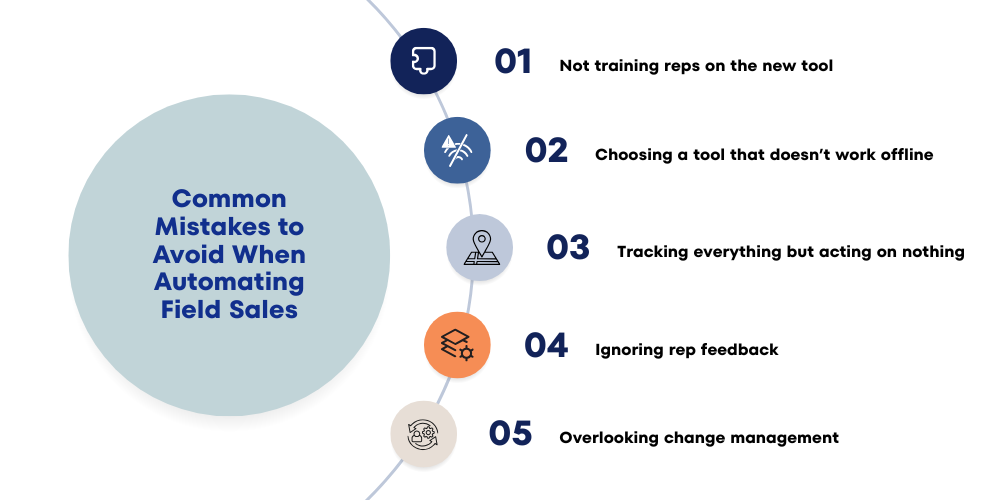
While automation offers significant advantages, improper implementation can limit its effectiveness. Avoiding common mistakes ensures that your reporting system delivers maximum value.
-
Overloading Reports with Excessive Data
It can be hard to find important insights in a report if it has too much information. Reports should not give users too much information; instead, they should focus on the most important metrics that help them make decisions. -
Ignoring User Adoption and Training
Even the best system will fail if users do not adopt it properly. Lack of training can lead to incomplete or inaccurate data entry, which directly affects report quality. Ensuring that your team understands and uses the system correctly is essential.
-
Lack of Customization Based on Business Needs
Every business operates differently, and generic reports may not provide the insights you need. Customizing reports to match your workflows and objectives ensures that they remain relevant and useful. -
Poor Data Quality at the Source
The quality of the data that goes into the system is what makes automation work. Reports will show mistakes if field reps don't enter data correctly or consistently. It is very important to keep data discipline. -
Not Acting on Insights Generated
Reports are only valuable if they lead to action. Businesses often generate reports but fail to use them effectively. Turning insights into decisions is what drives real impact.
Use Case: How FMCG and Distribution Businesses Benefit
Field sales automation and reporting are especially valuable in industries like FMCG and distribution, where operations are complex and fast-moving.
-
Managing Large Field Teams Efficiently
FMCG companies often have large sales teams operating across multiple regions. Automated reporting provides a centralized view of all activities, making it easier to manage performance and ensure consistency across teams. -
Handling High Order Volumes with Accuracy
In high-volume environments, manual reporting becomes impractical. Automation ensures that every order is captured and reported accurately, reducing errors and improving operational efficiency. -
Improving Territory-Level Visibility
With automated reports, businesses can analyze performance at the territory level and identify areas that need attention. This helps in optimizing resource allocation and improving overall coverage. -
Enhancing Distributor and Retailer Relationships
Access to real-time data allows businesses to respond quickly to distributor and retailer needs. This improves service levels and strengthens long-term relationships. -
Optimizing Inventory and Supply Chain Decisions
By combining sales and inventory data, automated reports provide insights that help businesses manage stock more effectively. This reduces losses due to stockouts or excess inventory.
Future Trends in Field Sales Reporting
As technology continues to evolve, field sales reporting is becoming more advanced and intelligent. Businesses that adopt these trends early can gain a significant competitive advantage.
-
AI-Driven Predictive Analytics
Artificial intelligence is enabling systems to predict future sales trends based on historical data. This helps businesses plan better and anticipate demand more accurately. -
Mobile-First Reporting Experience
As more people depend on smartphones, reporting systems are becoming easier to use on those devices. Managers can get dashboards and insights right from their devices, which makes them more flexible and responsive. -
Advanced Data Visualization Techniques
Interactive dashboards and visual storytelling are being used by modern reporting tools to make data easier to understand. This helps users find patterns and trends quickly without having to do a lot of research. -
Automation Beyond Reporting
Automation is moving beyond reporting and into areas like assigning tasks, optimizing routes, and making suggestions for better performance. This makes the sales ecosystem smarter and more proactive.
Conclusion: Turn Daily Sales Data into a Growth Engine
Daily sales reporting is no longer just a routine task; when done right, it can be a strategic function that helps a business grow. Businesses can get rid of inefficiencies, make their operations more accurate, and see what's going on in real time by using automated daily sales reports for field teams. Teams can spend less time gathering and organizing data and more time doing what really matters: selling, making connections, and growing the business. Modern solutions make it easier than ever to set up automated reporting in field sales management software. This turns raw field data into useful information that helps you make decisions faster and more wisely.
If your business still relies on manual reporting, you're not only wasting time, but you're also missing out on opportunities. It's time to use a smarter strategy, give your field team more power, and turn your daily sales data into a strong competitive edge. When you do manual reporting, your business slows down, mistakes happen, and you can't see everything. But automated daily sales reports give you real-time information, make you more accountable, and help you make better decisions. The Delta Sales App automatically collects all of your field data, including visits, orders, collections, and territory performance. This makes it easy to get accurate, useful reports without any extra work.
Take your field sales to the next level. Book a free demo of Delta Sales App today and see automated reporting in action!