How Much Does Sales Force Automation Software Cost for Your Business?
When businesses start exploring sales force automation (SFA) software, one of the first questions that comes up is cost. Some vendors promise affordable pricing, while others quote figures that seem far beyond reach. The truth is, sales force automation software doesn’t come with a one-size-fits-all price tag.
The cost depends on several factors, your team size, features needed, deployment model, and even how your sales process works. Understanding these elements before investing can help you choose the right solution and avoid unexpected expenses later.
In this blog, we’ll break down how much sales force automation software really costs, what influences pricing, and how to evaluate whether the investment makes sense for your business.
What Is Sales Force Automation Software?
Sales force automation software is designed to streamline and automate day-to-day sales activities such as lead management, order processing, route optimization, reporting, and performance tracking. It helps sales teams spend less time on manual work and more time selling.
Modern SFA tools often include mobile access, real-time data syncing, analytics dashboards, and integrations with CRM or ERP systems. Businesses commonly explore sales force automation solutions for field teams when managing multiple sales reps across locations becomes difficult.
Why Sales Force Automation Pricing Varies So Much
If you compare different vendors, you’ll notice pricing can range from a few dollars per user per month to enterprise-level contracts costing thousands annually. This variation exists because SFA software is built to serve businesses of different sizes and industries.
Some companies need basic automation, while others require advanced analytics, offline access, or deep integrations. This is why understanding pricing factors is more important than focusing only on the final number.
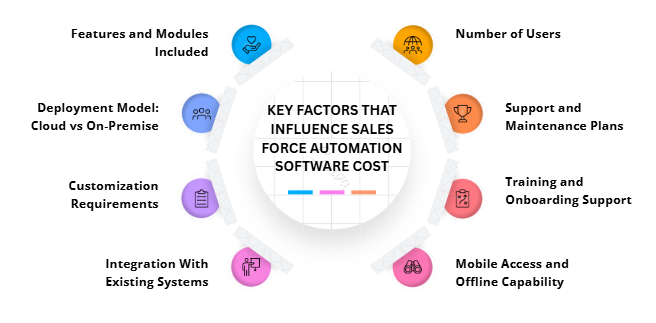
Key Factors That Influence Sales Force Automation Software Cost
-
Number of Users
Most SFA tools follow a per-user pricing model. The more sales reps, managers, or admins you add, the higher the overall cost.
For example:
-
Small Teams (5–10 users): Smaller sales teams usually pay lower costs since fewer licenses are required, making SFA software affordable and suitable for early-stage or growing businesses.
-
Mid-Sized Teams (25–100 users): Mid-sized teams experience moderate pricing because more users and features are needed, often requiring upgraded plans for better reporting and coordination.
-
Large Enterprises: Large organizations typically negotiate custom pricing plans that account for high user volumes, advanced features, integrations, and dedicated support services.
Businesses managing distributed teams often look into field sales tracking software to ensure productivity without adding unnecessary user licenses.
-
Features and Modules Included
Not all sales force automation software offers the same features. Basic plans typically include contact management and reporting, while advanced plans may offer:
-
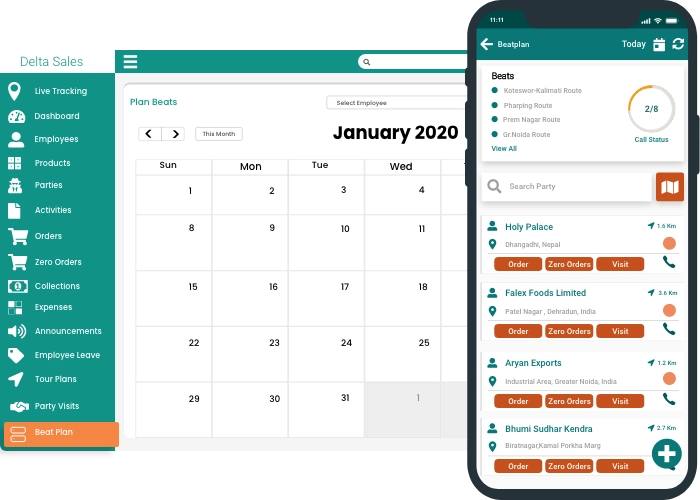
Territory Management: This feature helps assign and manage sales areas efficiently, ensuring balanced workloads and better coverage, but it usually comes at a higher pricing tier.
-
Route Optimization: Route optimization reduces travel time and fuel costs by suggesting efficient routes for field reps, often included only in premium or advanced plans.
-
Order and Inventory Tracking: Advanced SFA tools track orders and inventory in real time, improving accuracy and fulfillment but increasing software cost due to system integrations.
-
AI-Driven Insights: AI-driven analytics provide sales predictions and performance insights, helping decision-making while adding to the overall cost because of advanced data processing.
The more advanced the features, the higher the cost. Companies evaluating sales automation tools for growing businesses should focus on features they actually need rather than paying for unused modules.
-
Deployment Model: Cloud vs On-Premise
Cloud-based SFA software is usually more affordable upfront because it runs on a subscription model. You pay monthly or annually without worrying about infrastructure or maintenance.
On-premise solutions may require:
-
Server Costs (On-Premise): On-premise deployment requires purchasing and maintaining physical servers, increasing initial setup expenses and long-term hardware replacement costs.
-
IT Resources: On-premise systems need dedicated IT staff for installation, updates, troubleshooting, and security management, adding to operational and personnel expenses.
-
Maintenance Fees: Regular system upgrades, security patches, and technical maintenance for on-premise software often result in recurring costs beyond the initial license fee.
Most modern businesses prefer cloud-based sales automation software due to lower initial investment and easier scalability.
-
Customization Requirements
If your sales workflow is unique, you may need customization. Custom dashboards, reports, approval flows, or integrations can increase costs.
Out-of-the-box solutions work well for many businesses, but organizations with complex sales operations often explore customizable sales force automation platforms to match their processes.
-
Integration With Existing Systems
If your SFA software needs to integrate with CRM, accounting, ERP, or inventory systems, additional costs may apply.
Some vendors include integrations in premium plans, while others charge separately. Businesses focused on smooth operations often prioritize sales automation software with CRM integration to avoid data silos.
-
Mobile Access and Offline Capability
For field sales teams, mobile access is essential. Offline functionality allowing reps to work without the internet can be a premium feature.
Tools offering mobile sales force automation apps may charge more due to the added development and support required for seamless syncing.
-
Training and Onboarding Support
Some vendors include onboarding and training in the package, while others charge extra. Costs may include:
-
Live Training Sessions: Live training sessions help sales teams quickly understand software features and workflows but may increase overall costs when provided as paid or premium services.
-
Dedicated Account Managers: Dedicated account managers offer personalized guidance and faster issue resolution, improving adoption but adding to the total cost of sales force automation software.
-
Implementation Support: Implementation support covers system setup, configuration, and data migration, ensuring smooth deployment while potentially increasing upfront software expenses.
Companies onboarding large teams often benefit from sales team onboarding software tools that reduce training time and errors.
-
Support and Maintenance Plans
Basic customer support may be included, but priority support, dedicated managers, or SLA-based services can increase costs.
Businesses that rely heavily on real-time data often prefer sales performance management software with reliable support to avoid disruptions.
Typical Pricing Ranges for Sales Force Automation Software
While prices vary, here’s a general idea of what businesses can expect:
-
Small Businesses: $10–$30 per user/month
This pricing range suits startups and small teams needing basic sales automation. It usually includes contact management, basic reporting, mobile access, and limited integrations.
-
Mid-Sized Businesses: $30–$70 per user/month
Mid-sized companies require more advanced features such as performance tracking, workflow automation, territory management, and integrations, which increases software cost and overall value.
-
Enterprise Solutions: Custom Pricing ($100+ per user/month)
Enterprise-level solutions offer extensive customization, advanced analytics, large-scale integrations, high security, and dedicated support, leading to higher, contract-based pricing.
These figures usually depend on feature depth, scalability, and support levels.
Hidden Costs Businesses Often Overlook
Many companies focus only on subscription fees and overlook additional expenses, such as:
-
Data Migration
Migrating existing customer, sales, and order data into a new system may require technical effort, tools, or services that add unexpected implementation costs.
-
Custom Development
Customizing workflows, reports, or features to match business processes often involves development fees, increasing both initial and long-term software expenses.
-
Third-Party Integrations
Connecting sales automation software with CRM, accounting, or ERP systems may require paid integrations or middleware, adding to overall operational costs.
-
Scaling Costs
As sales teams grow, adding more users, features, or storage can raise subscription fees and support costs over time.
Evaluating sales productivity software costs holistically helps prevent budget surprises later.
Is Sales Force Automation Worth the Cost?
While SFA software requires investment, the return often outweighs the cost. Businesses typically see:
-
Improved Sales Rep Productivity
Automation reduces manual tasks, allowing sales representatives to spend more time selling, meeting customers, and closing deals efficiently.
-
Better Visibility into Performance
SFA software provides real-time dashboards and reports, enabling managers to track sales activities, targets, and individual performance more accurately.
-
Faster Order Processing
Automated order capture and approvals reduce delays, improve fulfillment speed, and enhance customer satisfaction across sales operations.
-
Reduced Manual Errors
By automating data entry and calculations, sales force automation minimizes human errors, improving data accuracy and operational reliability.
Organizations managing large or remote teams often rely on field sales management software to maintain consistency and control.

How to Choose Cost-Effective Sales Force Automation Software
To ensure you get value for money:
-
How to Choose Cost-Effective Sales Force Automation Software
Choosing the right SFA software requires balancing essential features, scalability, and long-term value to ensure maximum return on your investment.
-
Define Your Must-Have Features
Clearly identify essential sales automation features your team truly needs to avoid paying for unnecessary tools that add cost without delivering value.
-
Start With a Scalable Plan
Select software that allows easy upgrades as your sales team grows, preventing expensive migrations or replacements in the future.
-
Avoid Over-Customization Early
Excessive customization increases implementation costs and complexity; start simple and customize later as business requirements become clearer.
-
Ask About Hidden Fees
Always clarify additional costs such as onboarding, integrations, support, or future upgrades to avoid unexpected expenses after purchase.
-
Compare Long-Term ROI
Evaluate software based on productivity gains, efficiency improvements, and revenue impact rather than focusing only on upfront subscription pricing.
Looking at sales automation software pricing models can help you align cost with business growth.
Conclusion
The cost of sales force automation software depends on your business size, feature needs, deployment model, and long-term goals. While pricing may seem high initially, the efficiency, visibility, and scalability it brings can significantly improve sales outcomes.
If you’re exploring reliable, cost-effective solutions designed for modern field sales teams, platforms like Delta Sales App offer flexible pricing and features tailored to growing businesses making automation accessible without unnecessary complexity.
Try a Free Demo Today and find out how sales automation fits your needs and budget.