
Field Sales Process Automation: The Complete Playbook for Managers Who Want to Scale Without Adding Headcount

Field sales teams are always on the go, meeting customers, closing deals, and building relationships in person. But here's a hard truth that most businesses don't know: field sales reps only spend 30–35% of their time actually selling. They spend the rest of the day doing administrative work, writing reports by hand, traveling inefficiently, and always working with managers.
This is probably not surprising if you are in charge of a field sales team. You often get updates throughout the day through calls or WhatsApp. By noon, you're calling reps to find out what's really going on. As the day goes on, reports start to come in, but they are often incomplete or late, so you have to put everything together in spreadsheets late into the night.
Even with all this work, visibility is still low. You still don't know if your reps are going to the right clients, if they're following up on important leads, or which team members are really getting things done and which ones are just busy. This gap between activity and insight is more than just annoying; it has a direct effect on revenue, decision-making, and team performance.
The root of the problem lies in manual field sales processes. When your operations depend on spreadsheets, phone calls, and memory-based tracking, inefficiencies become unavoidable. Time is lost, errors creep in, and opportunities slip through the cracks without anyone noticing in real time.
This is where automating the field sales process makes a big difference. Automation gives you real-time visibility, structured workflows, and data-driven control over your whole sales operation, instead of relying on delayed updates and manual inputs. Tracking attendance, reporting visits, making orders, and following up are no longer things that people have to remember or do by hand. They become more streamlined, consistent, and easy to get to.
The effect is immediate and can be measured. Reps spend less time filling out reports and more time with customers. Instead of waiting until the end of the day, managers get real-time information. Choices are made faster, more accurately, and based on real data from the field instead of guesses.
What You’ll Learn in This Guide
-
How to automate your entire field sales workflow step by step
-
Ways to eliminate repetitive manual tasks and save time
-
How to improve visibility and control over your field team
-
Methods to increase client visits and conversions
-
How to scale your sales operations without increasing headcount
Who This Guide Is For
-
Field sales managers managing on-ground teams
-
Business owners scaling distribution or sales operations
-
Sales leaders handling teams of 5 to 200 field reps
-
Companies still relying on spreadsheets, calls, and manual tracking
What Is Field Sales Process Automation?
Field sales process automation refers to the use of digital tools and software to streamline, standardize, and automate the day-to-day activities of field sales teams. Instead of relying on manual inputs, calls, and spreadsheets, automation ensures that every key sales activity is tracked, recorded, and managed in real time.
At its core, a field force automation app replaces repetitive and error-prone tasks with structured workflows. Activities like attendance tracking, visit reporting, order booking, and follow-ups no longer depend on manual effort or memory. They are handled automatically through mobile apps and connected systems that sync data instantly with managers and backend teams.
This shift is not just about saving time. It fundamentally changes how field sales teams operate. Managers gain real-time visibility into rep activity, while reps can focus more on selling rather than administrative work. The result is a more efficient, accountable, and scalable sales operation.
Manual vs Automated Field Sales
To understand the impact of automation in field sales, it helps to compare how common activities are handled in manual versus automated environments. In a manual setup, attendance tracking depends on calls, messages, or handwritten logs, while automated systems use GPS-based, geo-fenced check-ins for accurate tracking. Visit reporting is typically completed at the end of the day using Excel sheets or paper forms, whereas automation enables instant digital submission after each visit. Route planning is often based on a sales rep’s personal experience in manual systems, but automated tools optimize routes using distance, priority, and efficiency.

Similarly, order booking in manual processes involves written notes or delayed data entry, while automated systems allow real-time mobile order entry with live stock visibility. Follow-ups, which are often inconsistent due to reliance on memory or scattered notes, are streamlined through automated reminders and alerts. Performance tracking also shifts from manual compilation at the end of the day or week to real-time dashboards with auto-generated reports. This comparison clearly highlights that manual systems are reactive and prone to delays, whereas automated systems are proactive, efficient, and operate in real time.
What Field Sales Automation Is Not
People are most worried about automation because they think it might take the place of field sales reps. This is not true.
Automating the field sales process doesn't mean getting rid of people. It's about getting rid of low-value, repetitive tasks that slow down work. Reps can spend less time filling out reports and coordinating updates and more time on what really matters: building relationships, getting clients involved, and closing deals.
Automation actually makes good salespeople even better. It gives them better tools, makes their priorities clearer, and cuts down on distractions, which helps them do their best work.
In the end, field sales process automation is all about control, visibility, and efficiency. It lets managers see what's going on in real time, make decisions more quickly, and grow the business without making things more complicated than they need to be.
Why Manual Field Sales Processes Are Costing You
At first glance, manual field sales processes may seem manageable. Spreadsheets, calls, and messaging apps feel familiar, and many teams continue using them simply because “that’s how it’s always been done.” But beneath the surface, these systems create hidden inefficiencies that quietly impact revenue, productivity, and team performance.
The real cost of manual processes is not just operational. It’s strategic.
The Hidden Costs of Manual Field Sales
When you have to keep track of and coordinate your field sales operations by hand, a number of problems start to build up over time. The effect isn't always clear right away, but it builds over time and affects both productivity and income.
Here are the five hidden costs that most teams underestimate:
-
Lost Selling Time
Field reps spend a lot of time doing things that don't involve selling, like filling out reports, updating Excel sheets, and giving status updates. This directly cuts down on the number of times you can talk to clients and close deals. -
Reporting Errors
When you enter data by hand, you often make mistakes like entering the wrong numbers, leaving out fields, or sending in your work late. These errors make it harder to make predictions, keep track of performance, and make decisions in general.
Discover a detailed comparison of manual vs automated reporting and how it affects productivity → Manual vs Automated Field Sales Reporting
-
Delayed Decision-Making
Managers are always working with old information when reports are turned in at the end of the day or later. This delay makes it hard to act quickly on missed visits, poor performance, or urgent chances. -
Rep Burnout
Too much administrative work makes people less happy with their jobs. Salespeople lose motivation when they spend more time reporting than selling, which makes them less productive and more likely to leave. -
Missed Follow-ups
Without automated reminders, people have to rely on their memories or notes that are all over the place. Without clear tracking, leads go cold, client relationships get weaker, and possible sales are lost.
The Cost of Inefficiency: A Simple Breakdown
To fully understand the impact of manual processes, it helps to quantify the loss using a simple formula:
Annual Productivity Loss = Number of Reps × Hours Lost per Day × Working Days per Year × Cost per Hour
Imagine a team of 20 field sales reps. If each rep loses just 1 hour per day on manual tasks, that adds up quickly over time. Multiply that across the entire team and over weeks and months; let's say there are 250 working days and it loses $5 per hour, and the cost becomes significant, not just in terms of time but also in missed revenue opportunities. The bigger your team, the greater the impact. What seems like a small daily inefficiency turns into a major annual loss.
Annual Loss = 20 × 1 × 250 × 5 = $25,000
And this calculation only accounts for time. It does not include:
-
Missed sales opportunities
-
Delayed order processing
-
Lost customers due to poor follow-ups
When you factor those in, the real cost is significantly higher.
The Bigger Problem: Lack of Visibility
More than anything, manual processes create a visibility gap. Managers don’t know:
-
What’s happening in the field in real time
-
Which reps are performing well
-
Which leads are at risk of being lost
Without visibility, decision-making becomes reactive instead of proactive. You’re always responding to problems after they occur, instead of preventing them in the first place.
It may be easy to do manual field sales, but they cost a lot. As your team gets bigger, these problems get worse, making it harder to grow, harder to manage, and harder to compete.
This is why automation is no longer an option. It's a must for any business that wants to make more money, work more efficiently, and grow its field sales operations in a smart way.
The 7 Core Areas of Field Sales You Can Automate (Step-by-Step)
It's not just about using one tool or fixing one problem when it comes to field sales automation. It's about making big changes to how your entire sales operation works on the ground.
In most organizations, inefficiencies don’t come from a single gap. They come from multiple disconnected processes, manual handoffs, and lack of real-time visibility. Automation solves this by creating a connected workflow where every activity is tracked, structured, and optimized.
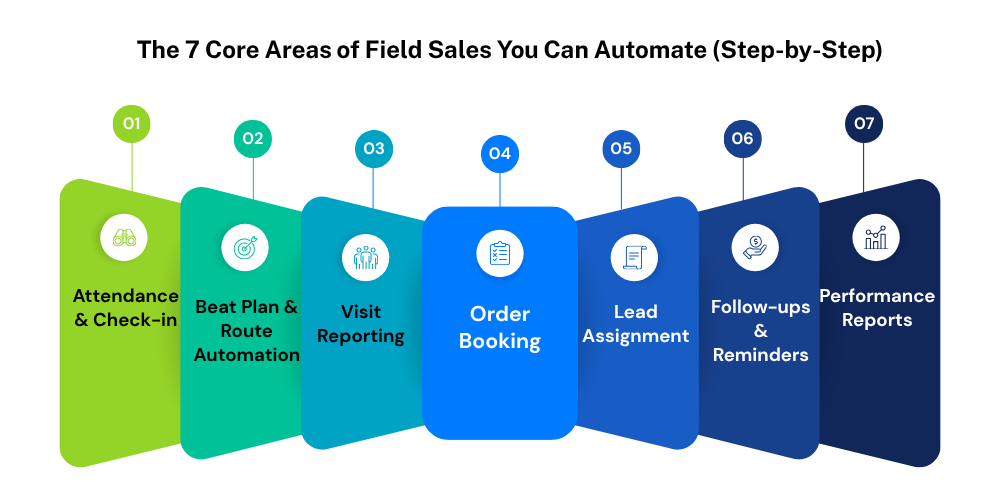
To make this useful, let's break it down into seven main areas of field sales that you can automate one at a time. Each of these areas has a direct effect on productivity, accountability, and revenue. Together, they make up the basis for a field sales system that can grow.
1. Attendance & Check-in Automation
Tracking attendance may seem like a simple task, but in field sales, it’s critical for accountability and real-time visibility. With manual systems, attendance is often tracked through calls, messages, or simple logs, which can be inaccurate and hard to verify. Attendance management changes this completely. Using mobile apps with GPS and geo-fencing, field reps can mark their presence directly from their assigned locations. Check-ins are automatically validated, ensuring accuracy and eliminating the need for manual follow-ups. Managers get instant visibility into who is present, where reps are, and which areas have been covered.
What it is:
Attendance and check-in automation uses mobile apps with GPS to let field reps mark their presence right from where they are supposed to be. With geo-fencing, check-ins are only valid if they are made from the right place, which makes sure they are correct and clear.

What it replaces
It replaces manual attendance logs, verbal check-ins, and unreliable reporting methods where managers have no real proof of field activity.
How to set it up
Start by assigning territories or specific locations to each rep. Enable geo-fenced check-ins so that attendance is automatically recorded only when the rep is physically present within the defined area. This ensures that check-ins are both accurate and tamper-proof. Managers can then monitor attendance in real time without needing to follow up individually.
Over time, this creates a culture of accountability while also reducing the need for constant supervision.
2. Beat Plan & Route Automation
Poor route planning is one of the most common but often ignored problems in field sales. When reps plan their own routes based on what they usually do or what works best for them, it can lead to unnecessary travel, missed visits, and uneven coverage.
What it is:
Beat plan and route automation uses data to create optimized daily schedules for reps, ensuring that they visit the right clients in the most efficient sequence.
What it replaces
It replaces manual route planning, guesswork, and inconsistent coverage across territories.
How to set it up
Start by uploading your client database with correct information about where they are. Set priorities based on things like how valuable a client is, how urgent their needs are, or how often they come in. The system then makes the best routes on its own, which means they take the least amount of time and cover the most area.
This not only makes things run more smoothly, but it also makes sure that important clients are never missed. It leads to better territory management and more organized fieldwork over time.
3. Visit Reporting Automation
Visit reporting is one of the biggest friction points in manual field sales processes. Reps often delay reporting until the end of the day, leading to incomplete data, forgotten details, and inconsistent formats.
What it is:
Visit reporting automation enables reps to capture and submit visit details instantly through mobile apps immediately after each client interaction.
What it replaces
It replaces paper-based forms, scattered notes, and end-of-day Excel reporting.
How to set it up
Make sure that all reps fill out the same digital forms after each visit. These forms can have sections for things like customer feedback, products talked about, orders placed, and next steps. You can also turn on photo or audio capture to prove that you were there and give more information.
Managers can see what's going on in the field in real time because reports are sent right away. This lets people make decisions more quickly and act right away if they need to.
This also makes data more consistent over time and gets rid of the need for manual compilation.
4. Order Booking Automation
In many field sales setups, order booking is still handled manually, which leads to delays, errors, and lost opportunities. By the time the order reaches the backend team, there may already be discrepancies or stock issues.
What it is:
Order booking automation allows reps to place orders directly from their mobile devices during client visits, with real-time synchronization to backend systems.
What it replaces
It replaces handwritten orders, delayed data entry, and manual coordination between sales and operations teams.
How to set it up:
Start by integrating your product catalog into the system, including pricing and stock availability. Enable real-time inventory visibility so reps can provide accurate information to clients during the visit. Once an order is placed, it is instantly synced with the backend, and invoices can be generated automatically.
This significantly reduces order processing time and improves accuracy. It also enhances the customer experience by providing faster confirmations and fewer errors.
5. Lead Assignment Automation
Lead management is another area where manual processes create delays and inefficiencies. When managers assign leads manually, it often leads to uneven distribution, slower response times, and missed opportunities.
What it is:
Lead assignment automation uses predefined rules to automatically distribute leads to the most suitable reps.
What it replaces
It replaces manual lead allocation, which is time-consuming and prone to bias or delays.
How to set it up
Define assignment criteria such as geographic territory, rep availability, workload, or performance metrics. Once configured, the system automatically routes new leads to the appropriate rep in real time.
This ensures that leads are acted upon quickly and that no opportunity is left unattended. It also creates a more balanced workload across the team, improving overall efficiency.
6. Follow-up & Reminder Automation
In field sales, consistent follow-ups are critical for closing deals and maintaining relationships. However, in manual systems, follow-ups often depend on memory or scattered notes, making them unreliable.
What it is:
Follow-up and reminder automation ensures that every interaction is tracked and followed up with timely notifications and alerts.
What it replaces
It replaces memory-based tracking and unstructured follow-up processes.
How to set it up
Based on the type of interaction, like a new lead, a client visit, or an order that is still pending, set follow-up deadlines. Set up automatic reminders that let reps know about tasks that are due or coming up. Managers can also keep an eye on the rates of follow-up completion to make sure everyone is responsible.
This makes it possible to follow up with every lead and client, which over time greatly increases conversion rates.
7. Performance Report Automation
Performance tracking is essential for managing any sales team, but manual reporting makes it slow, inconsistent, and reactive. Automated performance tracking allows for faster decisions, early identification of trends, and proactive intervention when needed
What it is:
Performance report automation provides real-time dashboards and automatically generated reports that give managers instant visibility into team performance.
What it replaces
It replaces manual data compilation, Excel-based reporting, and delayed performance reviews.
How to set it up
Define key performance indicators such as number of visits, conversions, revenue generated, and follow-up completion rates. Configure the system to generate reports on a daily, weekly, or monthly basis. Managers can access these insights through dashboards without needing to compile data manually.
This allows for faster, data-driven decisions and helps identify trends, gaps, and opportunities much earlier.
How to Build Your Field Sales Automation Workflow
It's not enough to just buy software or turn on features to automate your field sales process. You need a structured framework that shows how your current operations work, finds areas where they are inefficient, and systematically puts automation into place in order to see measurable results.
Phase 1: Audit: Identify Every Manual Task
The first step is to understand what’s happening today. Audit every activity that your field reps and managers perform daily. This includes:
-
Attendance tracking
-
Client visits
-
Reporting and data entry
-
Order booking
-
Follow-ups and reminders
The goal is to find tasks that waste time, slow things down, and are done over and over again. Find tasks that take a long time but don't add much value. Often, these are the easiest wins for automation.
Tip: Make a spreadsheet with all of your tasks, the amount of time you think you'll spend on each one, how often you'll do them, and the problems that come up with them. Write down the three activities that take up the most time; these are the ones you should start automating.
Phase 2: Map: Compare Current vs Ideal Workflow
Once you know what’s being done manually, the next step is to visualize it. Draw a simple before-and-after workflow diagram:
-
Current workflow: Illustrates all manual steps, handoffs, and delays
-
Ideal workflow: Shows the same process with automation tools in place
This map shows you where automation can cut down on duplicate work, make fewer mistakes, and speed up tasks. It also makes sure that your team understands how things work and agrees with the new system.
For example, instead of having reps turn in paper visit reports at the end of the day, the best workflow would have them submit reports digitally right away, which would go straight into dashboards and cut down on delays and mistakes.
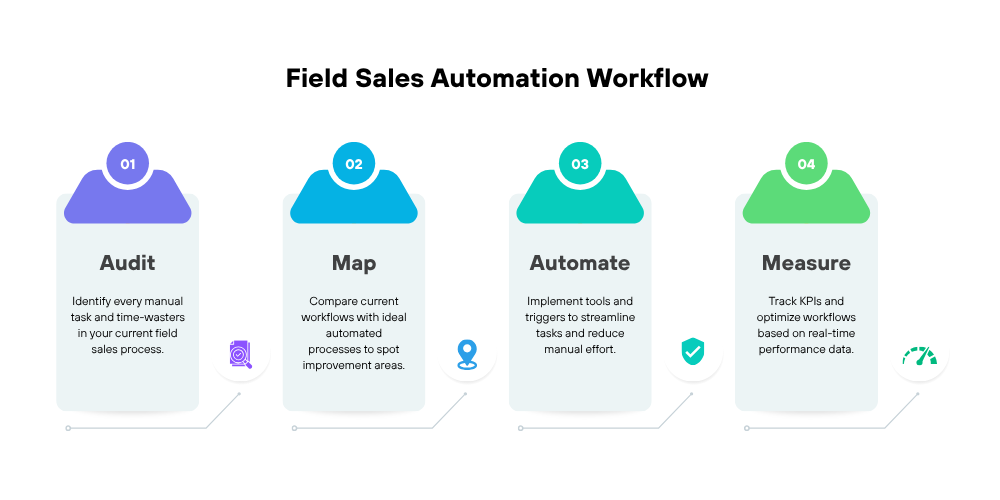
Phase 3: Automate: Implement Tools and Triggers
Now comes the execution phase. Based on your audit and workflow map, implement automation tools and configure workflows:
-
Choose tools that integrate with your existing systems (CRM, ERP, inventory)
-
Set up triggers for key actions like check-ins, order placements, follow-ups, or lead assignments.
-
Train your reps on mobile apps, dashboards, and automated reporting systems
-
Configure alerts for managers to monitor performance in real time
Tip: Start with one or two high-impact areas first (like attendance automation or visit reporting) and expand gradually. Early wins build confidence and adoption among your team.
Phase 4: Measure: Track Performance and Optimize
Automation is not a “set and forget” process. To get real results, you need to measure its impact continuously:
-
Track KPIs such as time saved, report accuracy, visit completion rate, and order processing speed
-
Compare performance before and after automation
-
Identify new bottlenecks or areas for further improvement
Regular measurement ensures that automation is delivering value and provides data to optimize workflows over time
Tools & Software That Power Field Sales Automation
The tools that support field sales automation are what make it work. If your team is using the wrong software or systems that don't talk to each other, even the best-planned workflow will fail. The right tools make sure that your salespeople can focus on selling, managers can see what's going on in real time, and everything runs smoothly.
To choose the right tech stack, you need to know both the types of tools that are out there and the features that are actually useful in the field. Let's go through it step by step.
Key Tool Categories
-
Field Sales Apps
Field sales apps are what make automation possible for teams in the field. Sales reps can manage everything about their day from their smartphones or tablets with these mobile-first apps. These apps are great because they combine many tasks like attendance, reporting, order management, and follow-ups into one platform that the rep can use from anywhere. They allow reps to:-
Check in and out of client locations using GPS or geo-fencing
-
Capture visit reports instantly
-
Book orders in real time
-
Receive automated reminders and follow-ups
-
-
CRM with Automation Capabilities
Modern CRMs go far beyond simple contact management. When integrated with automation features, they become the central hub for all field sales activity. A robust CRM ensures that leads, client interactions, and orders are tracked, assigned, and followed up automatically, reducing manual intervention and improving response times. Integrated CRMs help:-
Automatically assign leads to reps based on territory, workload, or performance
-
Schedule follow-ups and send automated reminders
-
Track client interactions in real time
-
Sync sales data across other systems like inventory, billing, or ERP
-
-
Route & Beat Optimization Tools
Time spent traveling between clients is often one of the largest inefficiencies in field sales. Beat and Route optimization tools reduce wasted travel time while maximizing client coverage. These tools automatically generate the most efficient sequence of client visits based on location, priority, or urgency. Route optimization software:-
Automatically plans the most efficient daily routes
-
Prioritizes high-value or urgent clients
-
Minimizes travel time and operational costs
-
-
Reporting Dashboards
Real-time dashboards transform raw sales data into actionable insights. Instead of waiting for end-of-day spreadsheets, managers can monitor:-
Number of client visits completed
-
Orders booked and processed
-
Follow-up completion rates
-
Overall team productivity
-
-
Communication Tools
Automation handles workflows, but human communication is still essential. Integrated messaging platforms or in-app notifications ensure:-
Reps and managers stay connected
-
Alerts and reminders are delivered instantly
-
Updates are consistent and easy to track
-
Key Features to Look For
When evaluating software for your field sales team, these features are essential for true automation:
-
GPS Tracking: Confirms geo-fenced attendance and visit accuracy
-
Offline Mode: Essential for remote areas with limited internet
-
CRM Integration: Keeps all customer and sales data in sync
-
Custom Form Builder: Allows reps to capture relevant client information efficiently
-
Manager Dashboard: Provides visibility into team performance and productivity
-
Mobile-First Design: Ensures usability in the field, even on low-end devices
Choosing software without these features often leads to low adoption and wasted investment.
What to Avoid
Selecting the wrong tools can set your automation efforts back:
-
Overly Complex Tools: Reps may resist adoption if the interface is confusing
-
Tools Without Offline Mode: Field teams often work in areas with poor connectivity; offline capability is critical
-
No Mobile App: Field sales requires mobility; desktop-only software won’t work
-
Lack of Integration: Disconnected systems create silos and manual work, defeating the purpose of automation
By carefully choosing the right mix of tools and features, your team can get seamless automation, real-time reporting, and measurable increases in productivity. Automating field sales isn't just about making tasks digital; it's also about creating a system that keeps track of, improves, and makes every task possible.
For a detailed comparison and buyer’s guidance on selecting the right software, check out our Field Sales Management Software Guide.
Real Results: What Automation Looks Like in Practice
Numbers tell a story, but nothing resonates more than real-world results. Field sales automation transforms day-to-day operations, but seeing the measurable impact on time, efficiency, and revenue makes it tangible for managers and business owners.
Here’s how automation changes the game for field sales teams.
A Mini Case Study: Scaling Without Adding Headcount
Consider a mid-sized FMCG company with 50 field reps spread across multiple regions. Before automation, managers spent hours each day chasing updates, compiling spreadsheets, and coordinating between reps. Reports were delayed, follow-ups were missed, and travel inefficiencies caused frequent client dissatisfaction.
After implementing a comprehensive field sales automation solution, the company observed dramatic improvements:
-
Reporting time per rep reduced from 1 hour/day to just 10 minutes
-
Number of client visits increased by 20% per week
-
Follow-ups missed dropped from 15% to less than 2%
-
Order processing speed improved, with real-time entry eliminating delays in fulfillment
This transformation didn’t require hiring additional staff. By automating repetitive tasks, the team focused on selling instead of reporting, allowing managers to scale operations without increasing headcount.
Before vs After Automation
A comparison of field sales performance before and after automation clearly shows how significantly operations improve with the right tools in place. Before automation, sales reps typically spend around 60 minutes on daily reporting, whereas automation reduces this to just 10 minutes through instant digital updates. The number of client visits per week also increases from 80 to 96, as optimized routes and better planning help reps cover more ground efficiently. Missed follow-ups, which can be as high as 15% in manual systems, drop sharply to around 2% with automated reminders and alerts ensuring timely engagement.
Order processing time is another major area of improvement, shifting from a 24-hour delay in manual setups to real-time processing with mobile order entry and live data sync. Manager visibility, which is often low or delayed due to dependence on manual reports, becomes seamless with real-time dashboards that provide instant insights into team activities and performance. Overall, this comparison highlights that automation enhances every aspect of field sales operations, from productivity and responsiveness to customer satisfaction and revenue growth.
Testimonial
We were looking for an app that could help us have control over our sales team and could have the tools to support sales in the field. I was very impressed with the solution set that was offered but even more impressed with the level of support I received. I am excited with the possibilities of what we can do with the Delta Sales App.
David Mason (Delicioso Food)
Why This Matters
These results are not unique. Any field sales team can achieve similar outcomes by automating:
-
Attendance and check-ins
-
Visit reporting
-
Order booking
-
Follow-ups and reminders
-
Performance tracking
Automation converts time spent on admin into time spent selling, while providing managers with the insights they need to make data-driven decisions. The outcome is a scalable, efficient, and highly accountable field sales operation.
Common Mistakes to Avoid When Automating Field Sales
Field sales automation can change your business for the better, but you can't just plug it in and go. A lot of companies buy software and expect to see results right away, but they often find that it takes a long time to get people to use it, that bugs keep happening, or that the benefits aren't realized. Most of the time, these failures aren't because of the technology itself; they're because of mistakes that could have been avoided in planning, implementation, or management.
These are the most common mistakes and how to avoid them.
1. Automating Before Fixing Broken Processes
One of the biggest mistakes is trying to automate a process that isn't working or is broken from the start. Automation makes things that are already there bigger. If your sales process is messy, has steps that are repeated, or needs manual approvals, just putting it online won't fix the problems.
For example, if salespeople are spending hours updating Excel sheets with incomplete client information, automating the same broken process will just make digital copies of bad data.
First, do a full audit of your workflow. Find steps that are unnecessary, bottlenecks, or responsibilities that are not clear. You should only use automation after you've made the process easier. This makes sure that the tool makes things easier instead of harder.
2. Not Training Reps on the New Tool
Even the most sophisticated automation software is useless if field reps don’t know how to use it properly. Insufficient training leads to incomplete or incorrect data, inconsistent adoption, and frustration among the team.
Example: A rep may continue taking handwritten orders because they are uncomfortable with the new mobile app, defeating the purpose of automation.
Solution: Create a structured training program that includes
-
Step-by-step tutorials or video guides
-
Hands-on workshops for practical application
-
Continuous support channels for questions or troubleshooting
-
Incentives for correct and timely usage
Proper training ensures the team embraces the new system, maximizing ROI from day one.
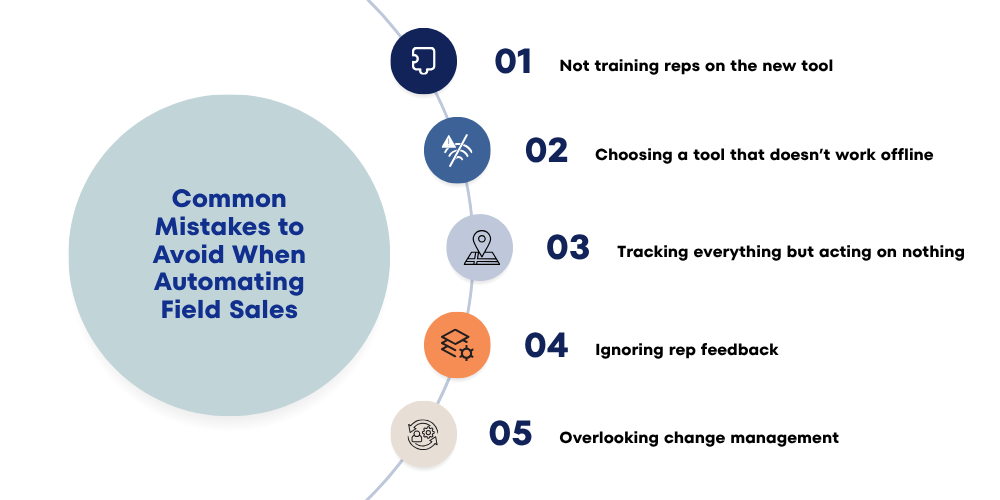
3. Choosing a Tool That Doesn’t Work Offline
Field sales often occur in areas with poor or unreliable internet connectivity. Tools that require a constant online connection will fail, leaving reps unable to check in, submit reports, or process orders.
Example: A rep in a rural area may miss submitting multiple client visits because the app cannot sync offline, leading to data gaps and delayed decision-making.
Solution: Choose a mobile-first solution that supports offline data entry and automatically syncs when connectivity is restored. This ensures reps remain productive no matter where they are working.
4. Tracking Everything but Acting on Nothing
Automation tools can generate a massive amount of data: GPS tracking logs, order histories, visit reports, performance dashboards, and more. However, collecting data alone doesn’t improve performance. Many managers make the mistake of tracking metrics without using them to drive decisions, leading to wasted effort.
Example: You may have daily visit data from all reps but still rely on verbal updates rather than analyzing trends to improve efficiency.
Solution:
-
Define clear KPIs for your team (e.g., visit completion rate, order processing speed, follow-up adherence)
-
Regularly review dashboards and reports
-
Identify bottlenecks or underperforming areas
-
Implement corrective actions based on insights
Automation is most effective when data drives action, not just reporting.

5. Ignoring Rep Feedback
Your field sales team are the end users of your automation tools. Ignoring their feedback can lead to frustration, underutilization, and resistance, even if the tool is technically capable.
Example: A manager may configure a rigid reporting form that’s difficult to fill on the move, causing reps to skip entries or input incomplete data.
Solution:
-
Involve reps during the rollout process
-
Collect feedback on usability, challenges, and missing features
-
Iterate the system to make it intuitive and aligned with their workflow
-
Encourage continuous feedback loops for ongoing improvement
Engaging reps early and incorporating their input leads to higher adoption, better data quality, and a more productive team.
6. Overlooking Change Management
A less obvious but critical mistake is underestimating the cultural and behavioral change required to adopt automation. Even the best software will fail if your team is not ready to adapt to new workflows.
Solution:
-
Communicate the benefits clearly to your team: less manual work, more selling time, faster approvals
-
Celebrate early wins to build confidence
-
Provide continuous support during the transition period
Change management ensures that automation becomes part of the daily routine rather than an optional add-on.
Conclusion
Field sales automation isn't just a new piece of technology; it's a new way of doing things that lets your team work faster, sell smarter, and do their jobs with confidence and clarity. This playbook shows how manual processes can add hidden costs like missed chances, lost selling time, mistakes in reports, and decisions that take too long. The Delta Sales App is a full-featured field sales automation platform that makes sales work easier on the ground. The app brings together GPS-based attendance and route tracking, automated visit reports, real-time order entry, performance dashboards, and deep analytics into one mobile-first solution. It works without an internet connection and syncs data perfectly, giving managers a complete picture of what's going on in the field and letting reps focus on selling instead of paperwork.
Ready to see it in action?
Book a free demo to experience how field sales automation can accelerate your team’s productivity and give you complete control over your field operations.