
How Can Industrial Distributors Automate Their Order Management Process?
Industrial distributors work in a sales environment. They need to handle product lists, special prices for customers' large orders, stock levels, shipping times, and how payments are made while making sure salespeople and office staff are on the same page. As more customers join, doing all these tasks by phone with spreadsheets, paper orders, and typing everything in by hand gets harder and harder.
A rep might collect an order from a retailer or industrial buyer, and the office doesn’t see it until the end of the day. By then, the inventory team may have allocated the same stock to another customer, the order entry team may have keyed in the wrong quantity, or the delivery team may have missed the dispatch window.
These problems are not always caused by sales performance. Often they come from an order management process that relies heavily on manual coordination. Order management automation helps industrial distributors record, check, process, and follow orders through a linked flow. It cuts down paperwork, makes order visibility clearer, and lets sales, inventory, finance, and delivery teams use more dependable data. For distributors who manage field sales representatives in many territories, automation also links customer visits with order booking, distributor stock visibility, and sales reporting.
This blog explains how industrial distributors can automate their order management process, which workflows to focus on, what features to check, and how to put automation in place without stopping operations.
Where Manual Order Management Breaks Down
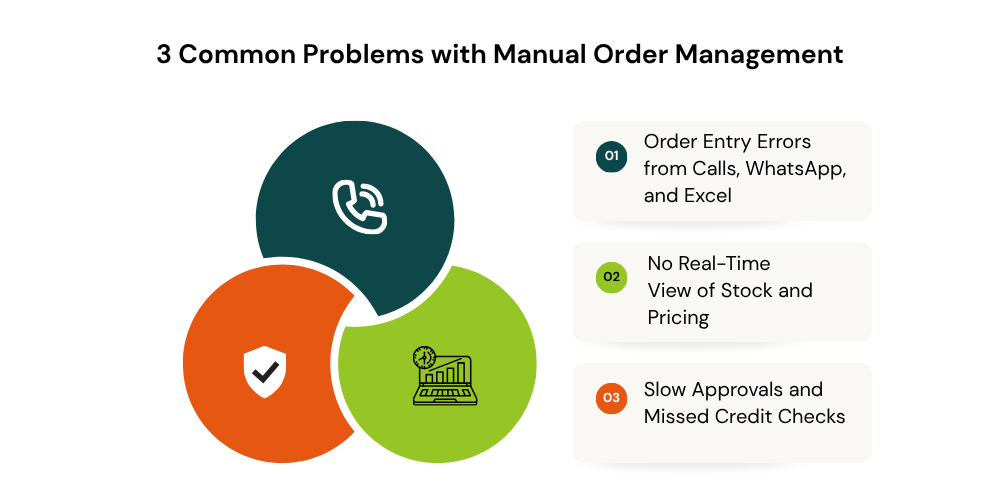
Manual order management becomes harder to control as distributors expand their customer base, product range, and territory coverage. The main problems usually involve inaccurate order entry, limited stock visibility, and delayed approvals.
-
Order Entry Errors from Calls, WhatsApp, and Excel
When reps write orders on paper or send details through messages, someone in the back office has to type them into business systems by hand. That’s where wrong SKUs, quantities, prices, and delivery details creep in. Excel makes it worse when several employees keep their own versions of customer and order records. Digital order booking cuts repeated data entry and keeps one central record of customer orders. Distributors transitioning from spreadsheets can explore Excel to Field Sales App for guidance on moving to a more structured workflow.
-
No Real-Time View of Stock and Pricing
Representatives might end up booking products that're not available or quoting prices that are no longer correct. This happens when they don’t have access to up-to-date inventory levels or the right pricing for each customer. When order management is connected to inventory and pricing systems, representatives can see what’s in stock, use the approved rates, and make sure delivery promises are realistic. The quality of these choices depends on how the linked systems are updated.
-
Slow Approvals and Missed Credit Checks
Manual approval requests get stuck across calls, emails, and messages. Reps who can’t see reliable customer credit information may also submit orders that go over approved limits. Automated validation flags exceptions before fulfillment and sends them to the right manager or finance employee. Routine orders move through standard rules, and only unusual discounts and credit issues need review.
How to Automate Order Management: Step by Step
Industrial distributors can automate order management in stages, beginning with digital order capture and expanding into validation, approvals, integration, and collections.
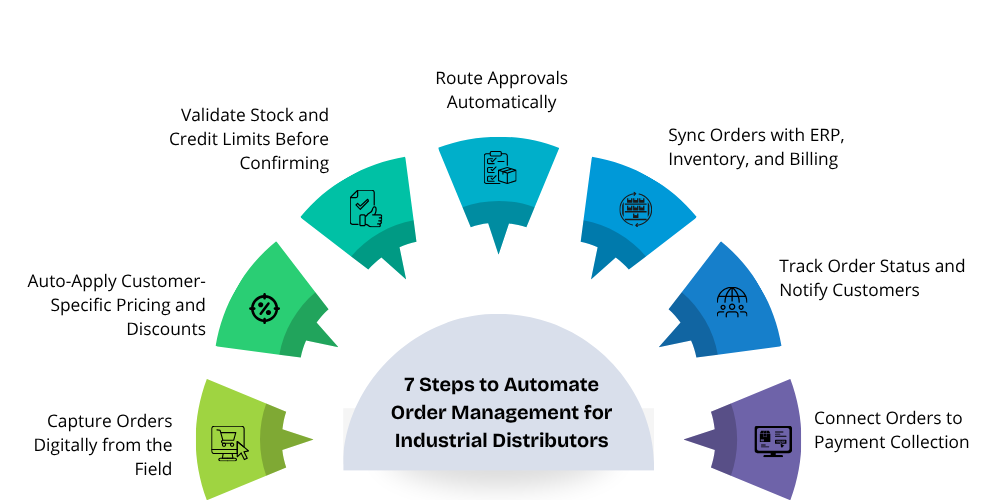
Step 1: Capture Orders Digitally from the Field
Give reps a mobile app where they can pick a customer, choose products, enter quantities, and submit the order during the visit. Digital booking cuts transcription errors and gets order information to the office sooner. Purchase history also helps reps spot repeat-order opportunities. In territories with unreliable connectivity, check whether the app supports offline order capture and reliable syncing.
Step 2: Auto-Apply Customer-Specific Pricing and Discounts
Industrial distributors often work with negotiated prices, customer-specific rates, and volume discounts. Checking each of these by hand on every order slows things down and invites pricing errors. Order management software can apply configured pricing rules and flag discounts that go past authorized limits. For that to work consistently, price lists have to be accurate and approval policies clearly defined.
Step 3: Validate Stock and Credit Limits Before Confirming
Before an order moves forward, the distributor should confirm the product is available and check the customer's credit position. Connected inventory data points to shortages, and credit checks flag orders that exceed approved limits or need finance review. Decide ahead of time how partial fulfillment, backorders, outstanding invoices, and pending payments will be handled.
Step 4: Route Approvals Automatically
Set approval rules for exceptional discounts, large orders, credit-limit breaches, and special commercial terms. The system can send each request to the responsible manager or finance employee and record the decision. Clear response times and escalation rules keep approvals from turning into another bottleneck.
Step 5: Sync Orders with ERP, Inventory, and Billing
Integrating order management with ERP, inventory, and accounting systems cuts duplicate data entry and keeps records consistent. Depending on the integration, order details can flow into the right systems for processing, invoicing, and fulfillment. Decide ahead of time how failed syncs, duplicate submissions, cancellations, and order amendments will be handled.

Step 6: Track Order Status and Notify Customers
A central order tracking workflow lets employees see whether an order is submitted, approved, processed, dispatched, or delivered. Automated alerts can tell the responsible team when an order needs attention. Where the platform supports it, customer notifications can confirm orders and send dispatch updates, which means fewer follow-up calls.
Step 7: Connect Orders to Payment Collection
Order management should connect with payment follow-up so representatives can understand customer outstanding balances and collection commitments. When reliable financial data is available, sales teams can prioritize overdue accounts and record collection activities alongside customer interactions. Explore payment collection for industrial distributors for more detail.
What Features Should You Look for in Order Management Software?
The right platform should support field sales activities, connect with existing business systems, and provide visibility into orders from booking through fulfillment.
-
Mobile Order Booking with Offline Mode
Look for mobile order capture, searchable product catalogs, customer purchase history, and clear order status indicators. Offline mode matters for reps who work where connectivity can't be trusted. Check how pending orders sync and how the app deals with duplicate submissions or changes to product and pricing information.
-
ERP, Inventory, and Billing Integration
Pick software that can exchange the right order information with your current ERP, inventory, and billing systems. Confirm which integrations are supported, how often they sync, and how errors get handled. Test the full workflow before implementation instead of trusting general integration claims.
-
Credit Limit and Outstanding Control
Distributors that sell on credit should check for customer balance visibility, credit-limit alerts, and approval rules for exceptional orders. Find out whether financial information comes straight from an accounting or ERP system and how often it refreshes. Outdated balances lead to bad approval decisions.
-
Order Tracking and Reporting
Managers need visibility into order values, pending approvals, cancellations, processing time, and fulfillment performance. Reporting by customer, SKU, territory, and representative helps identify operational bottlenecks and sales opportunities. Learn how these insights connect with field activity in how to track sales rep performance in industrial distribution.
How Delta Sales App Automates Order Management for Industrial Distributors
Industrial distributors can simplify order management by recording customer orders digitally, tracking order status, and connecting order data with field sales activities. Delta Sales App provides field sales order management features that help teams reduce manual work, organize orders, and improve visibility into sales operations.
-1793162783.png)
-
Order Booking and Pricing Control in the Field
Delta Sales App lets field reps record customer orders directly in the mobile app, so they don't have to depend on handwritten notes and manual data entry. Reps can also check a customer's credit limit and outstanding balance while placing an order, which helps them make better calls during the visit.
-
Order Tracking and Sales Activity Visibility
Sales managers can view orders and filter them by employee, date, or customer, and they can follow order status from one central platform. That makes it easier to chase pending orders and review sales activity without stitching together reports from different reps by hand.
- Payment Collection and Field Sales Reporting
Order management becomes more useful when connected with payment follow-ups and sales reporting. Delta Sales App includes payment collection management, customer visit monitoring, beat planning, and automated reports to help managers understand field activities and review team performance. The app also supports offline work, with data syncing when an internet connection becomes available
Final Thoughts
Growing order volumes don't call for more manual follow-ups. Industrial distributors need a process that carries accurate order information from the customer to the sales team, inventory, finance, and the warehouse without delays or repeated data entry. A practical starting point is to digitize order reporting, standardize customer and product information, set clear approval rules, and improve visibility into order status. From there, inventory sync, ERP integration, automated reporting, and exception management can strengthen the whole workflow.
For distributors that rely on outside sales teams, field sales automation is a big part of that improvement. It connects customer visits, order booking, territory coverage, and sales performance in one view.
Want better order visibility and field sales execution? Book a free demo and explore how Delta Sales App can support your distribution team's sales operations.