
The Complete Guide to Inventory Management Software: Track Stock, Prevent Stockouts & Automate Replenishment in 2026

Inventory mismanagement is one of the most expensive yet often overlooked problems in modern supply chains. Studies show that global retailers lose nearly $1 trillion in sales every year due to stockouts, while inventory inaccuracies and manual tracking errors continue to disrupt demand forecasting and operational planning. When businesses rely on outdated spreadsheets or delayed stock updates, even small mistakes can quickly turn into lost revenue and dissatisfied customers.
For companies operating in fast-moving industries such as FMCG distribution, manufacturing, and retail supply chains, inventory visibility is no longer optional, it is a competitive necessity. A delayed stock update, incorrect inventory count, or missed replenishment cycle can lead to empty shelves, frustrated retailers, and lost market share.
This is where modern inventory management software becomes essential. By providing real-time stock visibility, automated low-stock alerts, demand forecasting, and replenishment automation, these systems help businesses maintain optimal inventory levels and prevent costly stock disruptions.
In this complete guide, we will explore everything you need to know about inventory management software in 2026, including how it works, its key features, industry applications, and how to select the right platform for your organization.
Who This Guide Is For
This guide is designed for professionals and organizations that manage complex inventory and distribution operations, including:
-
Distributors and wholesalers managing multi-location inventory
-
FMCG brands handling high-volume, fast-moving products
-
Manufacturers coordinating production and supply chain inventory
-
Field sales-driven businesses that rely on accurate stock visibility during retail visits
If your business struggles with stockouts, excess inventory, inaccurate stock data, or slow replenishment cycles, this guide will help you understand how the right inventory management system can transform your operations.
What Is Inventory Management Software?
Inventory management software is a digital solution designed to track, monitor, and control stock levels across warehouses, distributors, and retail locations. It helps businesses maintain accurate inventory records, optimize stock availability, and ensure products are available when customers need them.
While many businesses still rely on spreadsheets for inventory tracking, modern inventory management software goes far beyond basic stock lists. Spreadsheets require manual updates, are prone to human error, and often lack real-time visibility. As businesses grow and manage more products, warehouses, and distribution channels, spreadsheet-based systems become inefficient and difficult to maintain.
Modern inventory management software solves these challenges by providing centralized inventory visibility and automation tools that help businesses manage stock more effectively.
Instead of manually updating stock levels, the system automatically updates inventory whenever products are sold, dispatched, transferred between warehouses, or received from suppliers. This ensures that inventory records always reflect the actual stock available across the supply chain.
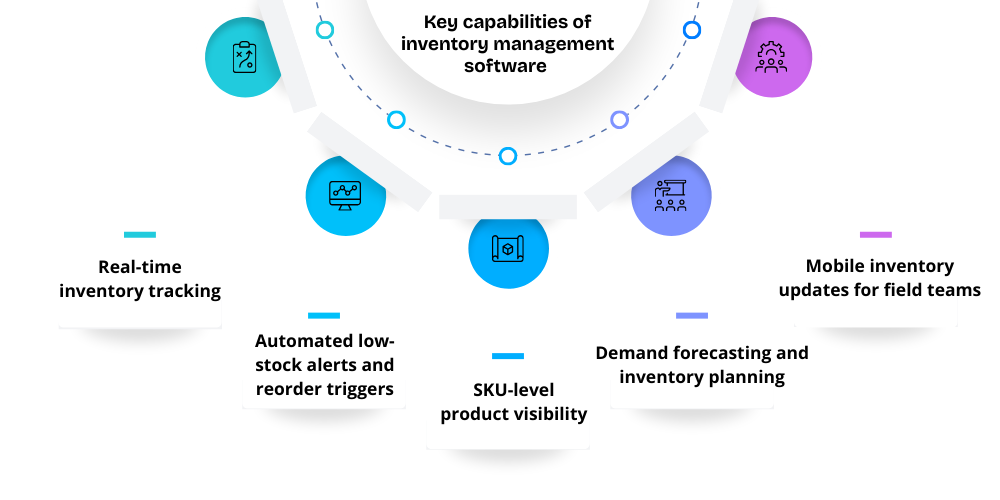
Key capabilities of inventory management software
The key capabilities of Inventory Management Software typically include:
Real-time inventory tracking
Businesses can instantly monitor stock levels across multiple warehouses, distributors, and retail locations, ensuring accurate visibility and eliminating discrepancies in real time.
Automated low-stock alerts and reorder triggers
The system automatically notifies managers or triggers replenishment workflows whenever inventory falls below thresholds, preventing stockouts and ensuring uninterrupted product availability.
SKU-level product visibility
Companies can track individual SKUs, product variants, and batch numbers, providing granular insights for effective inventory control and operational planning.
Demand forecasting and inventory planning
Advanced software analyzes historical sales patterns to forecast future demand accurately, enabling businesses to optimize inventory levels and reduce excess stock.
Mobile inventory updates for field teams
Field sales and warehouse staff can update stock information, perform audits, and verify product availability in real time using mobile devices efficiently.
These capabilities help organizations reduce stock discrepancies, improve order fulfillment, and ensure efficient inventory planning.
Inventory management software is widely used by businesses operating in complex supply chains, including:
-
Wholesalers managing bulk product distribution
-
Distributors coordinating inventory across multiple channels
-
FMCG manufacturers handling large product catalogs and fast-moving goods
-
Retailers ensuring consistent product availability across stores
To understand the broader concept and its role in sales operations, explore inventory management in field sales.
The Real Cost of Poor Inventory Management
Inventory problems rarely appear suddenly. More often, they start as small inaccuracies in stock counts, delayed updates, or mismanaged replenishment schedules. Over time, these issues compound, creating operational inefficiencies, lost revenue, and frustrated customers. For businesses operating in fast-moving sectors like FMCG, distribution, and retail, the consequences of poor inventory management can be severe.
Stockouts: Lost Revenue, Retailer Churn, and Brand Damage
Stockouts occur when products are unavailable for sale at the point of demand. They are among the most costly and visible consequences of poor inventory visibility. Retailers often replace unavailable products with competitors’ brands, causing immediate revenue loss and damaging long-term business relationships.
The impact of stockouts includes:
-
Lost immediate revenue, as sales opportunities are missed the moment products are unavailable.
-
Reduced shelf space, as retailers favor brands that reliably meet demand.
-
Damaged distributor relationships, because repeated stockouts reduce trust and reliability.
-
Lower brand loyalty, as consumers may switch to more consistently available alternatives.
For a more detailed analysis of stockouts and their effect on sales, see how stockouts hurt your sales.
Overstocking: Tied-Up Cash, Expiry Losses, and Storage Costs
While stockouts are costly due to missed sales, overstocking creates its own financial burden. Overstocking happens when businesses overestimate demand or fail to adjust inventory based on real-time sales data.
Consequences of overstocking include:
-
Excess inventory sitting idle in warehouses, tying up valuable working capital.
-
Higher storage and handling costs, increasing operational overhead.
-
Expiry losses in industries like FMCG and pharmaceuticals, where products have limited shelf life.
-
Reduced cash flow, as funds are locked in unsold stock rather than being available for other operational needs.
Manual Errors: Inaccurate Stock Counts and Delayed Decisions
Many businesses still rely on manual processes or spreadsheets for inventory tracking. These methods are highly prone to human error and often fail to provide real-time stock visibility.
Common issues caused by manual tracking include:
-
Incorrect stock counts, leading to either overstock or stockouts.
-
Delayed replenishment decisions, resulting in missed sales opportunities.
-
Inaccurate demand forecasts, making it difficult to plan production or purchases.
-
Poor visibility for leadership, limiting strategic decision-making and supply chain efficiency.
Modern inventory management software eliminates these risks by automating stock updates, sending low-stock alerts, and providing real-time data across all locations. This not only prevents costly errors but also empowers businesses to make data-driven decisions, improve cash flow, and enhance customer satisfaction.
Key Features to Look for in Inventory Management Software
Not all inventory systems are created equal. While some provide only basic stock tracking, the best inventory management platforms deliver operational visibility across the entire supply chain, from warehouses to distributors and field sales teams. Choosing a system with the right features ensures accurate inventory records, faster decision-making, and improved customer satisfaction.
Here are the most critical features to look for when evaluating inventory management software:
Real-Time Stock Tracking Across Locations
Modern inventory software allows businesses to monitor stock levels across warehouses, distributors, retail outlets, and field sales channels in real time.
This capability ensures that:
-
Stock discrepancies are immediately identified and corrected
-
Replenishment delays are minimized
-
Sales teams and operations managers always have accurate, up-to-date information
Real-time visibility across locations enables faster, more informed decisions, reducing stockouts and improving operational efficiency.
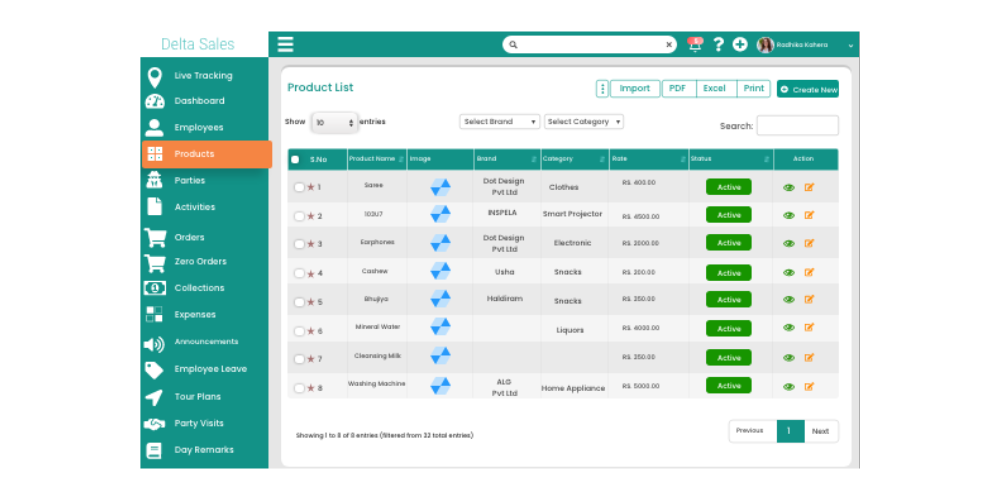
Automated Low-Stock Alerts and Reorder Triggers
Automated low-stock notifications are essential for preventing stockouts and maintaining smooth operations.
Inventory management software can:
-
Trigger alerts when stock falls below predefined thresholds
-
Automatically generate purchase orders for replenishment
-
Reduce the risk of lost sales and dissatisfied customers
-
Improve service levels by ensuring products are consistently available
By eliminating manual stock checks, businesses can maintain optimal inventory levels without constant oversight.
SKU-Level Visibility and Product Catalogue Management
Large businesses often manage thousands of SKUs, making detailed tracking essential. But what is an SKU and how does it work in practice?
An SKU (Stock Keeping Unit) is a unique identifier assigned to each product or product variant in your inventory. It allows businesses to track items individually, including differences in size, color, batch, or packaging. SKUs help in monitoring stock levels, managing replenishment, and analyzing product performance across warehouses, distributors, and retail outlets.
Advanced inventory software provides:
-
Visibility at the SKU, batch, or variant level to ensure accurate tracking of every product in your catalog
-
Management of product categories, batch numbers, and expiry dates to minimize losses and prevent stockouts
-
Historical stock movement tracking for accurate demand forecasting and better purchasing decisions
-
Tools to organize and maintain product catalogs efficiently, enabling teams to quickly access product information and monitor inventory health
For a deeper understanding of SKU-level inventory management strategies, explore inventory and SKU management, which explains how businesses can optimize stock visibility and operational efficiency.
Sales Order Sync and Auto-Adjustment After Dispatch
Modern systems automatically update inventory when sales orders are placed, dispatched, or delivered, ensuring that stock levels remain accurate across all channels.
This feature helps businesses:
-
Prevent overselling of products
-
Improve order fulfillment accuracy
-
Maintain consistency between warehouse, distributor, and retail stock
Automated syncing eliminates manual reconciliation and provides a single source of truth for inventory data.

Mobile Stock Audits and Offline Mode for Field Teams
Field sales teams and warehouse staff often operate in locations with limited connectivity. Mobile-enabled inventory systems allow teams to:
-
Conduct stock audits directly on mobile devices
-
Verify product availability in real time
-
Confirm order fulfillment or capture returns
-
Update inventory records offline, with automatic syncing once connectivity is restored
This feature ensures field teams remain productive and accurate even in remote or low-connectivity environments.
Multi-Warehouse and Multi-Distributor Support
Businesses with complex distribution networks need inventory software that can manage multiple warehouses and distributor locations simultaneously.
Key benefits include:
-
Centralized visibility of stock across all locations
-
Streamlined replenishment planning between warehouses and distributors
-
Reduced risk of overstocking or stockouts at specific locations
-
Enhanced collaboration across distribution channels
By supporting multi-location and multi-distributor networks, inventory management software ensures end-to-end supply chain efficiency and operational control.
Inventory Management Software for FMCG Distributors
Inventory management in the FMCG sector is uniquely challenging due to high product velocity, large SKU counts, and frequent replenishment cycles. Distributors must manage hundreds or even thousands of SKUs while ensuring that products reach retail outlets on time, remain within expiry limits, and are available to meet fluctuating demand. Without an effective system, FMCG distributors risk stockouts, expired products, and lost revenue.
Modern inventory management software helps distributors overcome these challenges by providing real-time stock visibility, automated replenishment, and detailed SKU-level tracking. Key functionalities that make these systems essential for FMCG distributors include:
High-SKU Environments and Fast Replenishment Cycles
FMCG distributors often deal with large product catalogs and rapid order turnover. Inventory software enables centralized tracking of all SKUs, across warehouses and distribution channels, while automating low-stock alerts and reorder cycles. This ensures that high-demand products are replenished promptly and efficiently, reducing the risk of lost sales.
ABC Analysis and Stock Turnover Rates
Effective FMCG inventory management requires understanding which products drive the most revenue and which move slowly. Advanced systems support ABC inventory analysis, categorizing products as:
-
A category - High revenue, fast-moving products that need tight stock control
-
B category - Moderate demand items that require standard monitoring
-
C category - Slow-moving products with lower priority but still tracked
Tracking stock turnover rates allows distributors to optimize purchasing decisions, reduce excess inventory, and ensure high-demand products are always available.
Expiry Tracking and Compliance
Expiry-sensitive products, such as perishable FMCG goods, require constant monitoring to minimize losses and maintain product quality. Inventory software automatically tracks batch numbers and expiry dates, helping distributors prevent expired stock from reaching retailers and maintain regulatory compliance.
Distributor-Level Stock Visibility
Advanced systems provide real-time inventory dashboards for each distributor, offering insights into stock levels, replenishment needs, and sales performance at an outlet or regional level. This allows FMCG manufacturers and distributors to standardize inventory norms and ensure products are consistently available across all channels.
Explore FMCG inventory management for a deeper dive into effective inventory practices in FMCG distribution, and learn how modern solutions provide smart inventory management for distributors.
How Inventory Software Connects to Your Distribution Network
Inventory does not exist in isolation, it constantly moves across a network that includes manufacturers, distributors, warehouses, and retailers. Without centralized visibility, businesses often face supply chain blind spots, delayed replenishments, and stock discrepancies. Modern inventory management software acts as the connecting hub, ensuring every stakeholder in the supply chain has accurate, real-time information about stock levels and movements.
Primary vs Secondary Stock Visibility

A critical aspect of inventory management is distinguishing between primary and secondary stock:
-
Primary stock: Inventory moving from the manufacturer to distributors, often in bulk quantities.
-
Secondary stock: Inventory moving from the distributor to retailers, ensuring products reach end customers efficiently.
Monitoring both stock levels ensures smooth supply chain operations, prevents delays, and avoids stockouts at retail locations. This concept aligns closely with comprehensive what is distribution management practices, which help businesses coordinate stock movement across multiple layers of the supply chain.
Distributor Inventory Dashboards
Manufacturers benefit from real-time dashboards that provide visibility into distributor inventory levels. These dashboards allow businesses to:
-
Track inventory trends across multiple distributors
-
Trigger replenishment orders automatically before shortages occur
-
Reduce excess stock at distributor locations
-
Ensure consistent product availability at retail outlets
For businesses managing multiple distributors, having clear insights into each distributor’s stock becomes essential when choosing a distributor management system. These systems integrate inventory tracking, sales reporting, and automated replenishment workflows to eliminate blind spots between factories, distributors, and retailers.
By connecting inventory data across all nodes of the supply chain, businesses can streamline operations, minimize stockouts, improve cash flow, and enhance retailer satisfaction, creating a more responsive and resilient distribution network.
Field Sales + Inventory Management: A Winning Combination
Field sales teams play a critical role in ensuring products are available at retail outlets, but their effectiveness depends heavily on real-time access to inventory data. When inventory management software is integrated with field sales tools, sales representatives can make informed decisions on the go, streamline order booking, and improve retail execution.
How Field Reps Use Inventory Data While on the Road
With connected inventory systems, field reps can access real-time stock levels for each outlet directly from their mobile devices. This allows them to:
-
Verify product availability before confirming orders
-
Identify low-stock outlets during store visits
-
Trigger replenishment immediately when inventory falls below critical levels
This visibility ensures that sales teams never leave a retailer underserved, while also preventing overstocking and wasted trips.
Mobile Stock Audits and Real-Time Product Availability Checks
Modern inventory software enables mobile-based stock audits, allowing field teams to capture stock information during store visits. Real-time product availability checks ensure:
-
Accurate data for every SKU at each outlet
-
Immediate updates to central inventory records
-
Faster decision-making for both sales and supply chain teams
This approach reduces manual errors, improves stock accuracy, and keeps retailers satisfied.
Order Booking That Auto-Adjusts Inventory
Integrated systems automatically adjust inventory levels when orders are booked or dispatched. This ensures stock records remain accurate across warehouses, distributors, and field sales channels. Benefits include:
-
Preventing overselling or stock discrepancies
-
Maintaining consistent stock visibility across the supply chain
-
Streamlining order fulfillment processes for faster deliveries
Beat Planning and Stock Replenishment at Outlet Level
Field sales and inventory integration allows for intelligent beat planning, where sales routes are optimized based on stock levels and retailer demand. Replenishment decisions can be prioritized at the outlet level, ensuring high-demand locations are restocked first while reducing excess inventory in slower-moving stores.
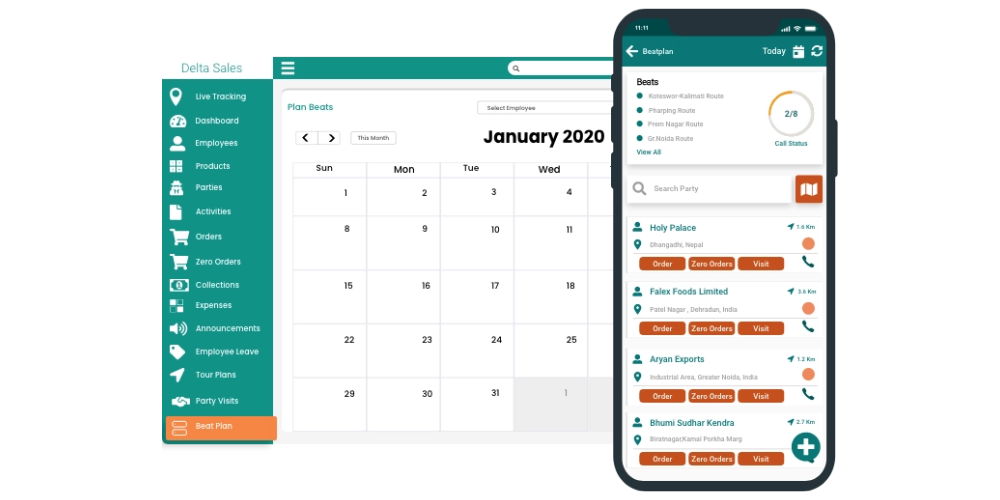
By connecting field operations with inventory management, companies create a data-driven sales ecosystem that improves efficiency, reduces stockouts, and strengthens retailer relationships. For businesses looking to tackle operational inefficiencies, see how inventory integration supports retail execution and supply chain challenges.
Inventory KPIs Every Sales Leader Should Track
Effective inventory optimization requires continuous monitoring of key performance metrics. By tracking the right KPIs, sales and operations leaders can make data-driven decisions, reduce stockouts, improve cash flow, and maintain high service levels across the supply chain.
Some of the most important inventory KPIs include:
Stock Turnover Rate
The stock turnover rate measures how frequently inventory is sold and replenished within a specific period. A high turnover indicates that products are moving quickly, while a low turnover may suggest overstocking or slow-moving items. Monitoring this KPI helps sales leaders optimize purchasing decisions, reduce holding costs, and ensure product availability.
Days of Inventory on Hand
This metric calculates how long current inventory will last based on sales velocity. It provides insights into whether inventory levels are sufficient to meet demand or if replenishment cycles need adjustment. Maintaining optimal days of inventory on hand helps prevent both stockouts and excessive storage costs.
Inventory Accuracy Rate
The inventory accuracy rate tracks how closely system data matches actual warehouse stock. Accurate records are critical for demand planning, replenishment decisions, and maintaining retailer trust. Low accuracy can lead to missed sales opportunities and inefficient supply chain operations.
Fill Rate
The fill rate measures the percentage of customer orders fulfilled without delay. High fill rates indicate that the business is reliably meeting demand, while low rates highlight gaps in inventory planning or distribution. Improving fill rates boosts retailer satisfaction and overall sales performance.
Stockout Frequency
Stockout frequency tracks how often inventory shortages occur across SKUs and locations. Frequent stockouts can harm revenue, retailer relationships, and brand loyalty. By monitoring this KPI, businesses can identify critical items, adjust reorder levels, and reduce missed sales opportunities.
Slow-Moving vs Fast-Moving SKU Analysis
Understanding the performance of each SKU is essential. Slow-moving SKUs may require promotion or reduced purchasing, while fast-moving SKUs need priority in replenishment and inventory planning. This analysis supports ABC categorization, demand forecasting, and optimized warehouse management.
For a detailed breakdown of operational metrics and actionable insights for sales leaders, check out our comprehensive guide on distribution KPIs to track, which explains how to measure performance effectively across your inventory and sales network.
Inventory Management Software vs Spreadsheets vs ERP
Many businesses face a common dilemma when managing inventory: should they rely on spreadsheets, invest in a full-scale ERP system, or adopt dedicated inventory management software? The right choice depends largely on the size of the business, the complexity of SKUs, and overall operational requirements.
Spreadsheets are often the starting point for small businesses with limited SKUs. They are easy to use, cost-effective, and require minimal setup. However, as operations grow, spreadsheets become increasingly inefficient. Manual data entry increases the risk of human error, and the lack of real-time visibility makes it difficult to track stock accurately or respond quickly to demand changes.
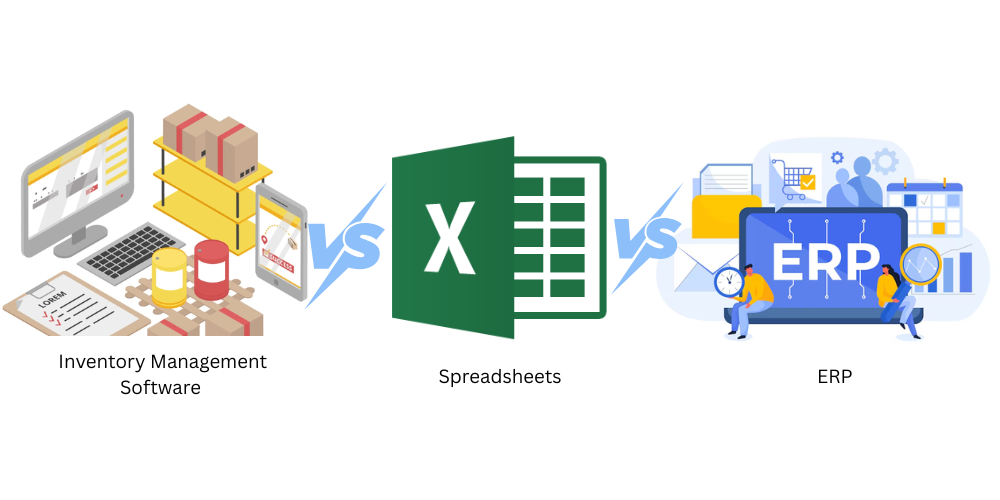
ERP systems, on the other hand, are designed for large enterprises that require fully integrated operations across departments such as finance, procurement, and supply chain. While ERPs offer comprehensive functionality, they come with significant challenges. Implementation is often complex and time-consuming, costs can be high, and businesses usually need dedicated IT resources to manage and maintain the system effectively.
Inventory management software strikes a balance between simplicity and functionality, making it ideal for distributors, FMCG brands, and growing businesses. These systems are specifically designed to handle stock tracking, order management, and replenishment efficiently, often with real-time data access. While they may require initial integration with existing tools and some level of customization, especially for multi-channel operations, the benefits in terms of accuracy, efficiency, and scalability make them a preferred choice for businesses looking to streamline their inventory processes without the heavy overhead of an ERP.
Ultimately, the decision comes down to business needs and growth plans. Small businesses may start with spreadsheets, but as complexity increases, transitioning to inventory management software becomes essential. For enterprises with highly integrated requirements, ERP systems remain a powerful, albeit resource-intensive, solution.
When a Standalone Inventory Tool Beats a Full ERP
Standalone inventory management software is often the better choice when your business needs:
-
Rapid deployment without long implementation cycles
-
Flexibility to scale as product lines, warehouses, or distribution networks grow
-
Real-time inventory updates across multiple locations and field teams
-
Cost-effective operations without the overhead of a full ERP
This allows smaller and mid-sized businesses to maintain operational efficiency and visibility while keeping IT complexity and costs manageable.
When to Integrate Inventory Software with Existing Systems
As your business grows, integrating inventory management software with ERP, CRM, or distributor management systems becomes necessary to:
-
Synchronize financial, sales, and inventory data
-
Gain deeper insights into operations across departments
-
Automate multi-level reporting and compliance
-
Maintain consistency across distribution channels
For businesses evaluating their technology needs, our guide on signs you need a distributor management system helps identify when it’s time to upgrade. To ensure your system covers all operational requirements, you should also review must-have features in a distributor management system.
By understanding the differences between spreadsheets, ERP systems, and inventory management software, businesses can make strategic technology decisions that reduce errors, optimize stock levels, and enhance supply chain performance.
Inventory Management for Specific Industries
Different industries face unique inventory challenges, and implementing the right inventory management software is crucial to streamline operations, reduce losses, and ensure product availability.
FMCG & CPG: High Velocity, Large SKUs, Expiry Management
Fast-moving consumer goods (FMCG) and consumer packaged goods (CPG) industries operate in high-velocity environments with hundreds or even thousands of SKUs. Inventory in these sectors must be closely monitored for expiry-sensitive products, ensuring that products are delivered and sold before their shelf life ends.
Advanced inventory systems help businesses:
-
Track SKU-level stock movement across warehouses, distributors, and retail outlets
-
Automate replenishment for high-demand products
-
Monitor expiry dates to minimize losses and avoid waste
These digital tools are a key component of digital transformation in CPG, allowing businesses to optimize inventory management, improve supply chain efficiency, and make data-driven decisions.
Pharmaceutical Supply Chains: Batch Tracking, Compliance, Cold Chain
Pharmaceutical companies face strict regulatory requirements and complex supply chain challenges. Inventory management software for pharma must:
-
Track batches and lot numbers for traceability
-
Ensure regulatory compliance across multiple jurisdictions
-
Monitor temperature-sensitive products in cold-chain logistics
By automating these processes, pharma companies can maintain product quality, reduce compliance risks, and ensure timely delivery to healthcare providers.
Distribution & Warehousing: Multi-Location, Multi-Tier Visibility
Logistics and distribution businesses require comprehensive inventory visibility across multiple warehouses and distribution tiers. Inventory management systems in this sector enable:
-
Real-time stock tracking across multiple locations
-
Centralized control over inventory movement between warehouses, distributors, and retailers
-
Optimization of stock replenishment and routing for efficient logistics
By implementing tailored inventory software, companies in these industries can reduce operational inefficiencies, prevent stockouts, and maintain high service levels across the supply chain.
Results Businesses Achieve With the Right Inventory Software
When implemented effectively, inventory management software delivers tangible improvements across every level of operations. Businesses of all sizes, from FMCG distributors to manufacturing companies, experience measurable benefits in inventory accuracy, operational efficiency, and financial performance.
Reduction in Stockouts
Automated inventory tracking, low-stock alerts, and demand forecasting help businesses maintain optimal stock levels, reducing the frequency of stockouts. This ensures that retail outlets are consistently stocked, distributors can meet orders on time, and end customers experience uninterrupted product availability. Fewer stockouts lead to higher revenue, improved retailer satisfaction, and stronger brand loyalty.
Improvement in Order Accuracy
Real-time stock synchronization across warehouses, distribution centers, and field sales teams ensures that orders reflect actual product availability. This reduces errors in order fulfillment, prevents overselling, and enhances trust with both distributors and retailers. Accurate order processing also minimizes returns, delays, and additional administrative work.
Cash Flow Improvement from Reduced Overstock
By maintaining optimal inventory levels and avoiding overstock, businesses can free up working capital that would otherwise be tied to excess products. Reduced storage costs, minimized expiry losses, and smarter purchasing decisions all contribute to improved cash flow, enabling companies to invest in growth initiatives, marketing, or expansion.
Time Saved from Eliminating Manual Stock Counts
Manual stock tracking is time-consuming and prone to errors. Modern inventory software automates stock counts, updates records in real time, and simplifies audits, freeing up staff to focus on higher-value tasks such as sales, planning, and customer engagement.
Client Case Study Snippets from Delta’s Portfolio
Companies leveraging Delta Sales App’s inventory management tools have reported:
-
30-40% reduction in stockouts across distributors and retail outlets
-
Significant improvement in order accuracy for field sales teams
-
Faster replenishment cycles, reducing excess inventory by 25%
-
Streamlined reporting and operational visibility across multi-tier distribution networks
By integrating inventory management with field sales, distribution, and warehouse operations, businesses can build a more responsive, data-driven supply chain, achieving measurable ROI and long-term operational efficiency.

How to Choose Inventory Management Software for Your Business
Selecting the right inventory management software is critical for ensuring operational efficiency, accurate stock tracking, and seamless supply chain management. With so many solutions available, businesses must carefully evaluate their needs to choose a platform that scales with growth and supports all aspects of inventory operations.
Buying Criteria: Team Size, Number of SKUs, Distribution Model, Integration Needs
When evaluating inventory software, consider the following:
-
Team Size and Operational Scale: Small teams may only need basic stock tracking, while larger organizations require multi-location visibility and advanced reporting. Inventory software should match your team’s operational complexity.
-
Number of SKUs: Businesses managing hundreds or thousands of SKUs require detailed catalog management, batch tracking, and analytics to optimize replenishment and avoid stockouts or overstocking.
-
Distribution Model: Companies operating through distributor networks need inventory visibility across multiple tiers, ensuring stock availability at both distributor and retailer levels.
-
Integration Needs: The system should seamlessly integrate with sales automation software, distributor management tools, ERP systems, or accounting software, providing a unified operational view.
Questions to Ask Vendors
Before finalizing a platform, ask vendors:
-
Does the system provide real-time inventory updates across warehouses, distributors, and retail channels?
-
Can field sales teams access inventory data via mobile apps for on-the-go decision-making?
-
Does it integrate with distributor and order management systems to prevent blind spots?
-
Can the software scale as your business grows, accommodating more SKUs, warehouses, or distributors?
Red Flags to Avoid
Be cautious of solutions that:
-
Require heavy manual updates, which increase errors and administrative burden
-
Offer limited reporting or analytics, preventing data-driven decisions
-
Lack mobile functionality for field teams
-
Do not integrate with sales, distribution, or ERP platforms, causing siloed operations
By evaluating these criteria, asking the right questions, and avoiding common pitfalls, businesses can select an inventory management software solution that enhances operational efficiency, reduces stock-related losses, and supports growth.
Final Thoughts
Competitive supply chain landscape, inventory blind spots can be costly. Businesses that fail to track stock accurately risk stockouts, overstocking, and lost revenue.
Delta Sales App offers a comprehensive inventory management solution that addresses these challenges by providing real-time visibility, automated alerts, and actionable insights. By centralizing inventory data across warehouses, distributors, and field sales teams, the platform ensures stock levels are always accurate, replenishment cycles are optimized, and operational decisions are data-driven.
For companies managing large distributor networks and field sales teams, integrating inventory management with sales automation creates a data-driven ecosystem. This integration allows field reps to access accurate stock information on the go, plan replenishments effectively, and improve retail execution, building a scalable foundation for growth.
If your business is looking to modernize inventory operations while improving order accuracy, supply chain visibility, and sales performance, exploring a platform that connects inventory, distribution, and field sales workflows can deliver substantial efficiency gains and higher profitability.
Schedule a demo today to see how modern inventory management solutions drive real-world results across distribution networks and FMCG operations.

-1792906895-resized320.png)